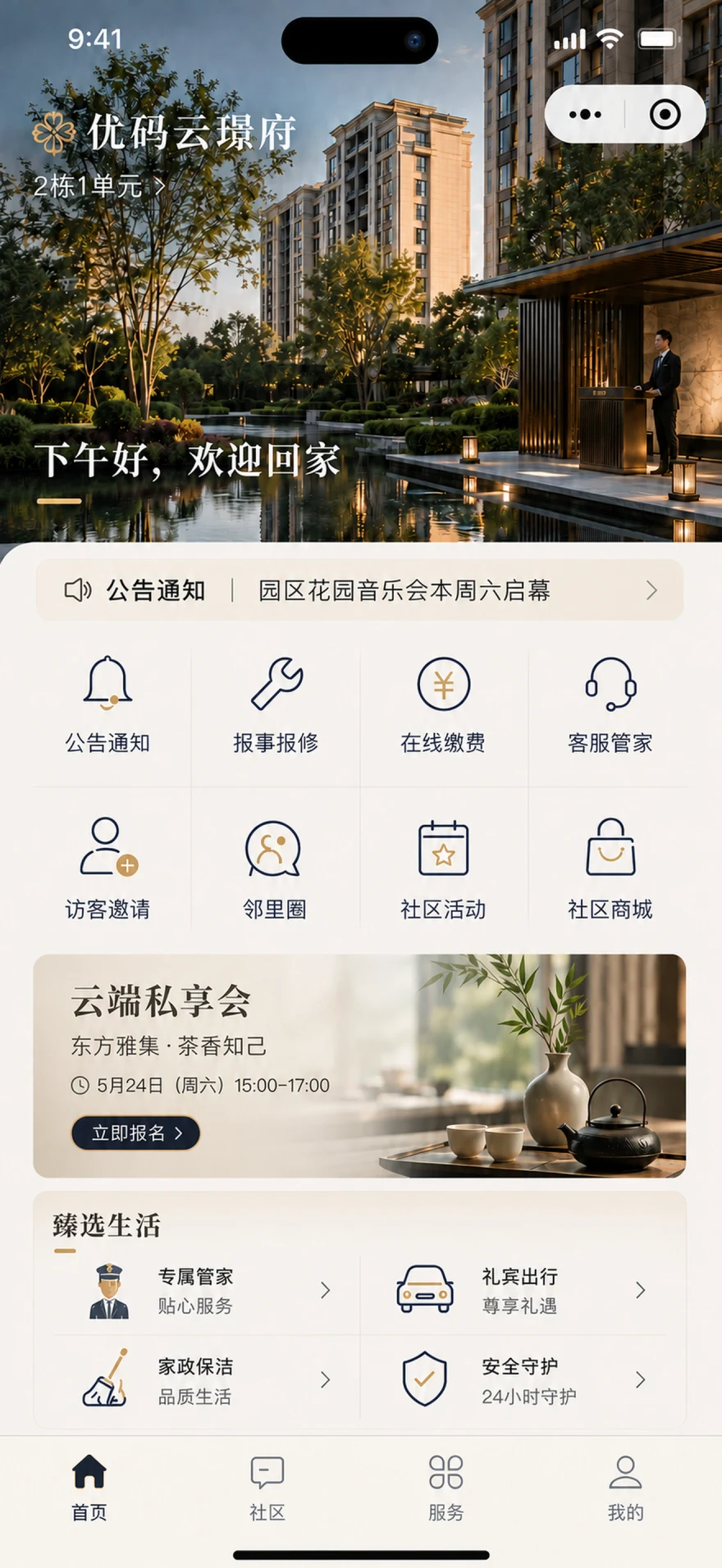
Youke Cloud·User Operations
Unify User Identity and Access across Services, Communities and Value-added Operations
User Operations provides a unified entrance for owners, residents, tenants, merchants and enterprise users of the park. The operation team can provide announcements, payment, repair, visitor, event and community services by project configuration, and continuously check the processing, participation, interaction and transaction results.

residential community Industrial Park
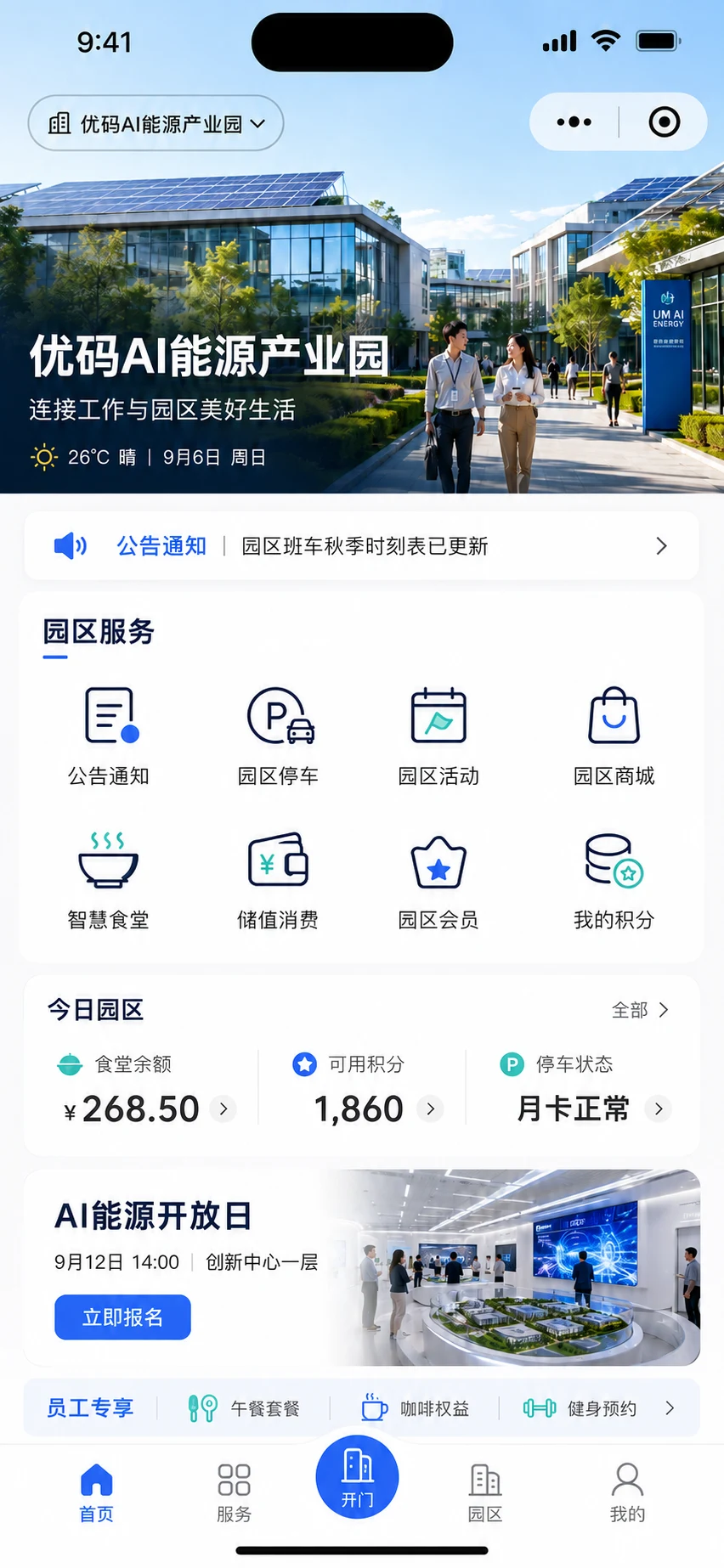
One Shared Foundation, with Service Portals Configured for Residential Communities and Industrial Parks
Apply toPerson in charge of User OperationsCustomer Service and Concierge TeamEvents and content operations teamMall operation teamDigital teams
Product Definition
What Is User Operations?
User Operations uses the Preferred Home Mini Program as a unified mobile app entrance for owners, residents, tenants, merchants and enterprise users in the park. The product range focuses on three layers: basic services such as certification, notification, guide, housekeeping, repair, payment, visitors and satisfaction; community interaction such as activities, registration, sign-in, community release and content review; and value-added services such as mall, commodity services, order fulfillment, membership rights and merchant settlement.
Without Unified Identity and Access, Services, Engagement and Results Stay Scattered
Fragmented Identity and Access
User information is distributed in the registration form, official account, Mini Program and group message, the same user needs to confirm the identity repeatedly, and the service entrance is difficult to open accurately by identity.
Notices and Service Guides Are Scattered
Community announcements, bill reminders, service instructions, and housekeeper contact information are distributed across different channels, making it difficult for the operation team to confirm the scope of notifications, delivery time, and whether users have received them.
Service Processes Lack Continuous Records
Payment, repair, visitor, and satisfaction are handled by different personnel, making it difficult for users to continuously check progress, and it is difficult for the operation team to file results by user and property.
Events and Content Are Hard to Sustain
Event registration, on-site check-in, community content, and interactive results lack a unified entrance, and participation lists, content review, and secondary access require manual sorting.
Value-added Operations Are Incomplete
Merchants, goods, services, orders, fulfillment and after-sales are decentralized, and transaction progress and commission basis are difficult to centrally view.
One Portal for Essential Services, Community Engagement and Value-added Services
Users complete identity authentication first, and then view the available services by identity. Basic services solve daily processing, activities and communities undertake continuous interaction, and malls and orders undertake value-added operations; the operation team views access, processing, participation, interaction and transaction results respectively.
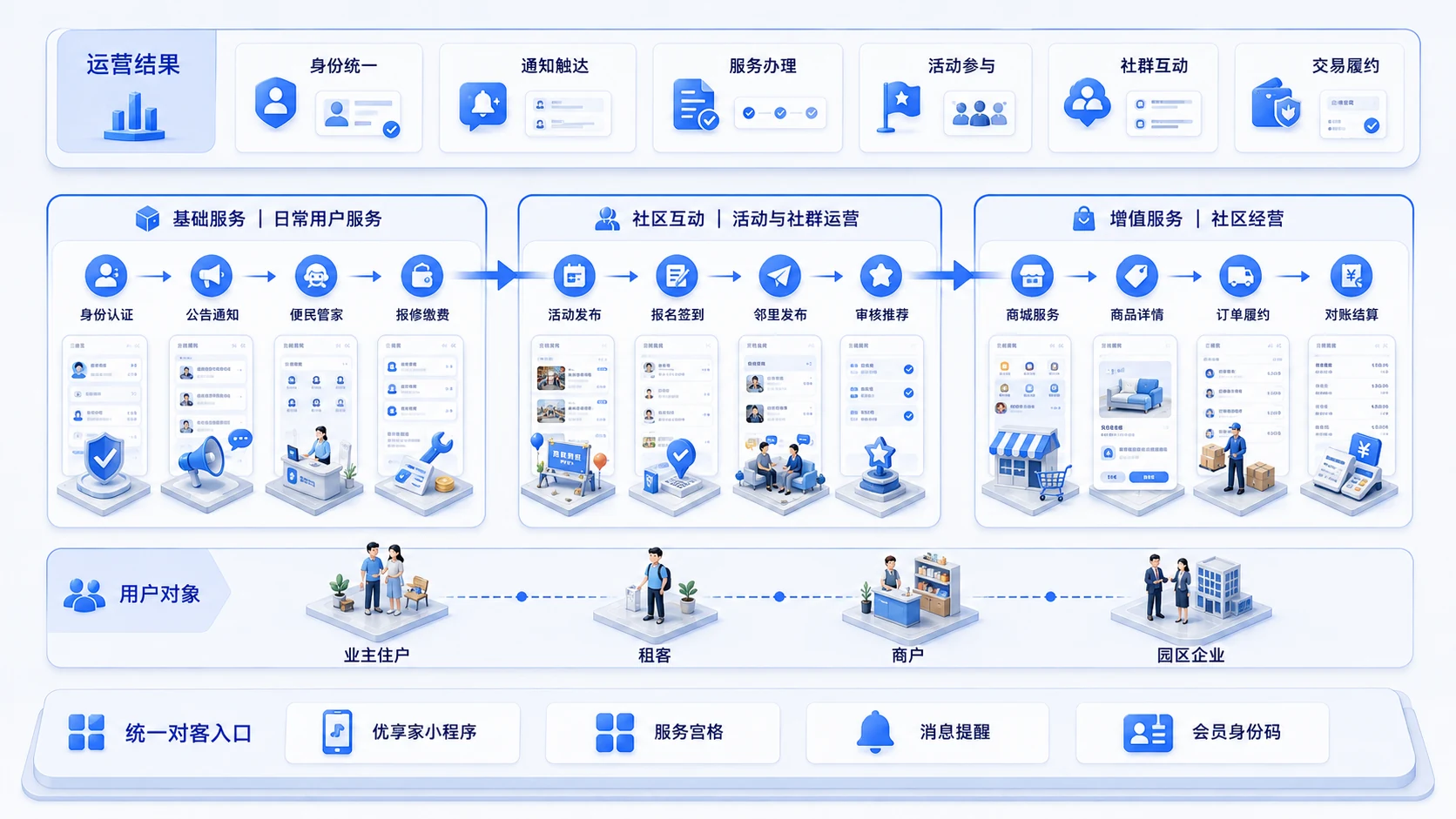
The unified identity and service portal runs through basic services, community interaction and value-added operations, forming a continuous closed loop between user experience and operating results.
In collaboration with Membership Center:User Operations undertakes user-oriented services, activities, communities, and business portals; Membership Center uniformly manages membership levels, growth values, points, rights, and cross-business settlement rules.
Unified entrance, user authentication and service opening
Authenticate Once and Receive Services and Permissions by Identity
Owners, residents, tenants, merchants, and park-based enterprise users link their mobile number and identity information to a property or organization. If no automatic match is available, they can submit documents for an operations review. Once verified, each project and identity receives the appropriate announcements, guides, concierge support, repairs, payments, visitor services, events, communities, and marketplace access, with notifications and results returned to one portal.
Owner/tenanttenantmerchantPark enterprise
Key Points
- 01 multi-class user authentication
Owners, residents, tenants, merchants, and enterprise users in the park are authenticated according to their roles, and permissions and service scope are matched with their identities.
- 02 Family and identity
The relationship between family members and the house is centrally maintained, and the certification results determine the visible service and authority.
- 03 Unified service grid
Configure and publish announcements, repairs, payments, visitor services, events, marketplace access, concierge support, and more by project.
- 04 one code pass identity
Activity sign-in, service cash, commodity exchange, reservation verification show the same identity code.
- 05 Message and service alerts
Certification results, bills, work order progress, and activity notifications are actively reached through the official account template message.
- 01 Choose identity
- 02 Submit for certification
- 03 Associated property or business
- 04 Access to services and permissions
user entrance + authentication
The same User Operations capabilities can serve residents and park-based enterprise users, with available services shown according to verified identity.
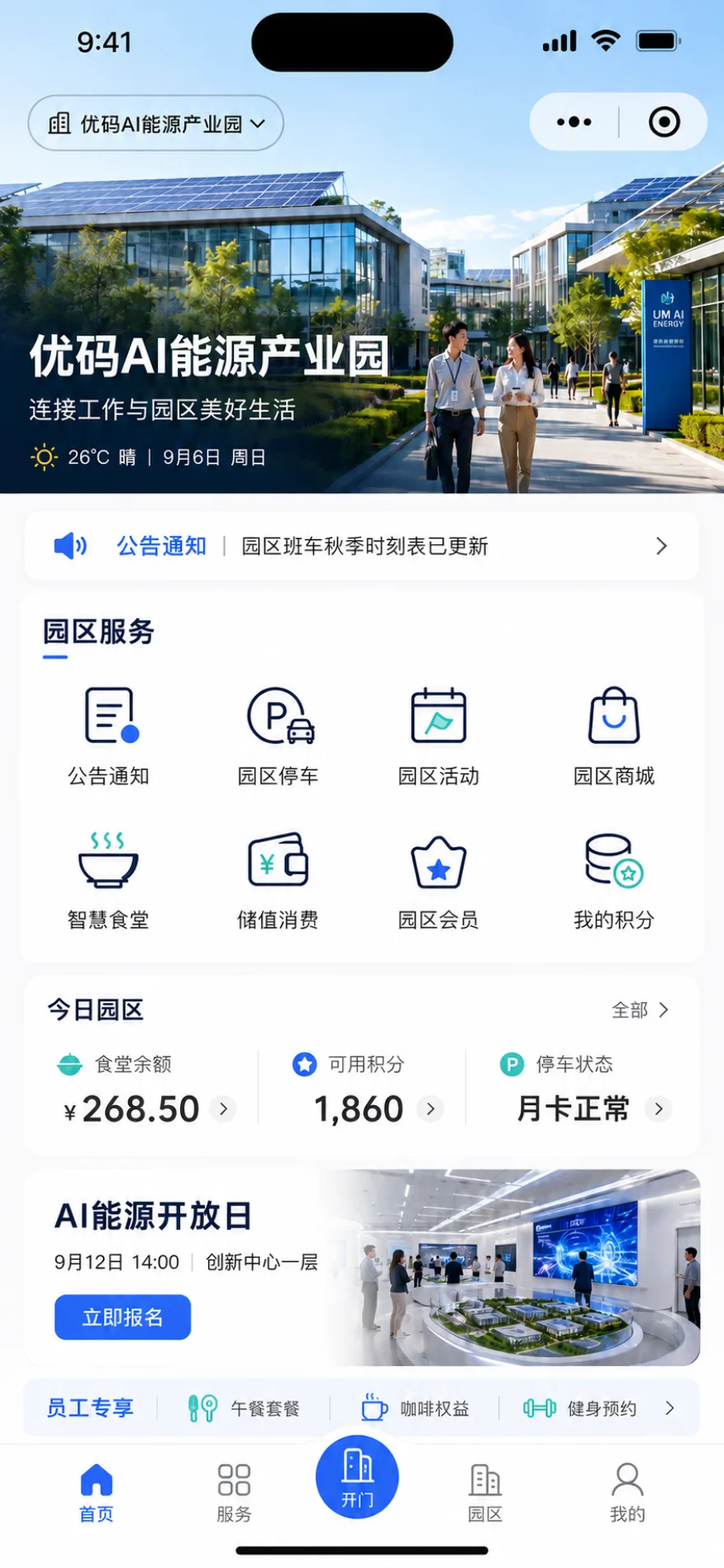
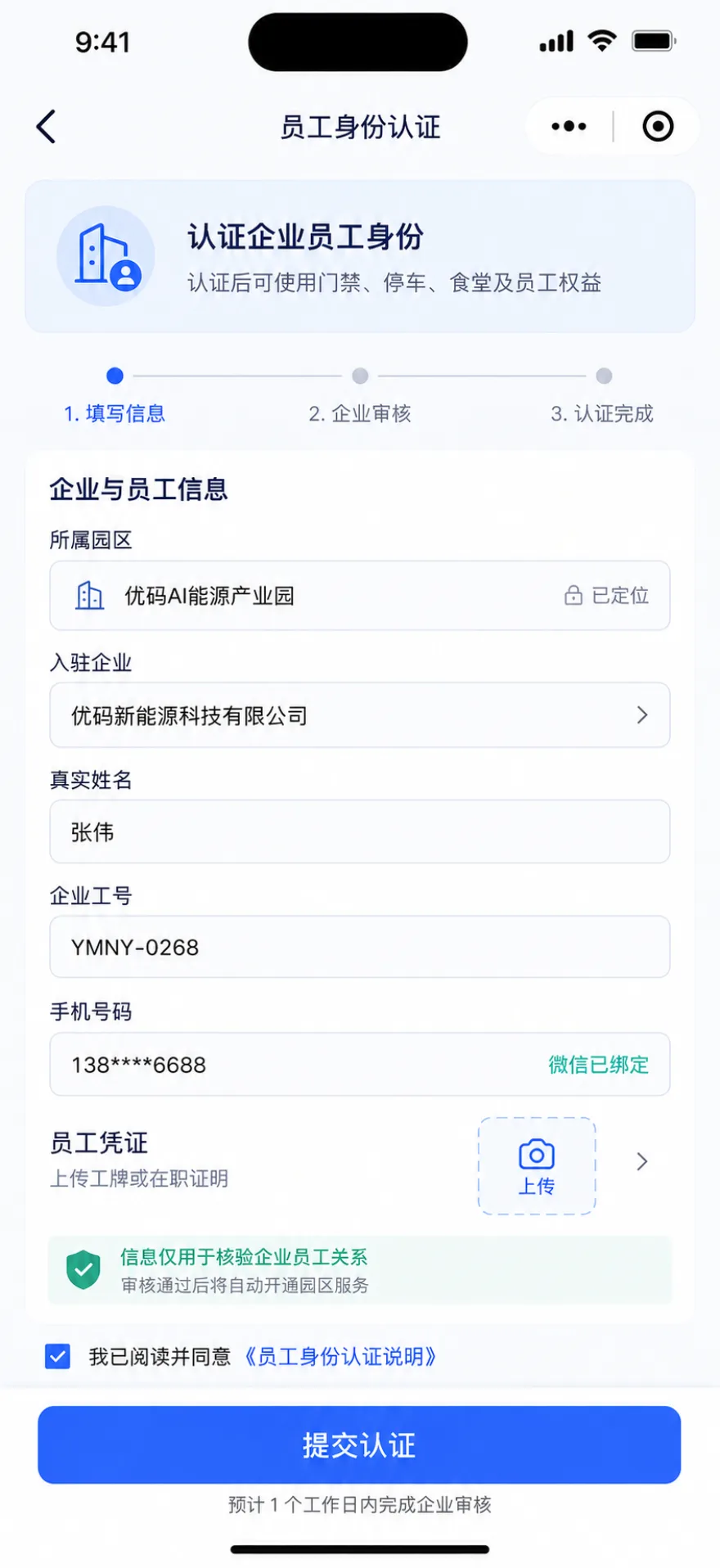
Unified identity serves as the starting point for the service entrance, allowing visible content and processing authority to be accurately accessible to users.View the Unified Entry Demo
Handle Notices, Guides, Concierge Services and Daily Requests in One Mini Program
The basic service revolves around the daily high-frequency matters of the community: the owner initiates, queries, and receives reminders in the Mini Program, and the service team configures the content, rules, and processing procedures in the background, so that information can be sent, things can be received, and results can be found.
Basic services · Announcements, push, convenience and housekeeping
Send Notices by Audience, Provide Clear Service Guides and Connect Users with Their Concierge
Community announcements can be sent immediately or scheduled, with audiences selected by project, building, unit, room, or specific user. Verification results, bills, work-order updates, and event information reach the relevant users. A centralized information area explains payments, renovations, broadband, and community services, and users can contact their building's dedicated concierge.
Four blocks ability
- 01 Announcement notice
Water and power outages, fire protection and other multi-template content will be released uniformly, and important community issues will be available for investigation.
- 02 information push
Support instant or regular sending, can be directed by the whole community, building, unit, room or designated owner, read and unread can be counted.
- 03 Convenience information
Community Affairs Treasure box, new owners quickly grasp the path.
- 04 Customer Service Concierge
According to the building configuration, one-click call, online communication, exclusive service instant access.
Information reach + exclusive service
The announcement list helps users quickly find important information, and the customer service manager puts the exclusive contact person, the scope of responsibility, and the contact entrance on the same page.
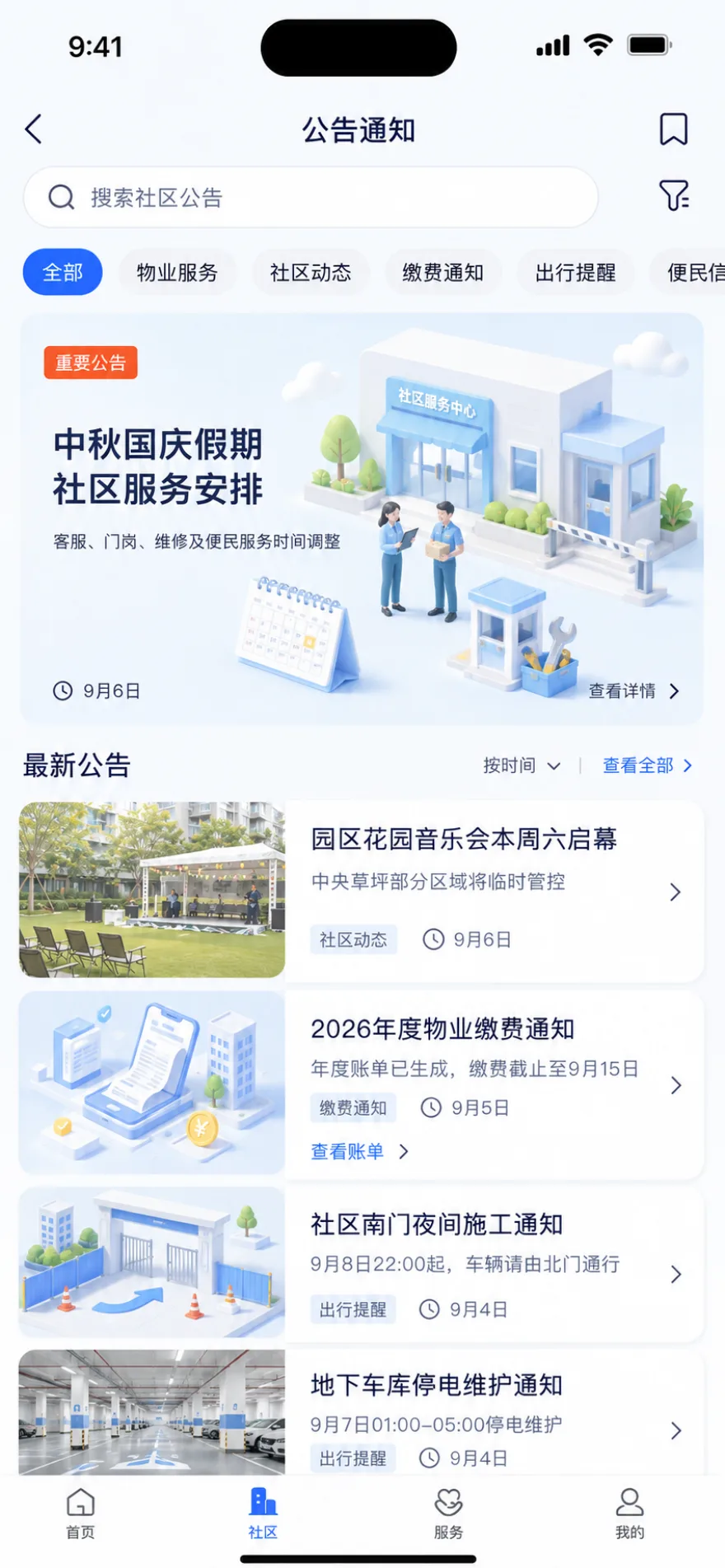
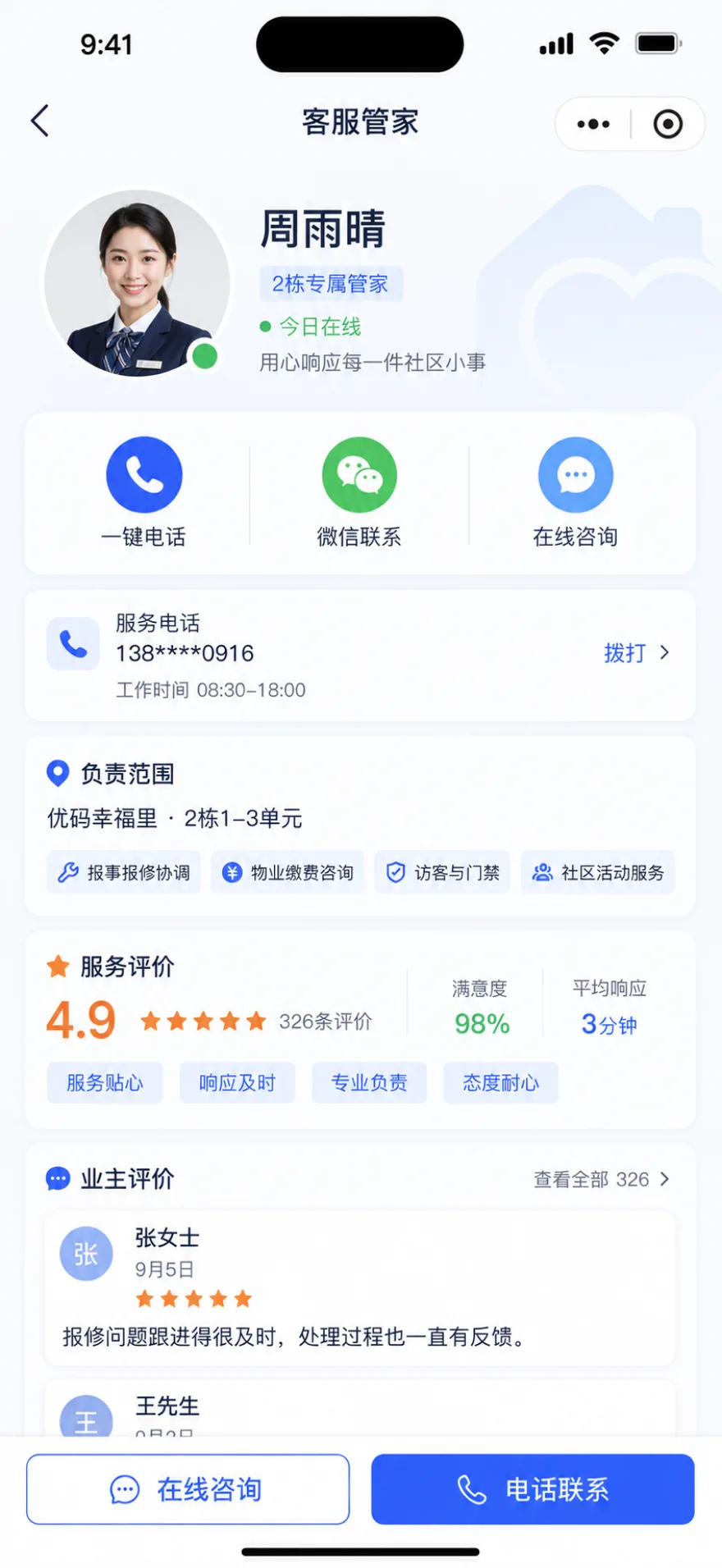
Notification scope, service instructions and housekeeper entrance are centrally configured for users to view on demand.View Messages and Concierge Demo
Core Services · Service Requests and Repairs
Submit Requests Online and Track Progress through Completion
Users fill in the questions and upload pictures in the Mini Program, and the service team will continue to update the processing status after accepting it. Users receive progress changes, view the results, confirm the processing and submit comments after the service is completed, and the process is filed according to the user and the property.
core competencies
- 01 submit online
Users fill in questions and upload pictures, linking users to real estate.
- 02 progress inquiry
The status of acceptance, processing, completion, etc. is continuously updated and users are reminded.
- 03 result confirmation
After the service is completed, the user reviews the results and confirms the processing.
- 04 satisfaction rating
Collect comments and feedback by service touchpoint, and record follow-up.
- 05 channel mix
Telephone and visit reception can be combined with Youma Service, and the mobile app can check the progress uniformly.
- 01 user submission
- 02 service acceptance
- 03 progress update
- 04 result confirmation
- 05 Review Archive
Submit a question + service evaluation
From uploading problems to result evaluation, users complete two key operations on the mobile app, and the service progress and evaluation results continue to leave traces.
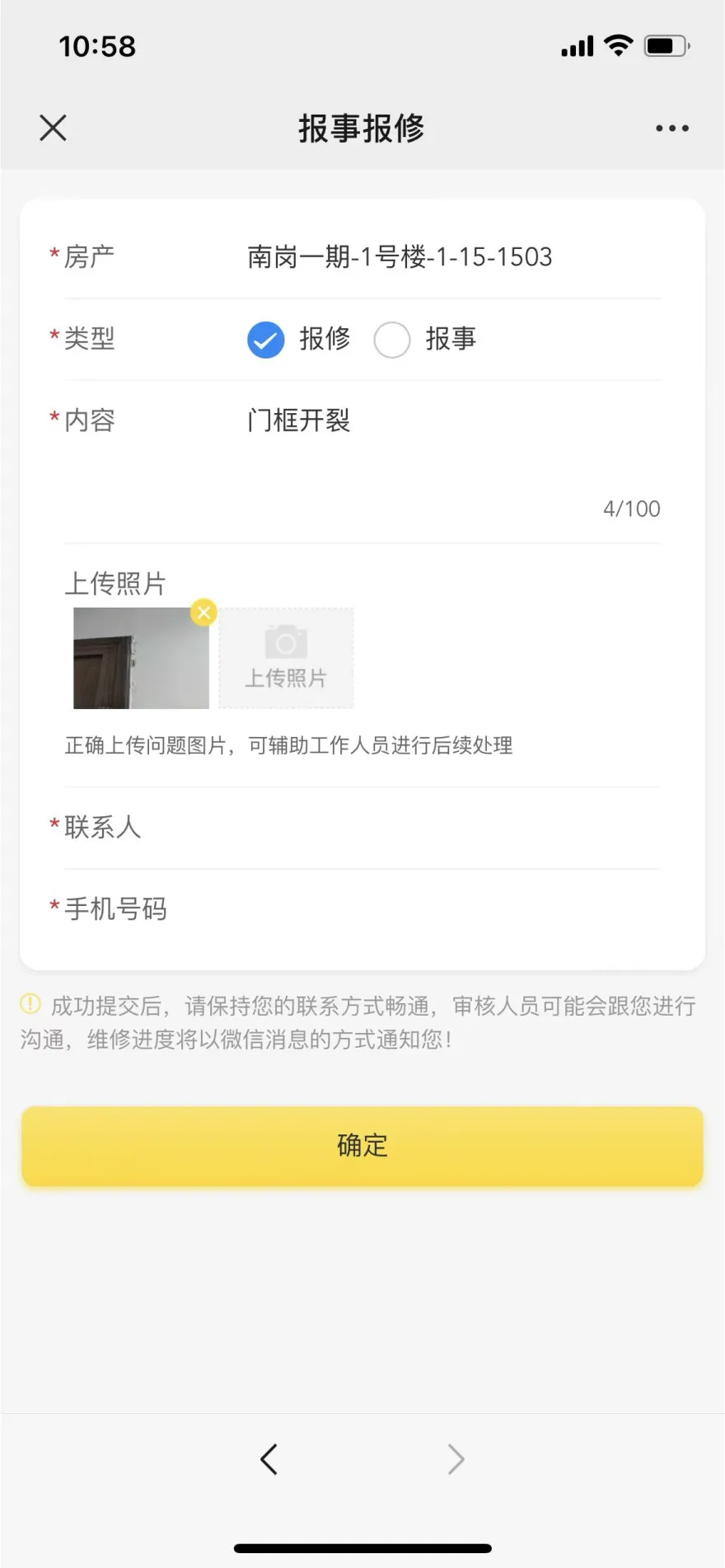
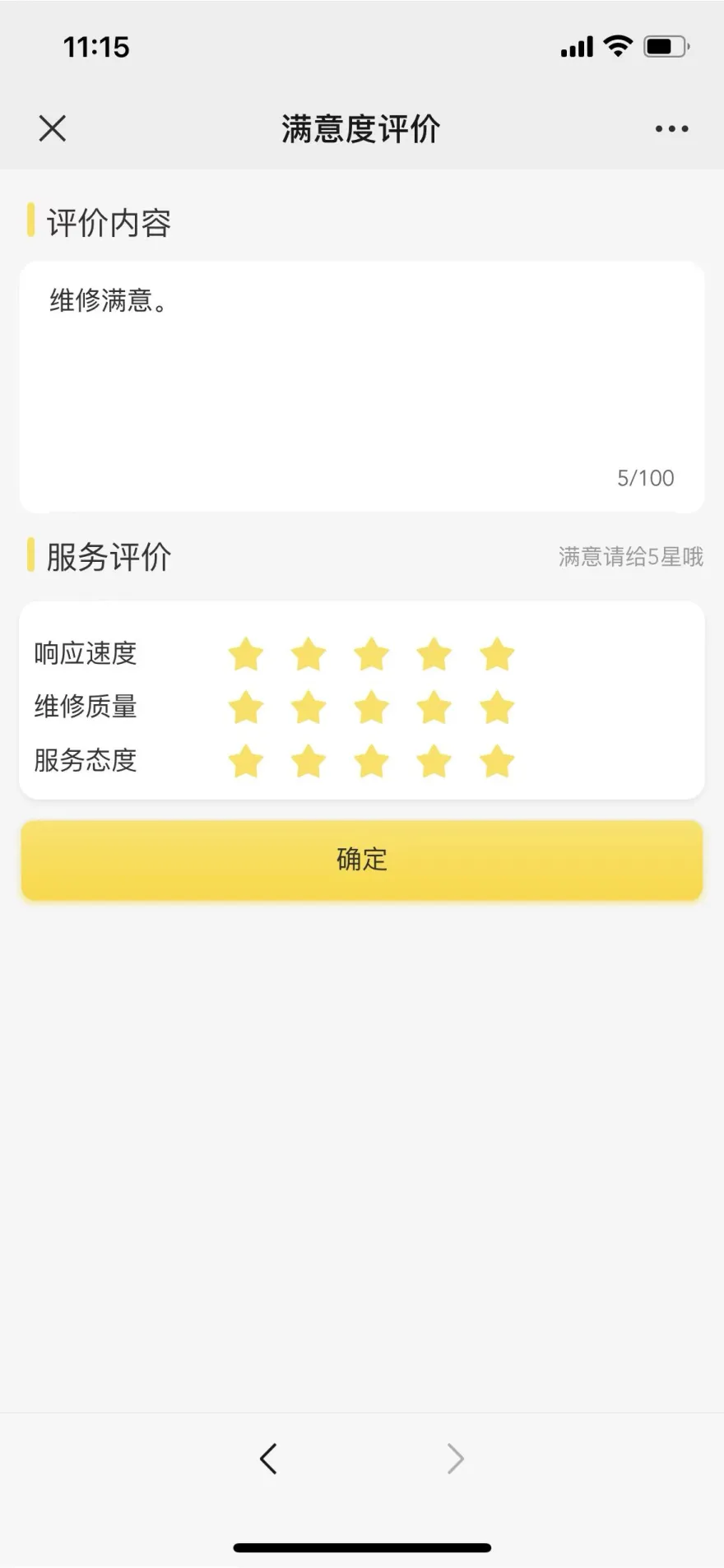
Submissions, progress, results and evaluations are presented continuously in the same mobile app portal.View the report repair demonstration
Basic services · Online payment
Send Bills to Users with Charges, Payment Status and Results in One View
The operation team configures fees and bills according to the project. Users check the fee details and complete the payment in the Mini Program. The payment results, bill status and business records are returned to the unified entrance, which is convenient for continuous inquiry and reconciliation.
core competencies
- 01 bill push
Send bill reminders to users by project.
- 02 fee details
Users can view expense items and billing descriptions in the Mini Program.
- 03 Online payment
The user completes the payment online and receives the payment result.
- 04 result feedback
After the payment is completed, check the status and results at the unified entrance.
- 05 business record
Billing and payment results form query records by user and property.
- 01 configuration fee
- 02 generate bills
- 03 push user
- 04 Online payment
- 05 View payment results
Bill list + fee details
The user first checks the bill to be paid, then checks the fee composition and completes the payment. The bill and payment result are left at the unified entrance.
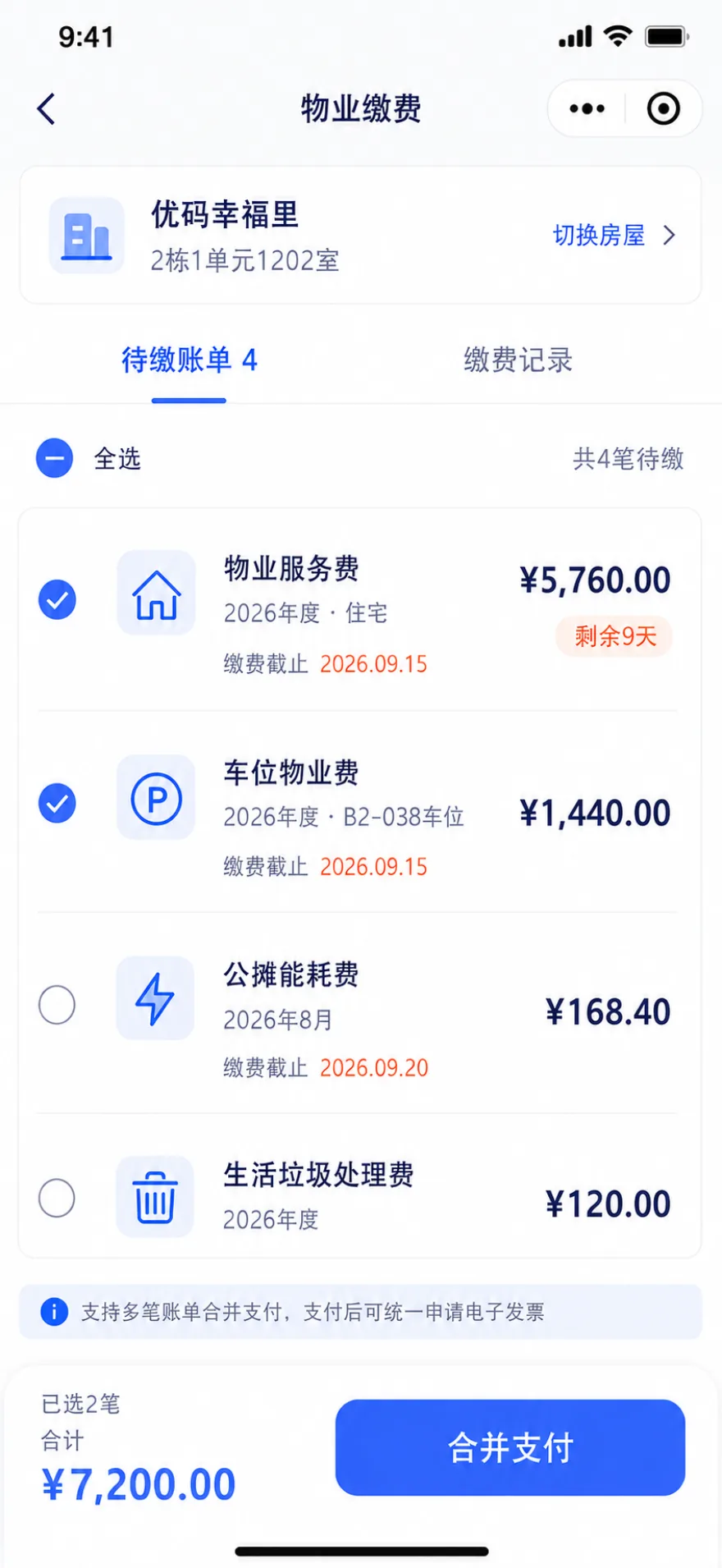
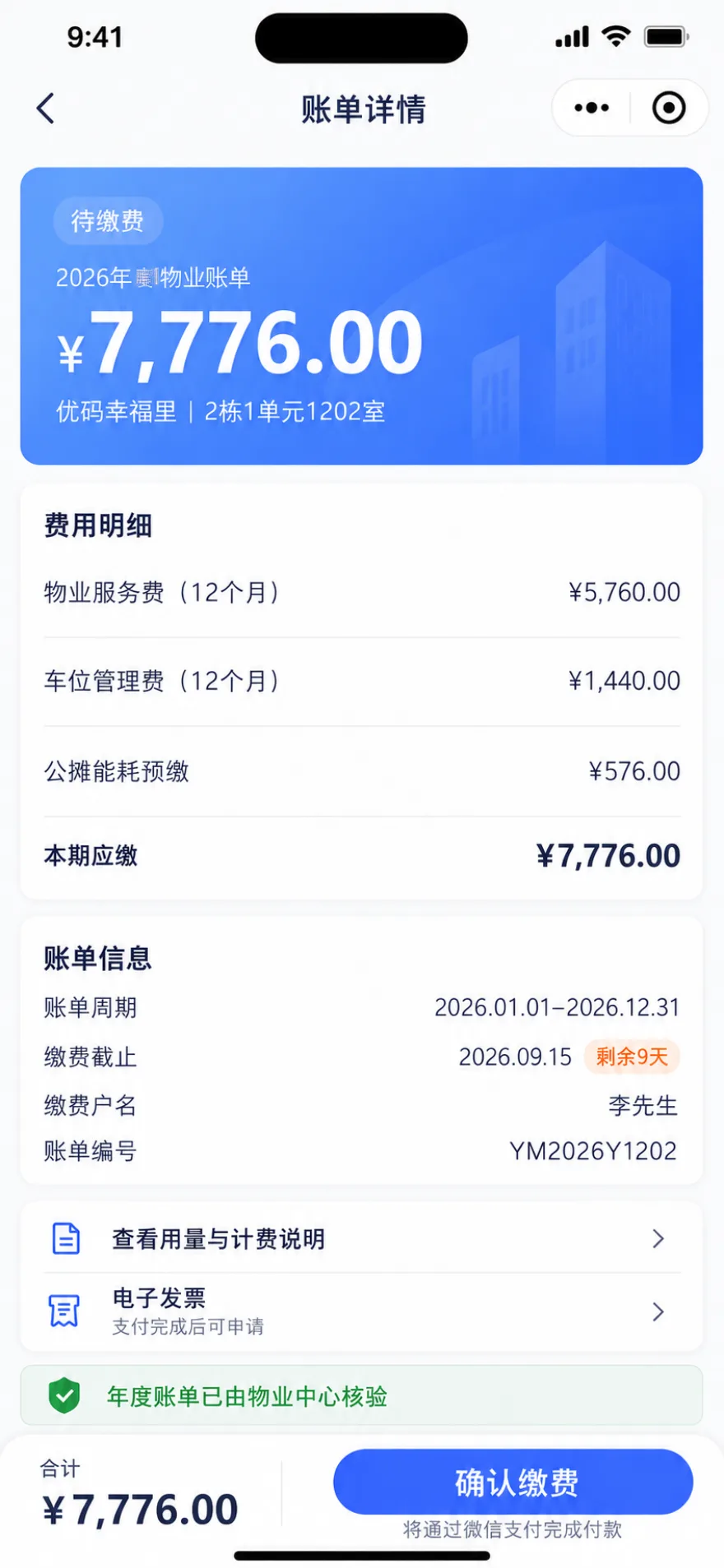
Bills, payments, and results are continuously displayed in the same portal, reducing users' cross-channel inquiries.View the online payment demo
Basic services · Visitor reservation
Let Residents Invite Visitors and Specify Visitor Details and Valid Times in One Step
Residents enter visitor details in the Mini Program, generate a visitor QR code, and share it with their guest. Invitation status, validity periods, and permitted areas remain visible in one place. Projects can configure one-time or recurring invitations for family and friends, renovation teams, service personnel, and other visitors.
core competencies
- 01 self-service invitation
Owners generate visitor codes by themselves, without the need to call the doorman.
- 02 scan code verification
Scan the code at the gate to verify, and the pass record will be automatically kept.
- 03 Flexible timeliness
One-time and periodic traffic modes.
- 04 multi-scene adaptation
Visits from relatives and friends, decoration entry, and service personnel entry.
- 01 Owner initiates invitation
- 02 Generate visitor code
- 03 Send a guest
- 04 on-site verification
- 05 record retention
visitor pass code
After the invitation is generated, the visitor information, valid time period, access area, and sharing entrance are centralized.
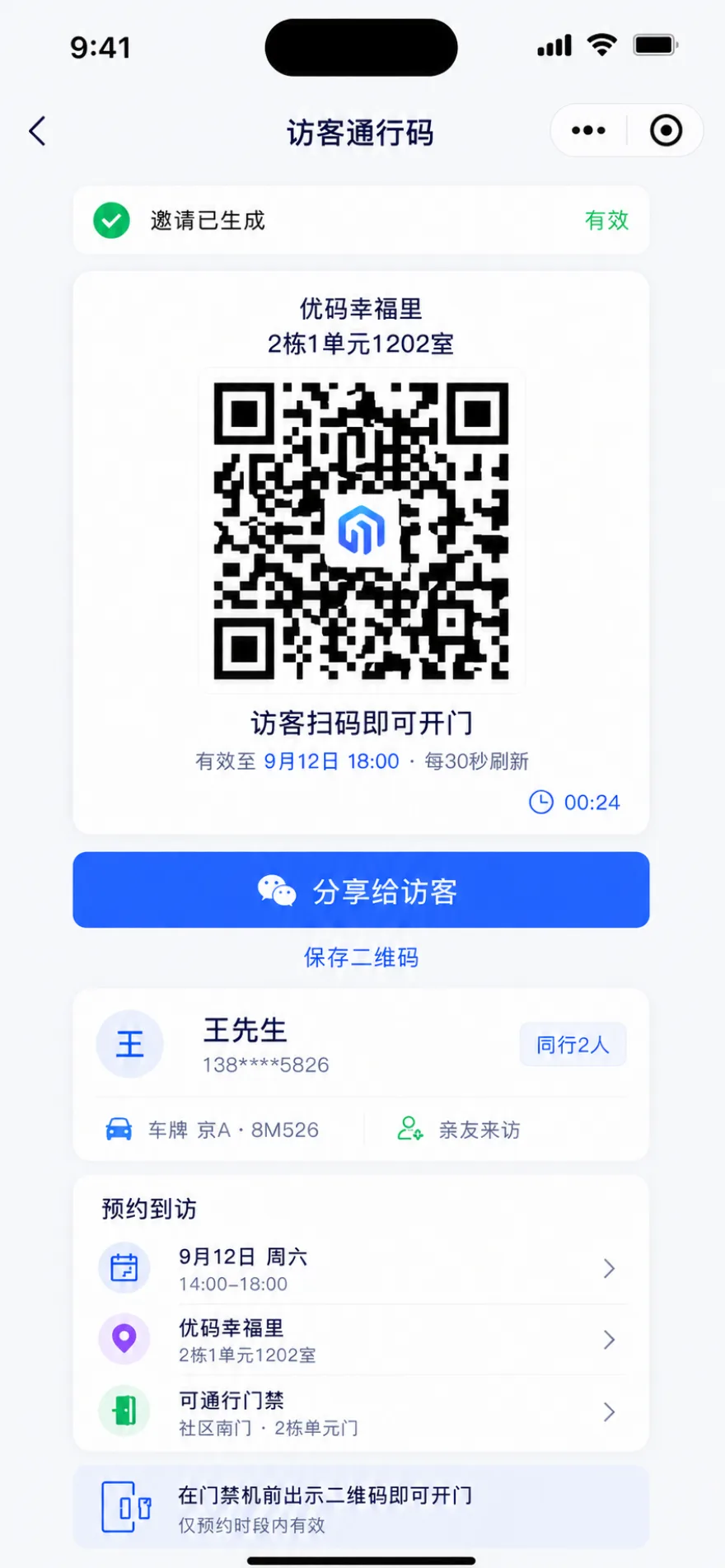
The invitation information is centralized, the scope of visit is clear, and the use records can be traced back.View the Visitor Reservation Demo
Run Complete Event Workflows and Continuous Community Content
Operators publish activities by identity or membership level, manage registration, reminders, check-ins, and reviews; users browse, publish, and interact in the neighborhood community, and complete content review, recommendation, and removal in the background.
Community interaction and event operation
Track Events from Publishing and Registration through On-site Check-in
Operators create events and configure objects, identities, sessions, registration limits, and custom information. Users browse, sign up, and receive reminders in the Mini Program, and complete check-in and gift verification on the spot; the operations team reviews the results of registration, check-in, interaction, and review, and conducts follow-up visits by participation status.
Five-step activity process
- 01 Create activity
Flexible configuration of multiple shows, time and registration limit.
- 02 configuration rules
Object, identity, participation restrictions, visibility, custom registration information.
- 03 promotion registration
Event details like comments and shares, and messages are actively reminded and pushed.
- 04 sign in on site
Scan the code to sign in, convenient statistics.
- 05 data review
Registration, evaluation, sharing, liking, voting, and access are presented in real time, and the list is divided into status management and secondary access.
- 01 Create activity
- 02 configuration rules
- 03 promotion registration
- 04 sign in on site
- 05 data review
Discover activities + learn more + sign in on site
An event is not a promotional page, but a complete user path covering browsing, registration, reminders, check-ins, and reviews.
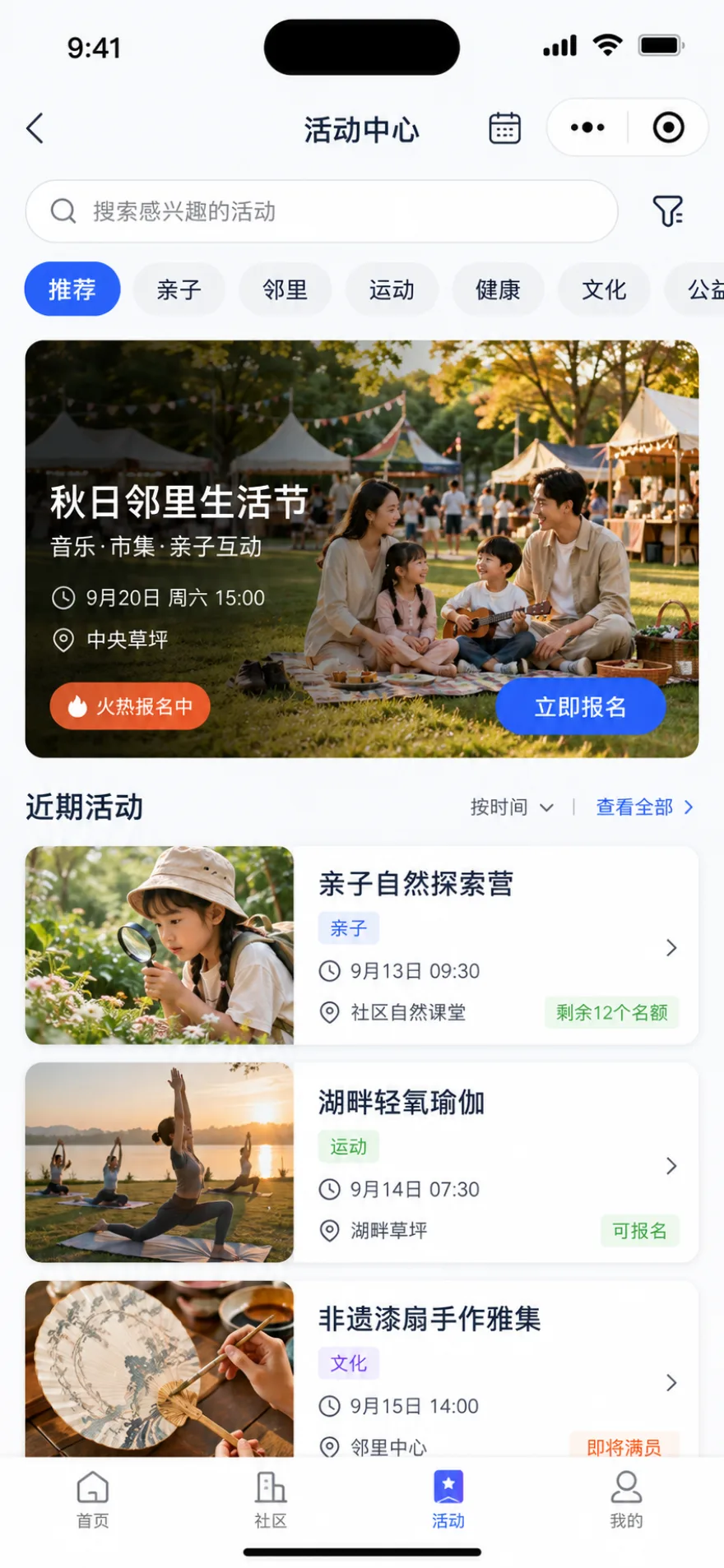
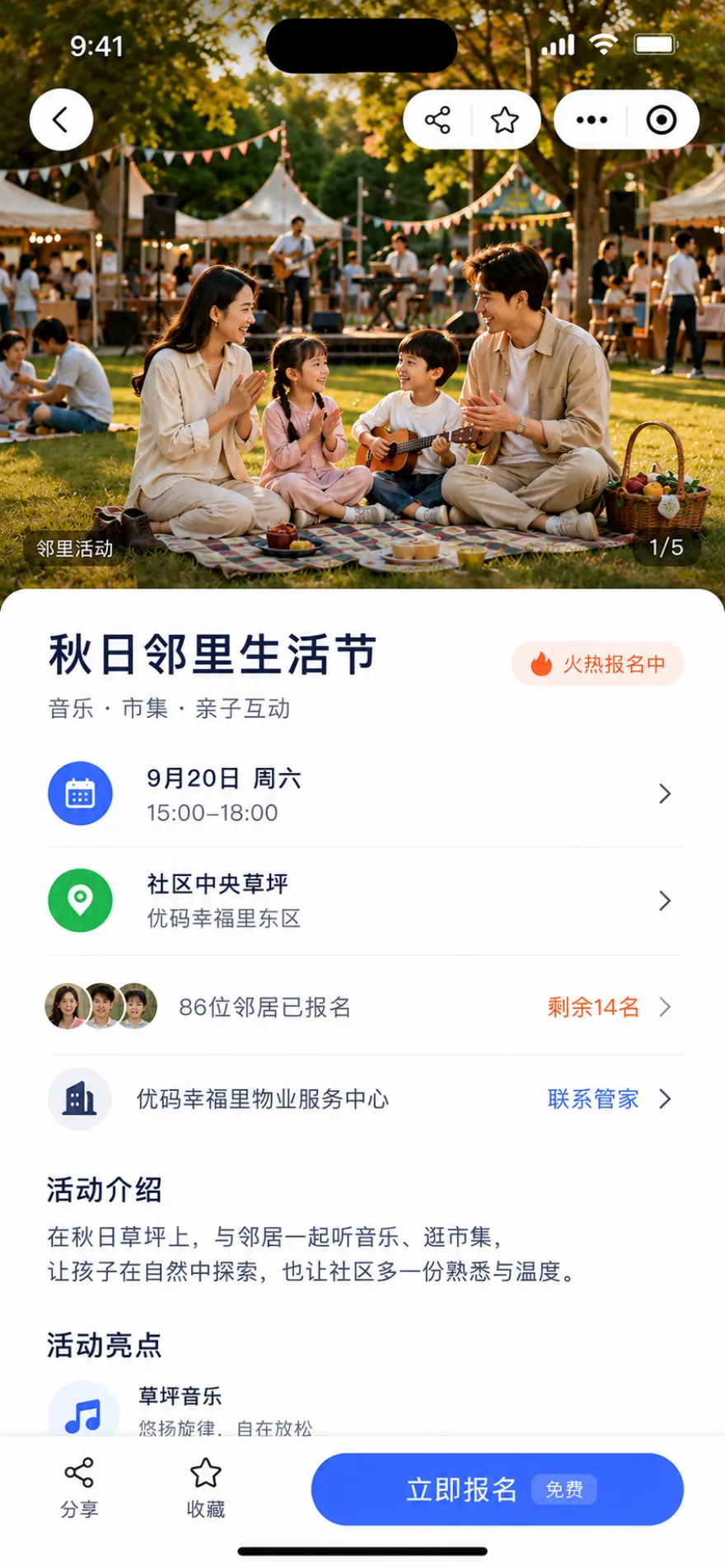
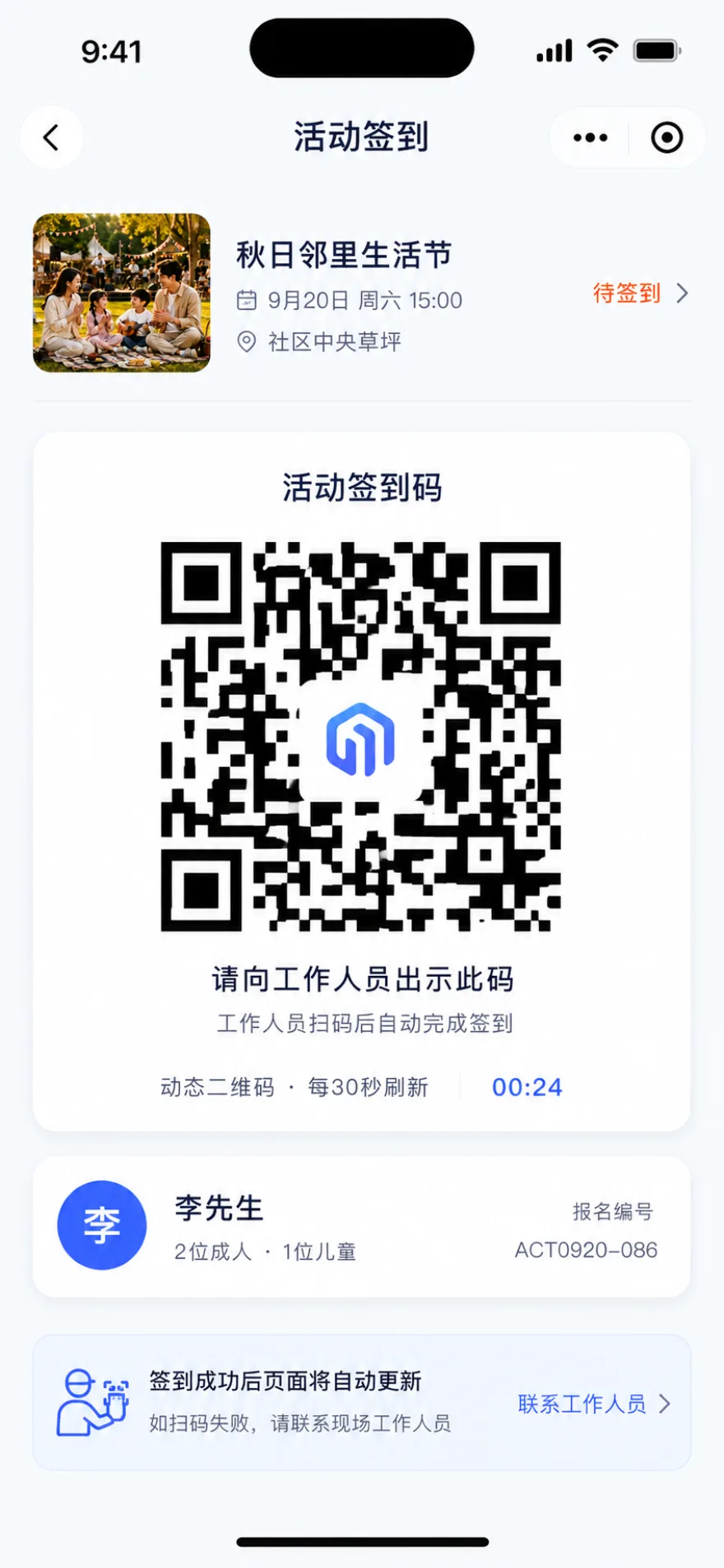
Activity object, registration list, on-site check-in and review results are centrally managed.View the event operation demo
Community interaction · Neighborhood community
Users Browse, Post and Engage while Operations Teams Moderate and Curate Content
The operation team can establish community content and interest sections by project, and use the official account to publish content. Users post text, pictures or videos and participate in comment interactions; the background sets review and sensitive word rules according to project and content type, blocks or removes content that needs to be processed, and keeps operation records.
core competencies
- 01 official operating account
Official publication, content review, recommendation and refinement.
- 02 Neighborhood Posts
Free combination of text, graphics and videos.
- 03 rich content section
Configure community sections for recommendations, product reviews, family moments, mutual help, and more.
- 04 interaction mechanism
Users participate in community interactions by liking, commenting, and sharing.
- 05 Content compliance
Configure sensitive words and audit rules by project, block or remove content and keep records.
Browse content + select format + edit and publish
The neighborhood community uses the content list as an entrance, supports pictures, videos, and other publishing methods, and completes content and section editing before submission.
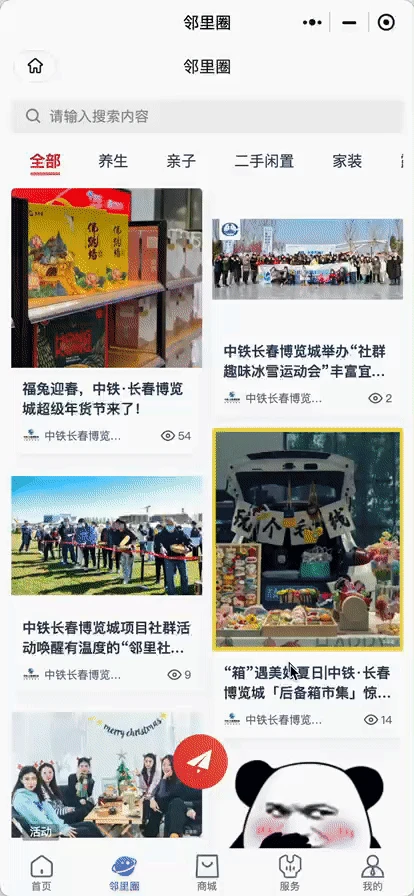
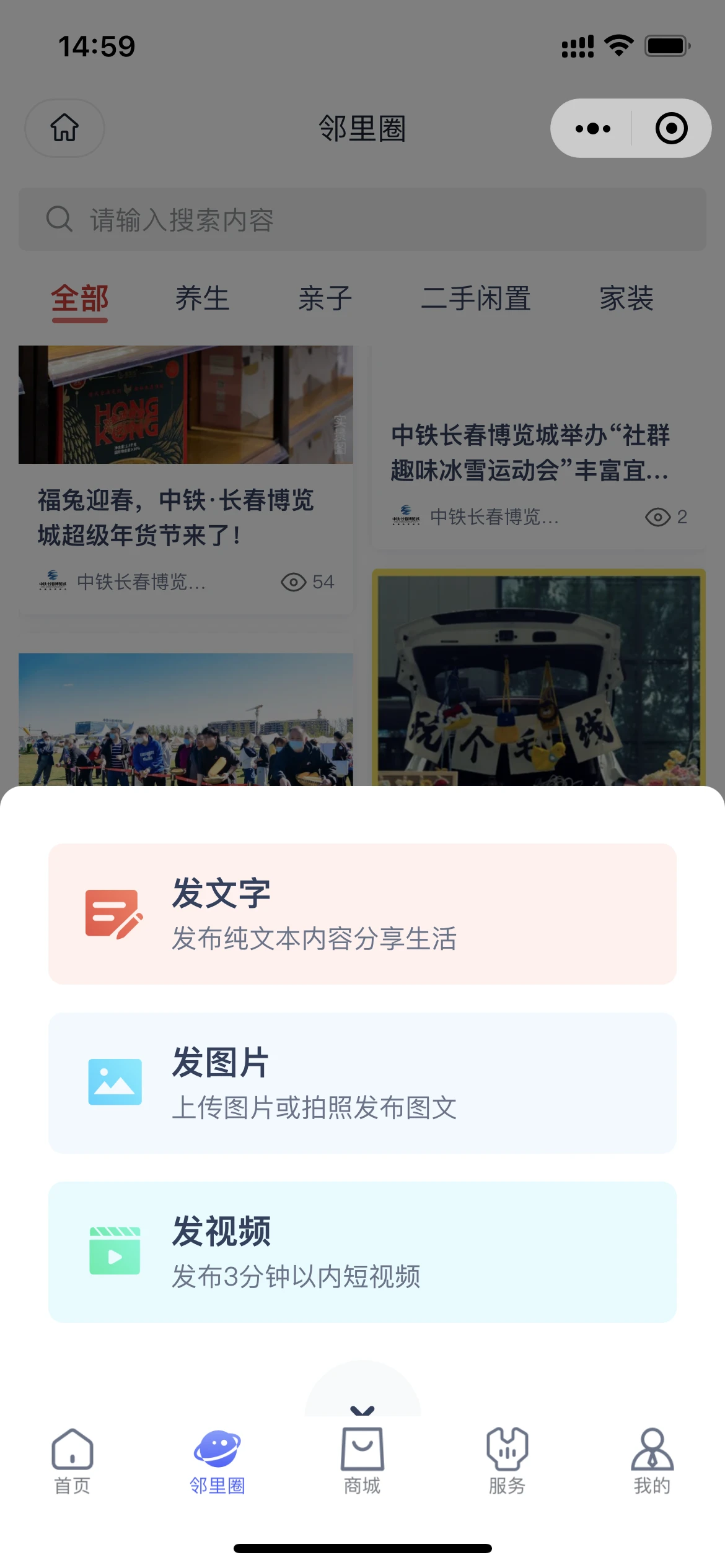
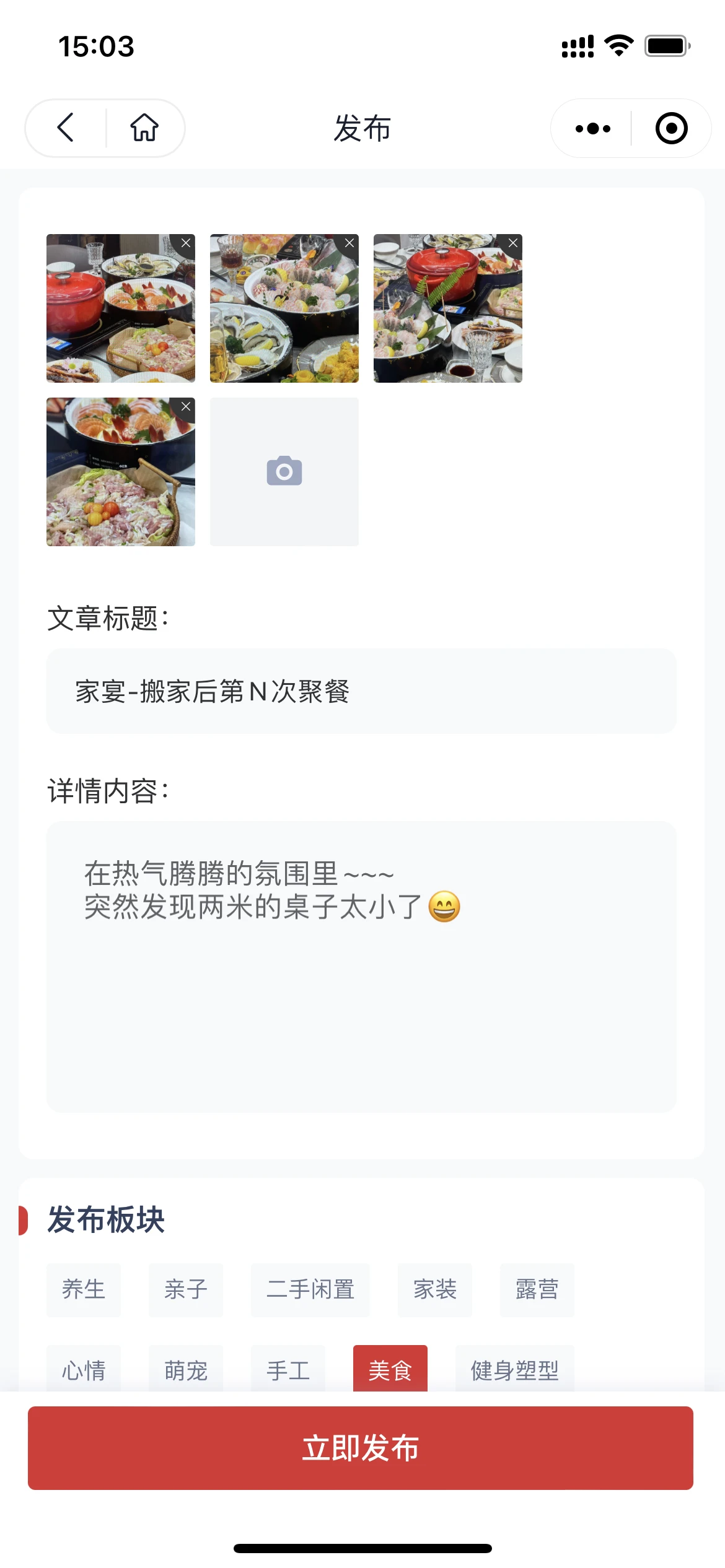
Content publishing, interaction, and moderation continue around the same community board.View the Neighborhood Community Demo
Community Engagement · Operations
Users See the Participation Experience while Operations Teams Track Configuration, Progress and Results
User Operations not only provides the owner-side page. The community and operation team configure the event content and participation rules in the background, check the online status, number of participants, number of interactions and pending items, and then carry out review and follow-up based on the registration, check-in and interaction results.
Operational Highlights
- 01 activity configuration
Operators configure event objects, shows, registration information, display scope and participation restrictions.
- 02 Content and gameplay
Activity, questionnaire, check-in, interaction and other operating templates can be used in combination according to scenarios.
- 03 process view
Focusing on online activities, the number of participants, the number of engagements, pending review, and content status.
- 04 follow-up
Form a list according to registration, check-in, interaction or non-participation status and carry out follow-up contact.
workbench + activity gameplay + running effect
Operators focus on viewing activity status and participation data, and quickly select activity gameplay; users enter the activity from the mobile app and complete the interaction.
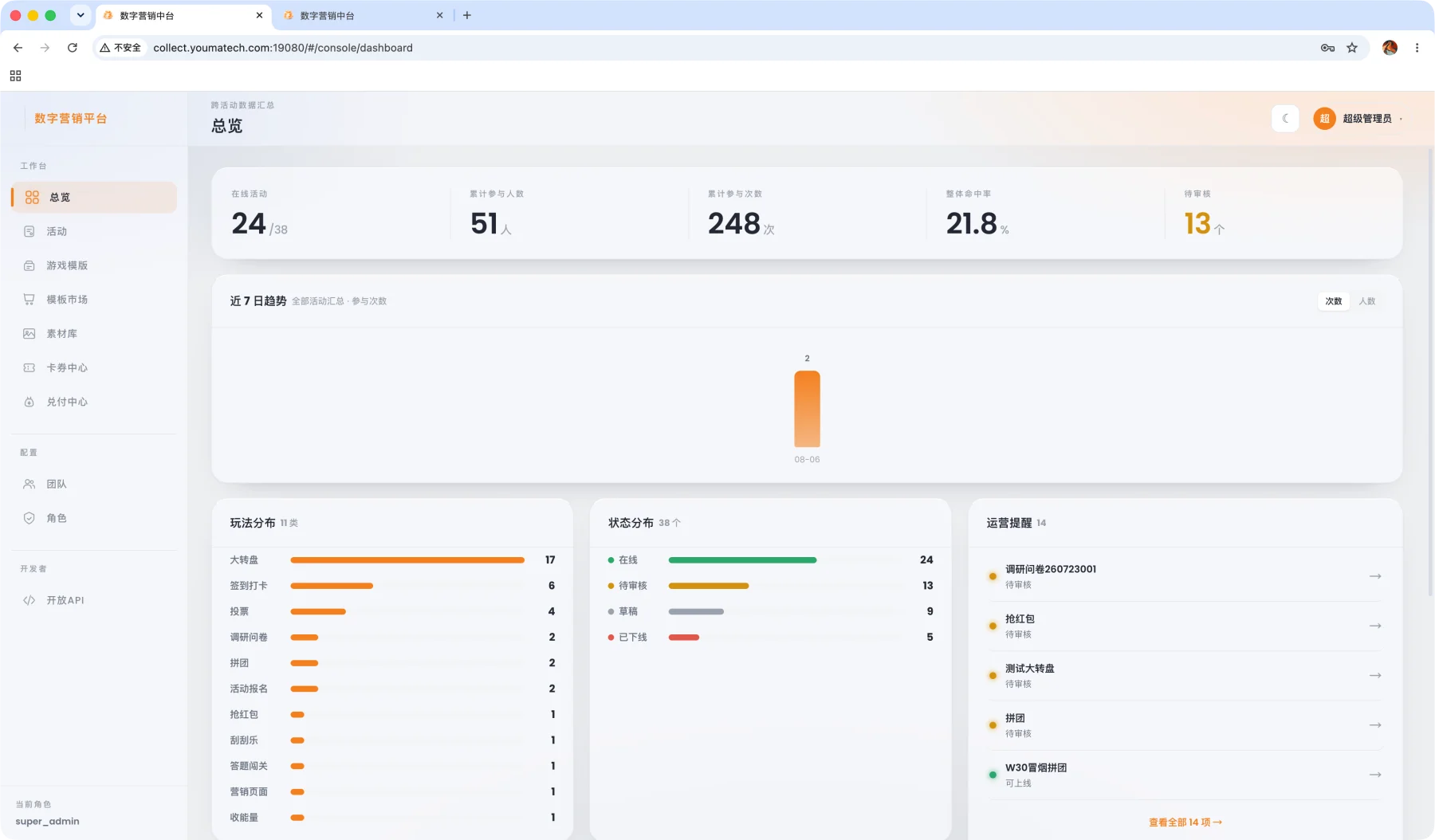
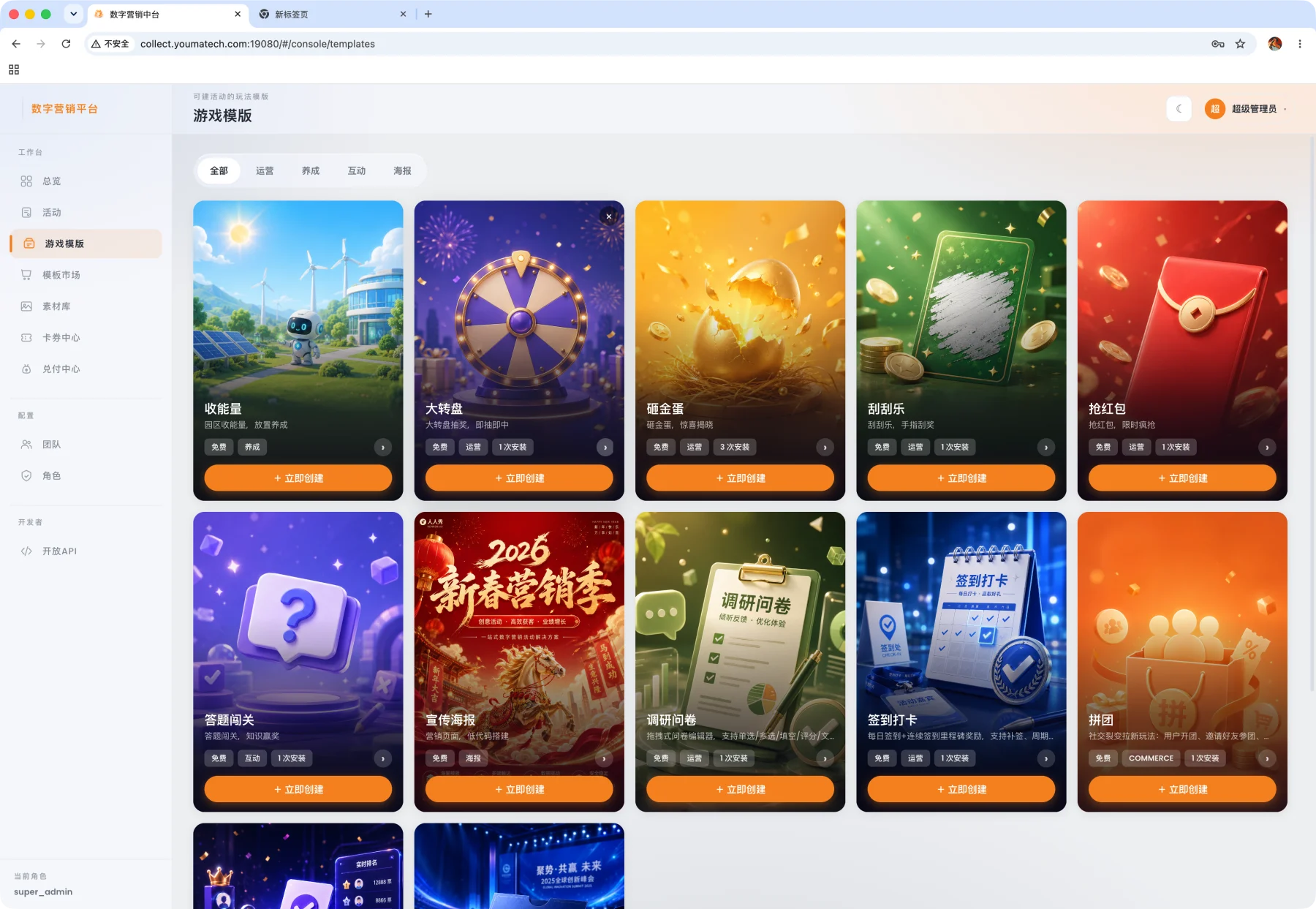
The foreground is responsible for participating in the experience, and the backstage is responsible for content configuration, process management, and result review.View the Operations Demo
Use Commerce, Products and Orders to Support Community Value-added Operations
Self-operated or allied merchants maintain goods and services, and users browse, purchase or make reservations at the unified entrance; the platform reviews orders, performance, after-sales and transaction progress, and forms the basis for merchant reconciliation and commission sharing.
Value-added services · Mall, services and orders
Present Products, Community Services, Offers and Orders in One Portal
The mall supports the configuration of goods, places and services by project. Users complete the purchase or reservation after viewing the details of the goods or services, and view the order, performance, after-sales and unified identity code in the personal center; the level, growth value, points and entitlement rules can be combined with Membership Center by project.
user-side core capabilities
- 01 Mall and service entrance
Configure mall content, merchandise, venues, and community services by project.
- 02 Product and service details
Centralized display of price, specifications, availability, reservation or delivery instructions.
- 03 Benefits and Membership Benefits
Coupons, tier benefits, and points rules can be combined with Membership Center.
- 04 Orders and fulfillment
Users check orders, logistics, store self-pickup, appointment progress and after-sales entrance.
- 05 Personal Center
Centralized view of identity, rights, points, real estate, orders and unified identity code.
- 01 Browse mall content
- 02 View goods or services
- 03 Purchase or make an appointment
- 04 Track order results
Operations Follow-up
- 01 Merchants and Sale Scope
Self-operated or allied merchants maintain goods and services, and the platform configures the scope of sales according to the project.
- 02 Order and fulfillment progress
The platform checks the progress of order placement, contract performance and after-sales service, and coordinates the handling by customer service if necessary.
- 03 Reconciliation and commission basis
Record the composition of cash, points, coupons and service fees to form the basis for subsequent reconciliation.
Mall purchase + venue/service reservation
Users can browse the mall, view product details, reserve venues and services, and continuously track orders and performance results from the same entrance.
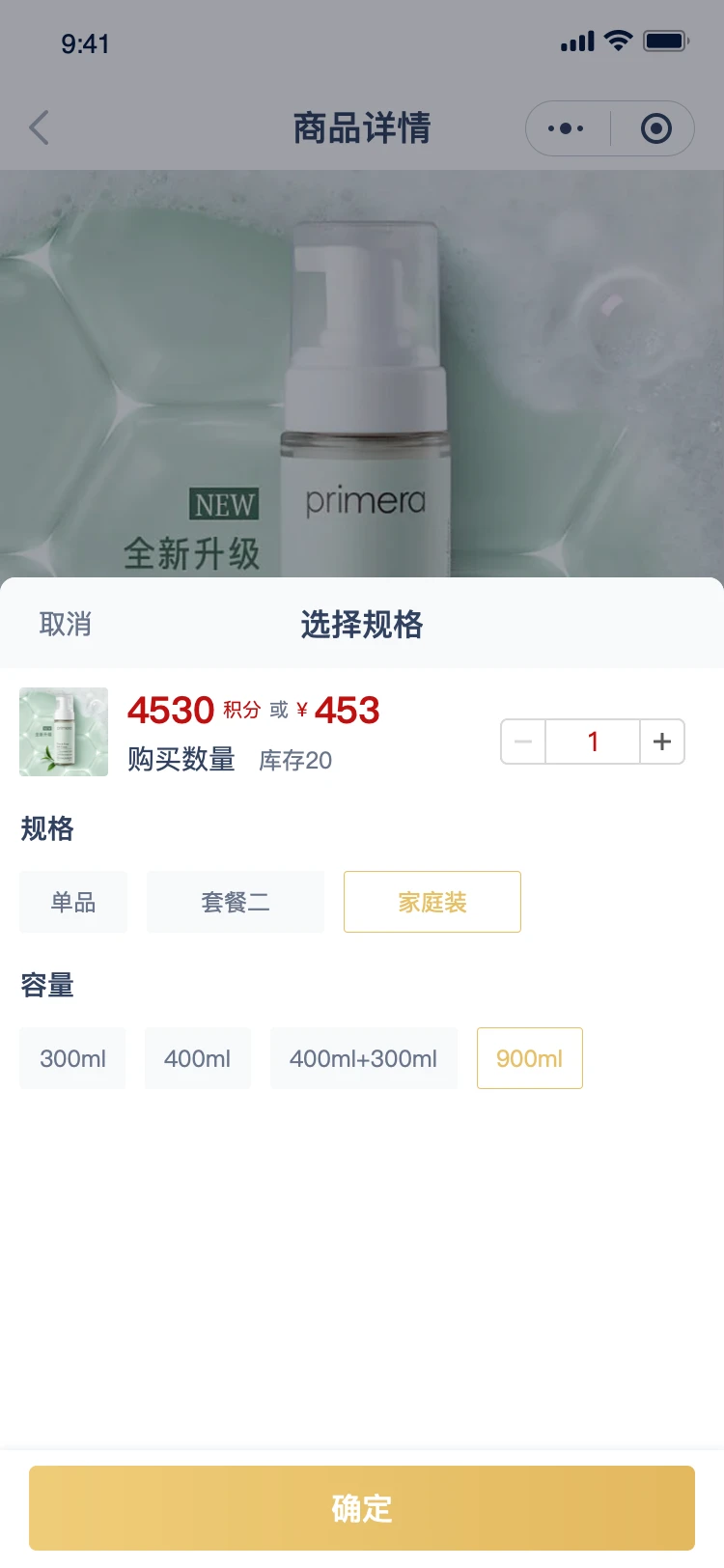
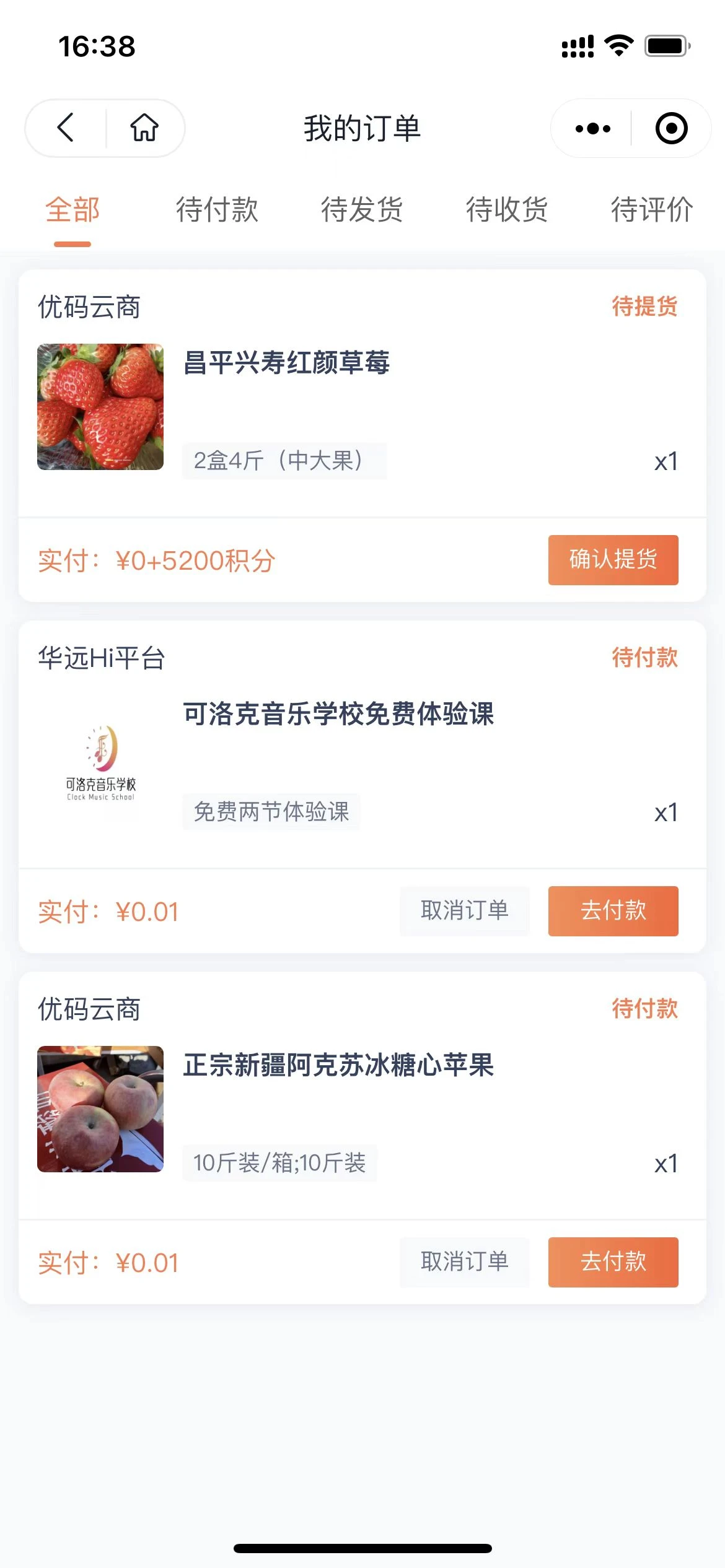
Goods, services, orders, and business progress are continuously presented around the same user portal.View the mall and order demo
Three Representative Business Scenarios
From the daily service after check-in to the active community and value-added operation, the three types of scenarios correspond to the user-side operation and the operation-side results respectively.
One Service Portal after Move-in
After the user completes the identity authentication, check the notification and service guide, contact the housekeeper, and handle payment, repair and visitor invitation. Submission, processing and results are continuously recorded by user and property.
Events and Community Engagement
Operators publish activities according to user identity or membership level, manage registration, reminders, check-ins, and reviews; users publish content and interactions in the community, and complete review, recommendation, and removal in the background.
Value-added Operations for Communities and Parks
The platform supports self-operated and partner merchants, with products, venues, and services configured by project. Users purchase or book online, while operators track orders, fulfillment, after-sales service, and settlement evidence.
FAQ
Focusing on unified entrance, basic services, active communities, mall orders, and multi-project operations, explain how the product supports daily user operations.
Q1 What problems does User Operations mainly solve?
The product puts user identity, basic services, event communities and value-added operations into the same mobile app portal. The operations team can configure the service scope by project and view notification access, event handling, event participation, content interaction and transaction progress.
Q2 Which users can use the Unified Entry?
Owners, residents, tenants, merchants, and park-based enterprise users can link their mobile number and identity information to a property or organization. If no automatic match is available, they can submit documents for an operations review. Verification determines the services and permissions available to each user.
Q3 What are the components of the basic service?
Core services include announcements, targeted notifications, local information, concierge support, service requests and repairs, online payments, visitor invitations, and instant satisfaction feedback. Users can submit requests, track progress, and receive completion updates in the Mini Program.
Q4 How can announcements and notifications reduce the interruption of irrelevant information?
Operators can choose the receiving range by project, building, unit, room, or designated user, and arrange for instant or regular notifications; authentication results, bills, work orders, and event reminders can also be reached by the corresponding user.
Q5 How to handle telephone calls and visiting reports?
User Operations focuses on online submission, progress inquiry and evaluation in the Mini Program. Telephone, visit registration and more complete customer service ticket processing can be combined with Youma Service to form a unified online and offline acceptance and continuous follow-up.
Q6 How do the activities cooperate with the neighborhood community?
Activity module is responsible for objects, shows, registration, charges, reminders, sign-in, gift verification and result records; community module is responsible for graphic and video release, comment interaction, content review, recommendation and removal, forming a continuous content operation position.
Q7 What is the relationship between the mall and Membership Center?
User Operations is responsible for the user-facing mall, commodity services, order fulfillment and operation entrance; Membership Center is responsible for membership status, level, growth value, points, benefits and cross-business settlement rules. When the two products are combined, services, activities and transactions can accumulate points or redeem benefits according to the membership rules.
Q8 Does it support group, regional, and multi-project management?
You can configure organizations, permissions, service listings, event rules, community segments, and marketplaces by group, region, and project, and centrally view operational data and business progress at all levels.
User Operations Product Demo
See How Your Users and Services Fit into One Mobile Portal
Combined with your residential, park or office operation scenarios, we will sort out user authentication, basic services, active communities and value-added business solutions for you, and demonstrate the corresponding mobile app usage path on the spot.