Delivery ready is planned
Lots, rooms, materials, standards, and positions are organized around the same delivery plan.

Youma Handover organizes preparation by project and batch, connecting customer appointments, on-site guidance, home inspections, issue rectification, reinspection and closeout, and household-level archiving. Project teams maintain a current view of progress and quality, while site staff work to consistent standards. Signing, payment, and related steps coordinate with the systems connected for each project.
Lots, rooms, materials, standards, and positions are organized around the same delivery plan.
The room, location, inspection items, and problems are continuously correlated with on-site photos.
The end-to-end of registration, dispatch, rectification, reinspection and closure leaves marks.
Processing status, repossession credentials, problem results and evaluations are filed by household.
Around the project and delivery batch, connect customer appointment and on-site processing, site opening, household acceptance, special project inspection, formal delivery, rectification and reinspection, household filing and data review. The PC management console is responsible for planning, standards and progress, and the mobile app undertakes on-site inspection, processing and rectification coordination.
Serving the real estate group engineering and quality line, project delivery team, Customer relationship and property undertaking team, put delivery preparation, on-site action, quality issues, responsibility coordination and delivery credentials into the same business chain.
Paper lists are prone to missing items. What to check for rough and hardcover, and to what extent, the items are unclear and the group cannot see them.
Whether it has been sent out, who is rectifying, and who will re-inspect after the change, you need to turn over the records and call to confirm repeatedly.
The question of which contractor should be assigned, whether the rectification is completed, and the lack of unified credentials, the assessment and settlement are different.
The table base, key, evaluation and signature rely on manual entry, and complete records cannot be found retrospectively.
Where the defects are concentrated, how the contractor performs, and where the progress of the repossession is, there is no unified report to continuously answer.
Phone-based handover scheduling creates arrival peaks and queues. Unit acceptance, signatures, and payments are processed one by one, while manual filing makes omissions and errors difficult to trace.
Youma Handover organizes customer processing, on-site inspections, rectification, reinspection, and analytics by project, batch, and unit. All five business domains share the same master data, inspection standards, access controls, and contractor collaboration framework.
Prepare batches, materials and standards first
Let customers and positions enter the site as planned
One Set of Standards across Four On-site Scenarios
The problem is bound from the beginning of registration
Continuous Improvement of Quality Standards with Deliverables
View the complete business architecture horizontally on a smaller screen.
Customer appointments, on-site processing, four inspection and handover scenarios, issue rectification, and quality reviews remain connected to the same batch and unit. Specialist steps such as signing and payment coordinate with the systems connected for each project.
Project teams prepare the unit scope, handover documents, appointment capacity, and service roles. Customers follow their notifications to complete verification, booking, arrival, and result review. Both journeys stay synchronized around the same batch and unit status.
Determine delivery date, room scope and on-site positions
Organize notices, handle materials and household information packages
Set available time slots, capacity, and attendance rules
Collaborate according to check-in, inspection, receipt and handover nodes
capture processing status, problem results and delivery credentials
Verify identity and bind the property to be delivered
Review available time slots and submit delivery appointments
Understand the processing content and required materials in advance
After check-in, complete the on-site tasks assigned to the current step
Check the progress of the problem and complete the receipt and evaluation.
The management console delineates the scope of inspection according to the project and batch, and implements the responsibility of inspection; the mobile app connects the building, floor, room, apartment type parts and inspection items into continuous operation, so that one household and one inspection really falls on the spot.
The room list is expanded along the floor, and the house inspection engineer directly enters the corresponding room. The on-site inspection does not deviate from the project and the main room data. The management console can configure the date, room range, house inspection engineer and follow-up handlers by batch.
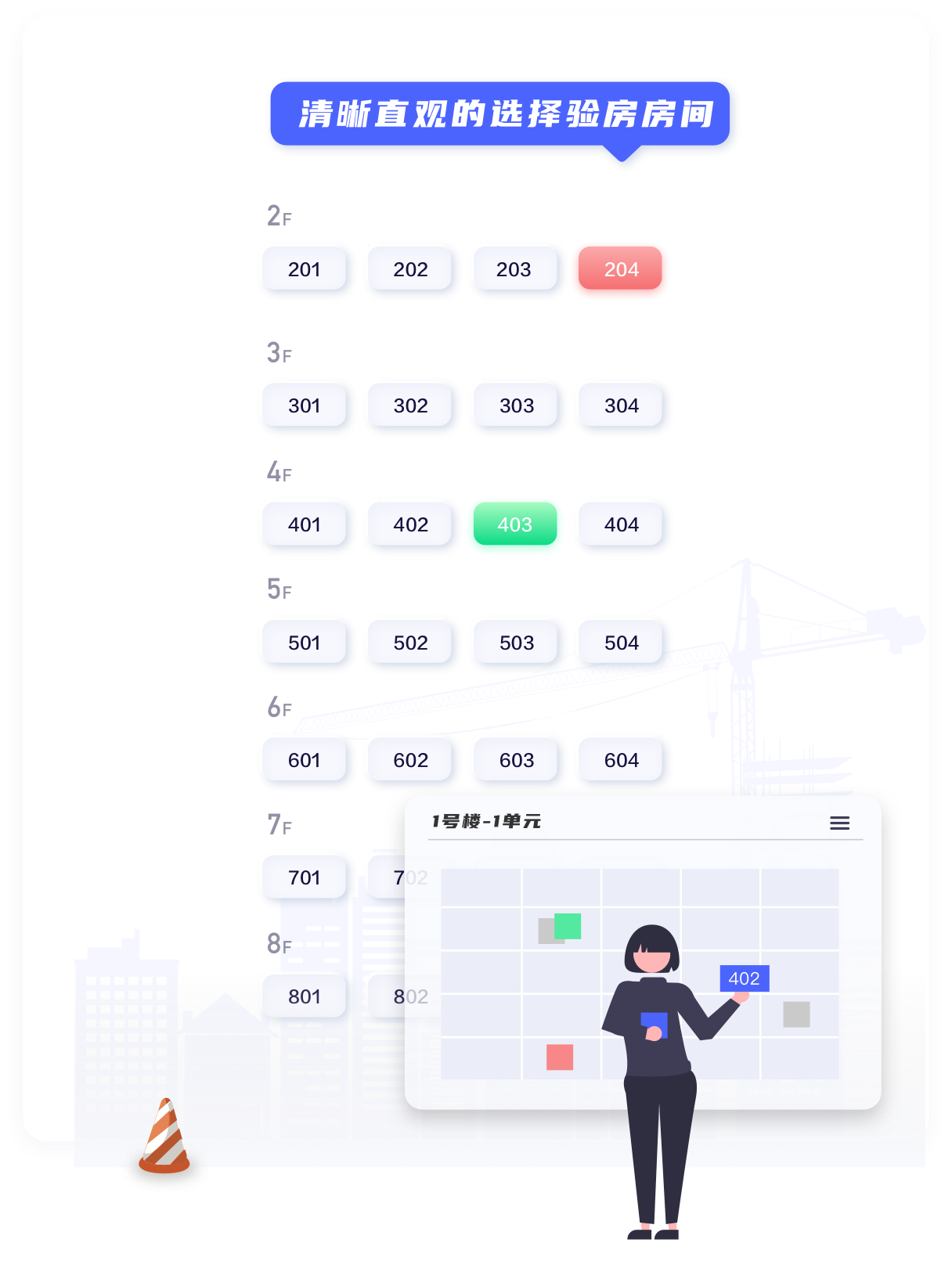
Site staff open the required inspection directly from the floor and unit, without switching between multiple checklists.
Unit type, problem location, current location and problem entrance are presented centrally, focusing on the core operation of a household inspection.
Navigation operation standardizes on-site inspection to rooms and parts. Engineers can choose inspection items, record the cause of problems and add photos; after the task is downloaded in advance, weak connection or no network environment can continue to work, and upload uniformly after restoring the network.
Record parts, inspection items, problems and photos at one time.
After uploading, enter the dispatch, rectification, reinspection and closure.
Initiate special project verification for specific facilities or compliance requirements such as elevators, fire protection, waterproofing, gas, etc. When creating a batch, directly select the inspection items, the engineer checks and registers by item, and the problem continues to enter the same set of dispatch, rectification and reinspection processes.
Organize the owner to enter the site for inspection before the official delivery, register the problems found on site, and enter the same set of problem management as the internal inspection. Risks are exposed on the open day, rectified before delivery, and the opening organization and rectification process are recorded.
Organize on-site processing by building and handover batch, with unit status such as not inspected, awaiting rectification, or awaiting reinspection visible in one view. Staff open each unit to record acceptance, and any issues continue through the same resolution workflow.
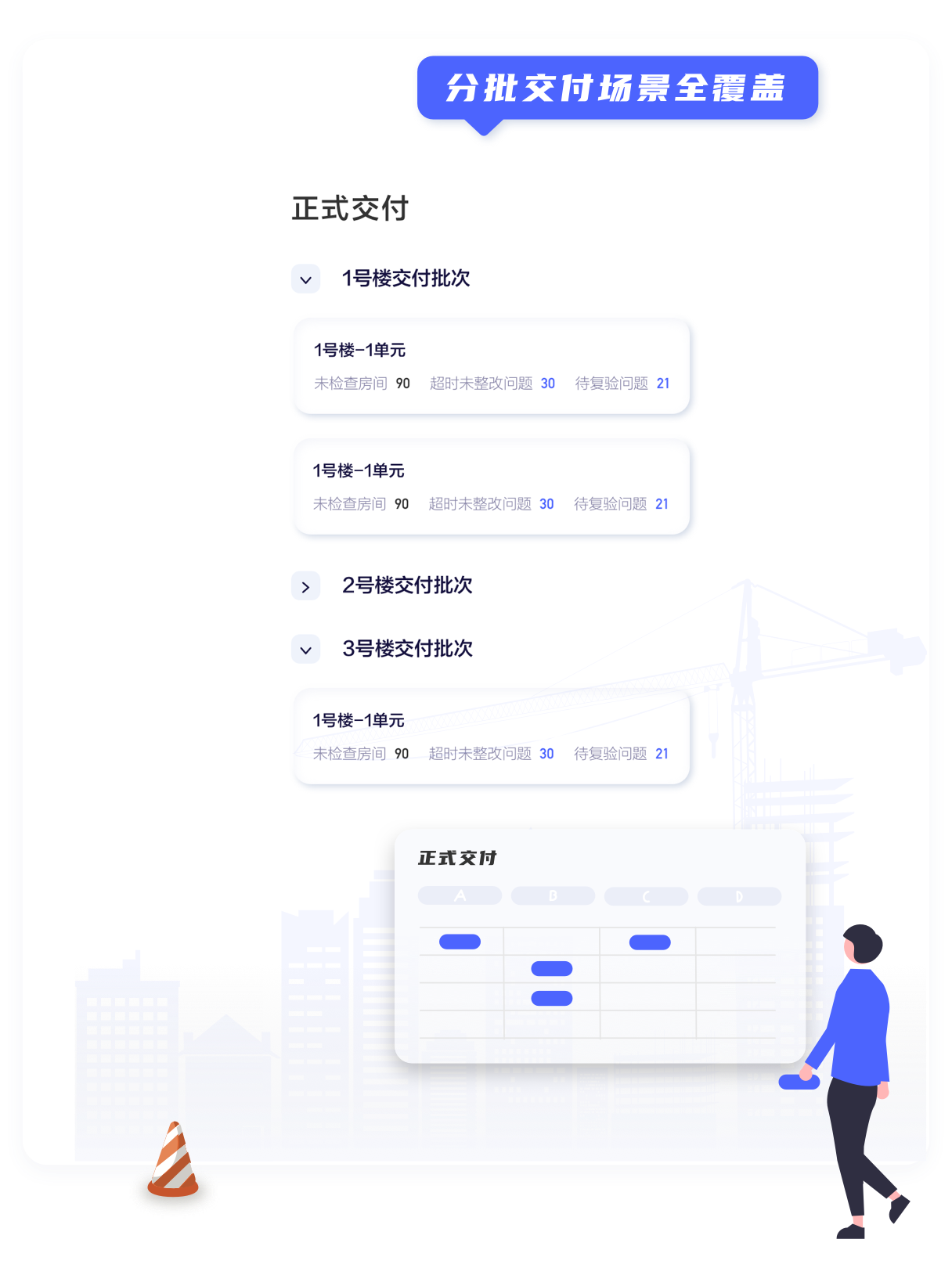
Launch the delivery batch according to the building, focus on the uninspected, to be rectified and to be re-inspected rooms, and support the orderly progress of multiple batches.
If an owner is not ready to accept the unit, the reason is recorded. Issues logged on site continue through rectification and reinspection, preserving the full history regardless of the initial decision.
Record Electricity, Water, Reclaimed-water, and Gas Meters Separately
Keep Retained Quantities Online, with Traceable Maintenance Use
Service attitude, inspection speed, overall satisfaction score on site
After the signature is submitted, an electronic receipt certificate will be formed.
Reason for rejection, description, date and complete marks of the handler
The status, credentials and records of the temporary non-receipt can be checked on one screen.
See batch progress, retain evidence for every on-site step, and continue resolving follow-up issues.View the official delivery demo
Issues from unit acceptance, specialist inspections, site open days, and formal handover enter one issue-management workflow. Once contractor responsibilities are mapped, each issue can be routed directly to the accountable party.
Room, location, inspection items, photos, and reasons
Automatic or manual determination of contractor liability
Processing and completion results Continuous marks
Engineers confirm the rectification results on site
There is a basis for passing, returning or abnormal closing
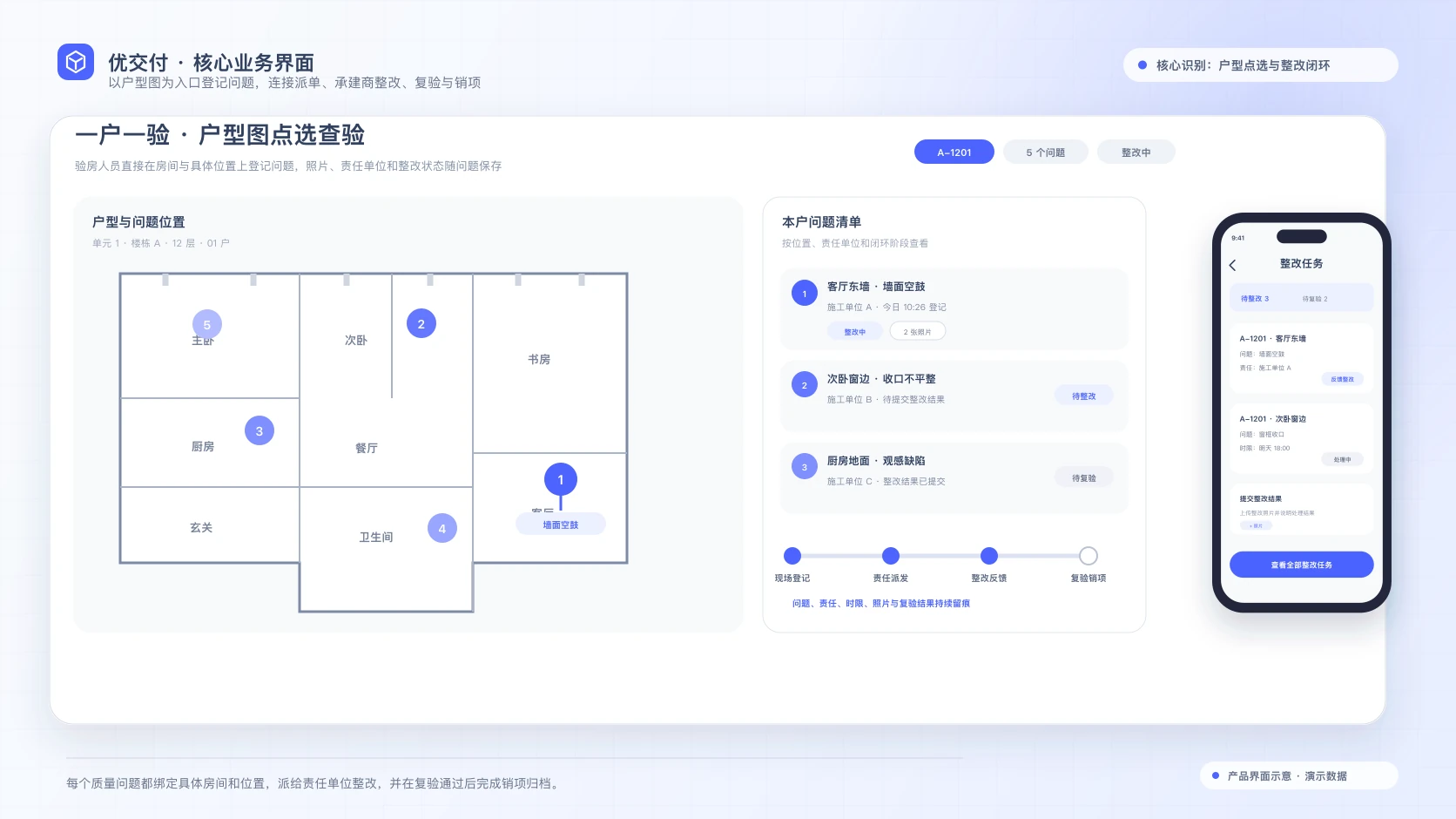
View the full product picture horizontally on a smaller screen.
The unit type, problem list, responsible unit, rectification status and reinspection items are continuously presented, which is convenient for on-site personnel and managers to cooperate on the same issue.
A complete reporting system summarizes inspection, problem rectification, and acquisition data, supporting viewing and export from the dimensions of project, batch, room, contractor, and defect type. Through quality problem and high-frequency defect analysis, we continuously improve enterprise inspection standards.
View data by project, batch, room, contractor, and defect type to identify high-frequency quality issues and address weaknesses.
01 List of room problems
02 Contractor Statistics Table
03 Product defect statistics table
04 Receipt Statistics Table
05 Summary of questions
06 Room problem analysis table
07 Summary of room problems
Translate the sentence as follows: Translate the sentence as follows: Translate the sentence as follows: Translate the sentence as follows: Translate the sentence as follows: Translate the sentence as follows: Translate the sentence as follows: Translate the sentence as follows: Translate the sentence as follows: Translate the sentence as follows: Translate the sentence as follows: Translate the sentence as follows: Trans
Organizations, projects, units, permissions, and tasks in the handover stage share the Youke Cloud foundation. Contractor collaboration and post-handover services are configured through the relevant applications for each project.
Unified application portal, to-do messages, and organizational permissions
Project, phase, building, unit, and room master data
Undertake the rectification task after automatic order dispatch, and the boundary is confirmed by project
After delivery, the owner's service and property operation will continue to connect
ERP, cost, customer service, etc. are coordinated according to data boundaries
Focusing on delivery preparation, customer appointment, on-site inspection, rectification and reinspection, data archiving and system collaboration, the actual use and product boundaries are clearly explained.
Youma Handover solve the five problems of inconsistent inspection standards, scattered problem tracking, rectification responsibility wrangling, paper-based acceptance procedures and difficult recovery of delivery data in the delivery stage of housing, covering the end-to-end of site opening, household acceptance, special project inspection and formal delivery.
Yes. Download the batch data to the APP before the house inspection, on-site offline inspection, offline registration problems, one-click upload synchronization after completion, weak connection and no network environment will not affect the on-site operation.
Combine the two. The system supports group-level inspection item library and project-level configuration. New projects can introduce inspection items from the group or other projects, or they can build two-level inspection items by themselves. Classified by rough and hardcover, and preset problem descriptions, decoration standards and rectification time limits.
After the contractor is pre-bound with the building and inspection items in the basic data and the automatic dispatch is turned on, the corresponding problem registration is automatically dispatched to the contractor's account; manual dispatch and problem transfer are also supported, and the end-to-end of rectification and reinspection is left behind.
Select "Temporarily do not accept the building", record the reason for rejection, explanation, processing date and handling engineer; the problems registered on the spot will enter the rectification closed loop as usual, and the end-to-end records will still be retained when the subsequent delivery is processed again.
Yes. Each scenario is organized independently by batch while sharing the same standards, mobile inspection tools, and issue-resolution workflow. Projects can introduce selected scenarios first according to their handover plan.
Yes. The complete statistical report system covers the dimensions of room problem details, contractor statistics, product defect statistics and repossession, and supports filtering and exporting by project, batch and time for analyzing quality problems and continuously optimizing inspection standards.
Youma Handover is a standard Youke Cloud application. It shares organization, project, and unit master data with common data services, contractor collaboration, repair requests, and satisfaction surveys. After handover, each project can connect owner services to property operations applications.
Youma Handover supports property verification, handover appointments, document access, on-site check-in, progress tracking, issue review, and satisfaction feedback. Agreement signing, payments, invoicing, and tax steps are configured around the enterprise systems connected for each project rather than duplicated as built-in capabilities.
Tell us about your handover batches, customer appointment process, on-site roles, inspection standards, and contractor management model. The demonstration will show the relevant capabilities for project teams, customers, inspectors, and responsible contractors, then explain how signing, payment, and other steps coordinate with existing systems.