Apply Group Standards at Project Level
Headquarters standardizes service levels, operating procedures, and performance metrics. Each project plans for its asset type, with results consolidated under consistent definitions.

Facing residences, parks, office buildings, commercial and public buildings, we manage project standards, on-site tasks, four guarantees and one service, facilities and equipment, customer service and charging management in a unified manner, allowing the group to see, manage the project, and execute the project on site.
More than just making a work order, and more than just showing management reports. The platform turns systems into plans, problems into tasks with responsibilities and time limits, and billing rules into continuous charging processes.
Headquarters standardizes service levels, operating procedures, and performance metrics. Each project plans for its asset type, with results consolidated under consistent definitions.
Planning, repair, inspection, alarm and quality problems are integrated into a unified task system, covering distribution, implementation, rectification, reinspection and follow-ups.
Engineering, order, cleaning, greening and customer service are carried out according to positions, shifts, regions, routes and points, and the process continues to leave traces.
Contracts, fees, tables and rules form receivables, linking calls, collections, verification, invoicing and reconciliation.
Aggregate overdue work orders, missed inspection points, repeated failures, long-term non-rectification, arrears, inventory and abnormal energy usage.
Headquarters configures inspection standards and projects schedule inspections. Site staff scan a code to view checkpoint requirements, record results and photos, and create a rectification work order when they find an issue.
Inspection actions, field recordings, and subsequent processing are continuously correlated to support offline operations in complex field environments.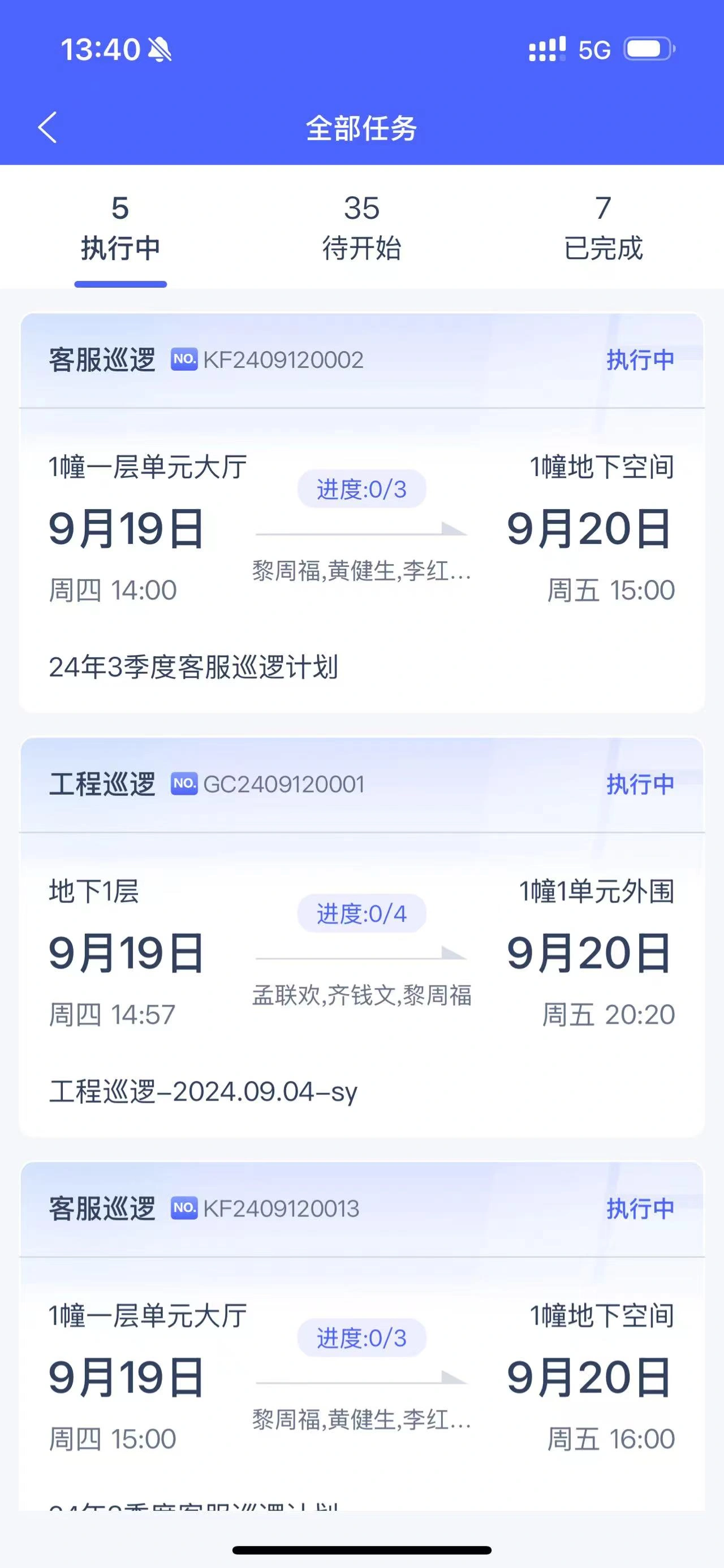
Receive point tasks as scheduled
Let's zoom in.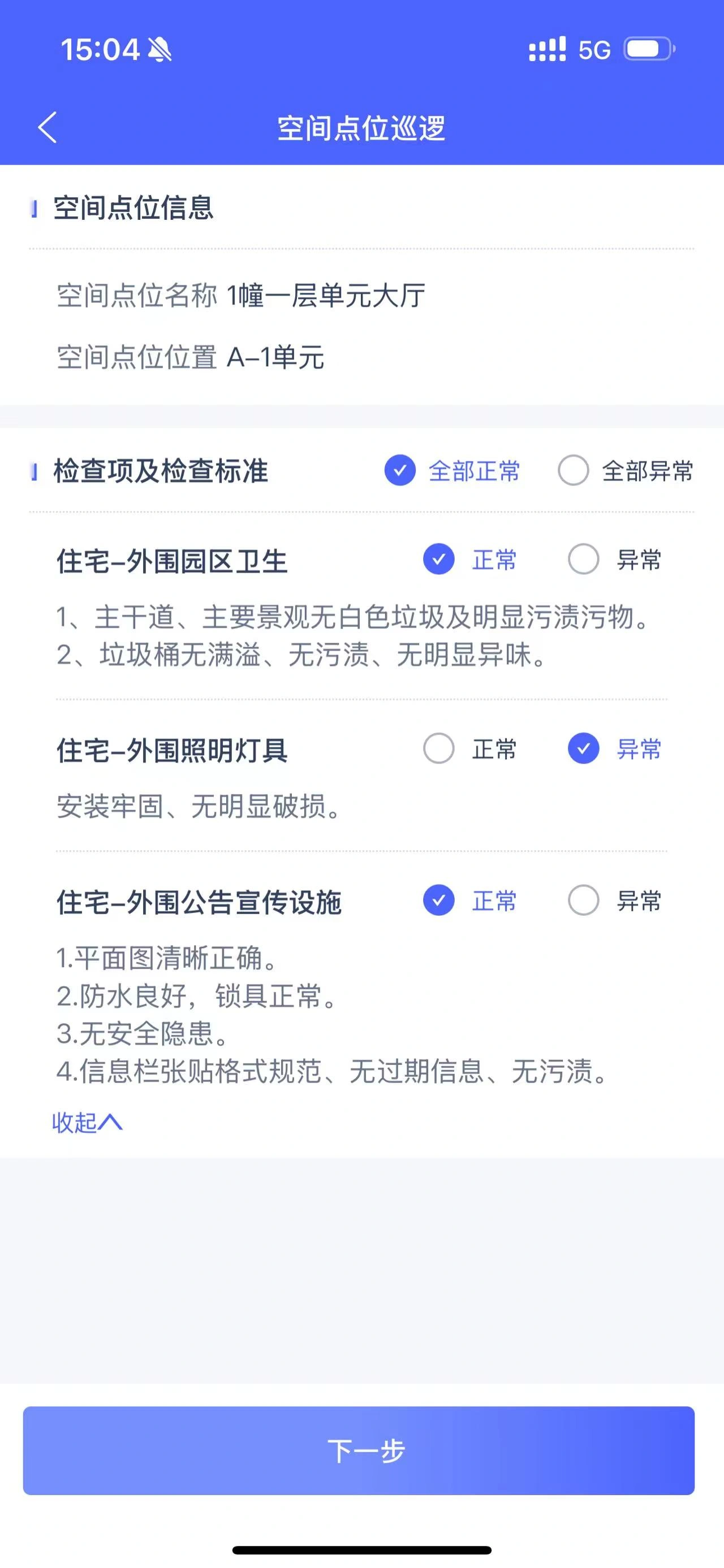
Scan the code to view the check items and register the results.
Let's zoom in.The group can use a unified master data, tasks, and analytical standard, and different projects can still retain spatial models, service menus, and charging rules that match the asset type.
The platform unifies the operation objects of the organization, project, space, equipment, customer, member, household, contract, meter and personnel. The service results go back to the equipment, space, customer and contract files, and enter the fee, cost, quality and operation analysis.
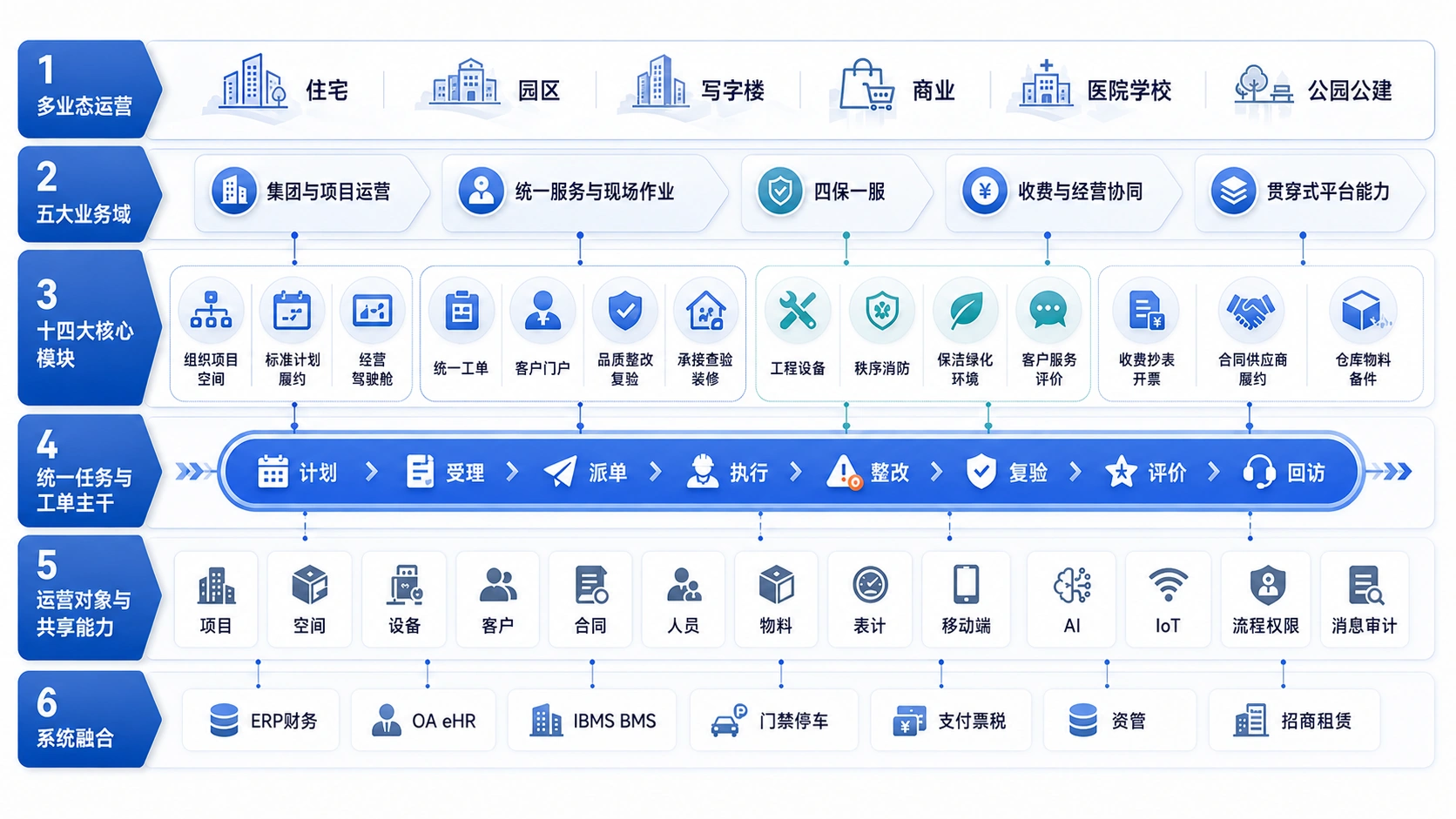
Covering multiple business asset types, five business domains, and a unified task order backbone, standards, implementation, supervision, and business results continue to be relevant.
Each module has clear business objects, responsible roles, and processing results; the unified work order is the main line running through multiple business entrances and on-site execution.
Unify the organization, project, space, customer, and household files, and transform the service system into a project plan, allowing the group to control, project execution, and business analysis using the same business standard.
Headquarters maintains shared standards for engineering, security, cleaning, landscaping, customer service, and quality. Projects create recurring plans against those standards, and the system automatically generates tasks for the responsible roles.
Unify customer, member, household, family or business relationships, and connect with housing, rental space, vehicles and service interests, and continuously settle repairs, payments, complaints, evaluations and historical communication.
The cockpit showcases project operations, work orders, equipment, quality, fees, contracts, inventory, and energy, and can continue to drill down to projects, spaces, customers, equipment, teams, and responsible personnel.
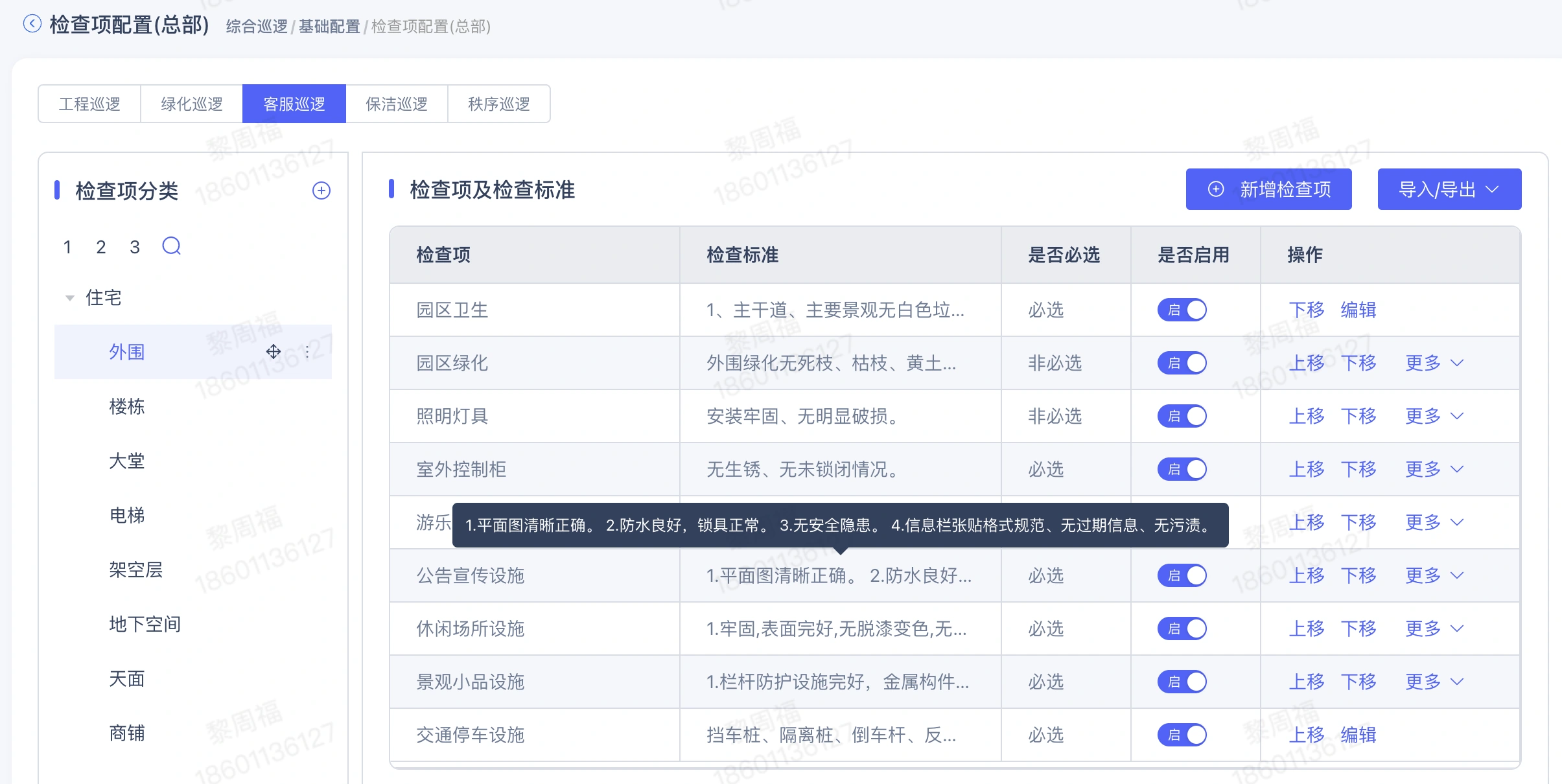
Unify engineering, order, environment and customer service inspections
Let's zoom in.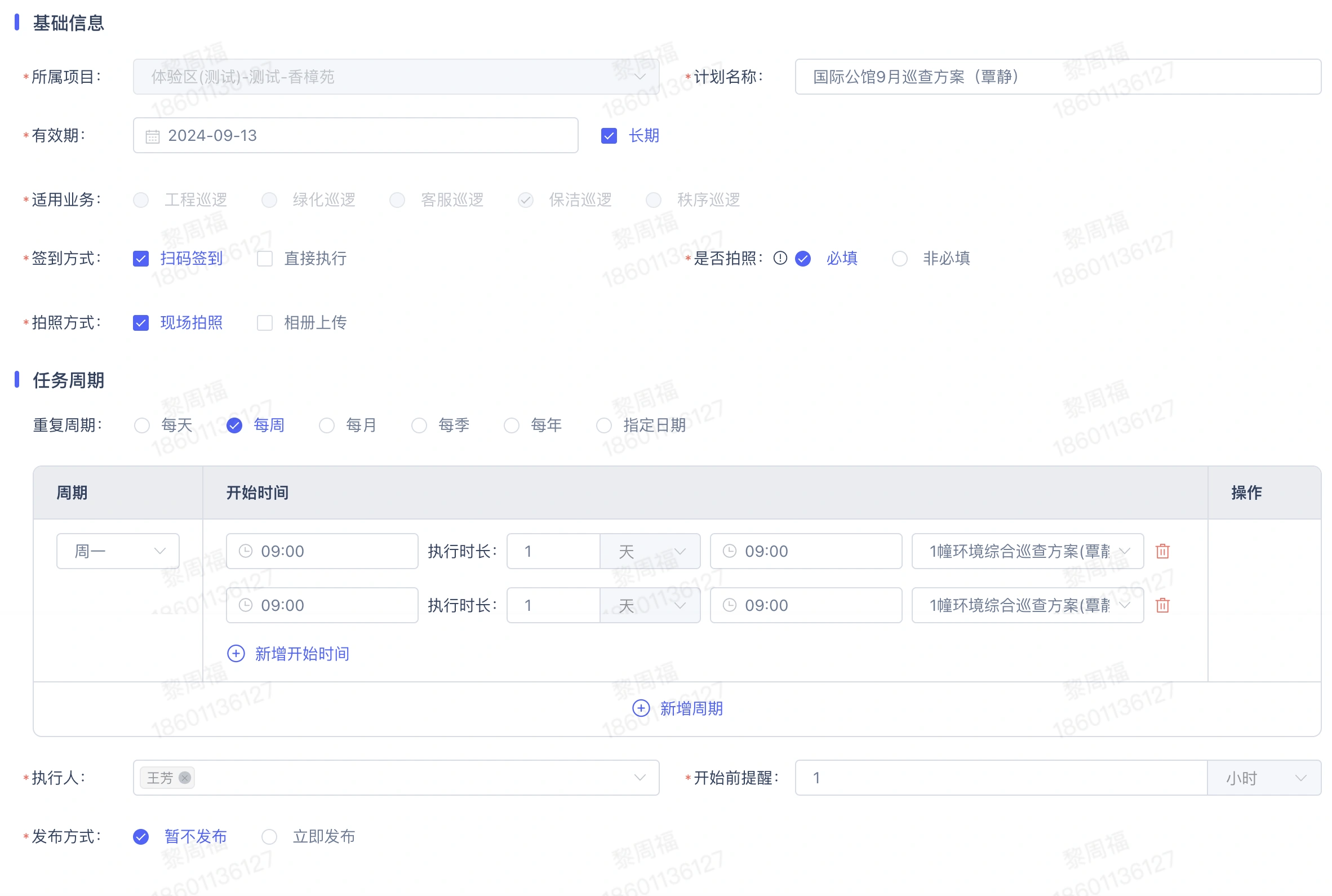
Configuration project inspection tasks and execution requirements
Let's zoom in.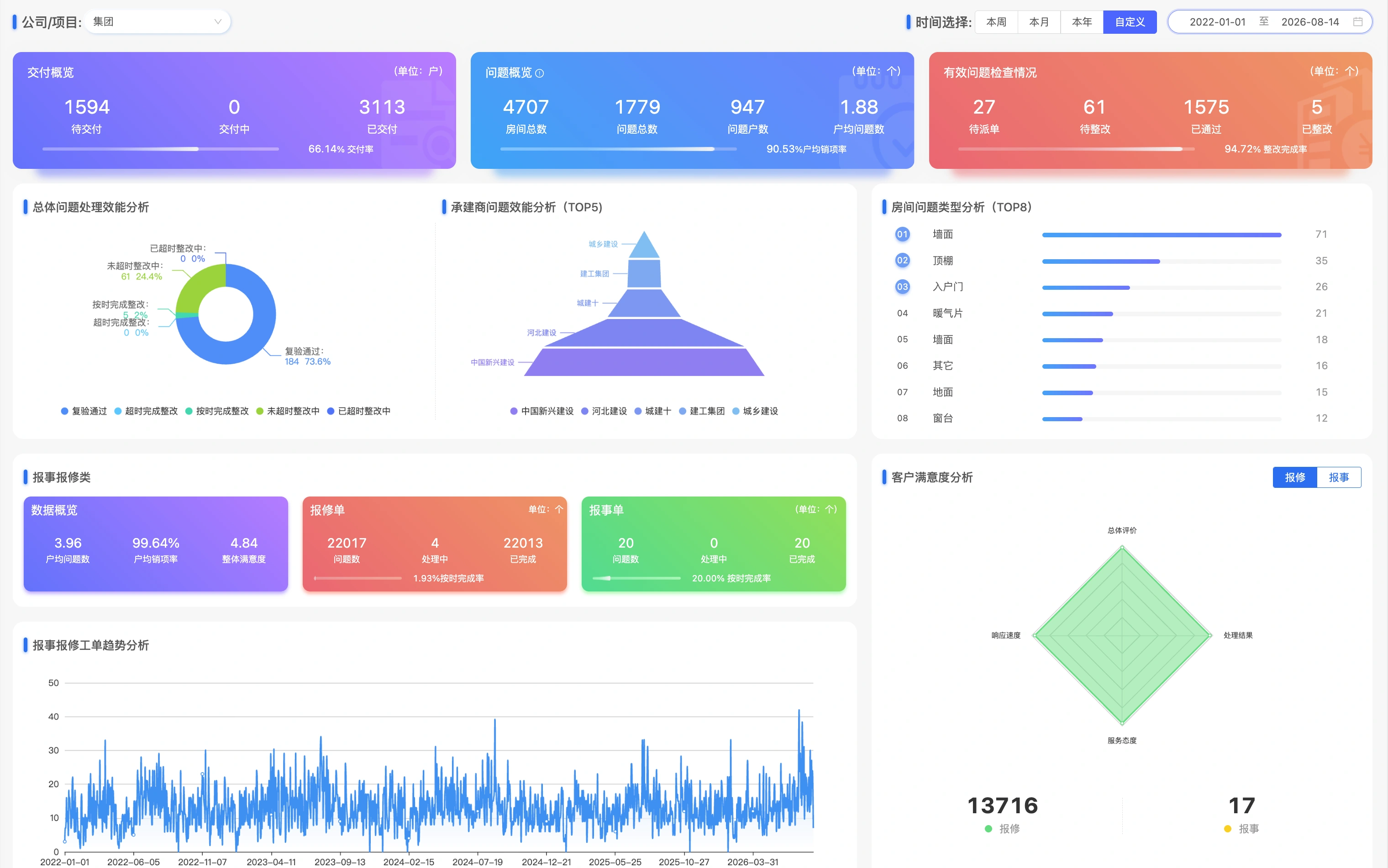
View business backlogs and metrics by role
Let's zoom in.Customer repair, on-site inspection and internal operations are entered into a unified single pool, processed according to templates and rules, and maintenance rectification, acceptance confirmation and follow-up results are continuously recorded.
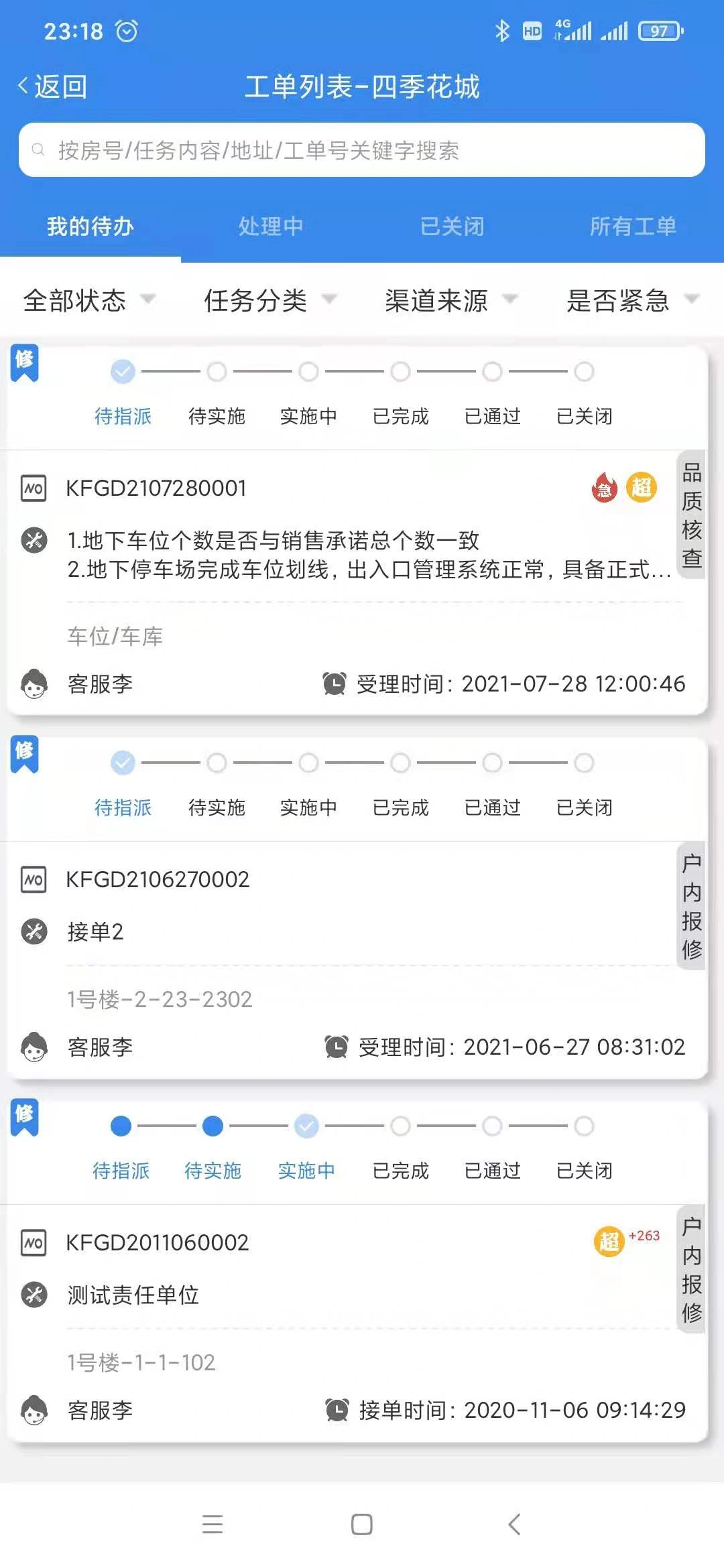
Work order list and pending items
Let's zoom in.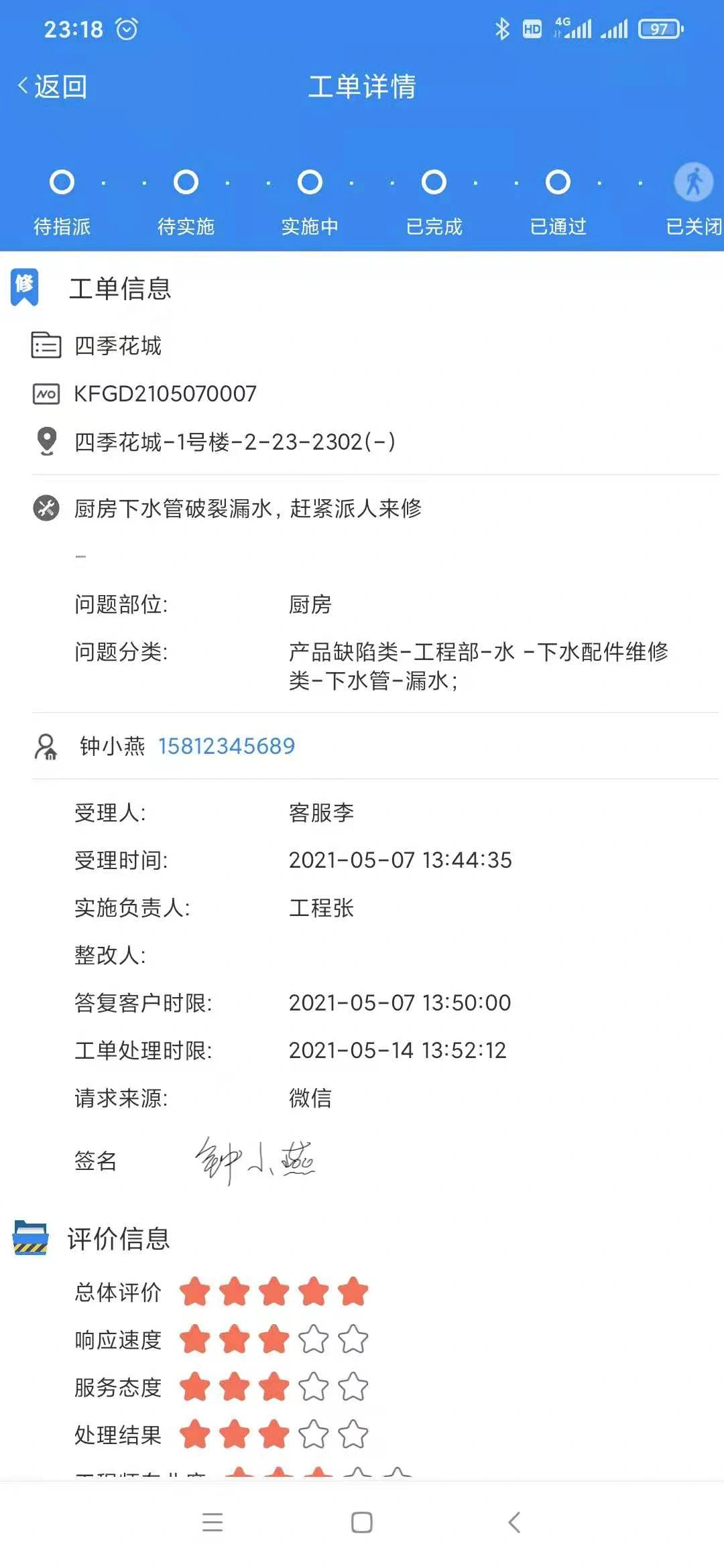
Maintenance, validation and evaluation records
Let's zoom in.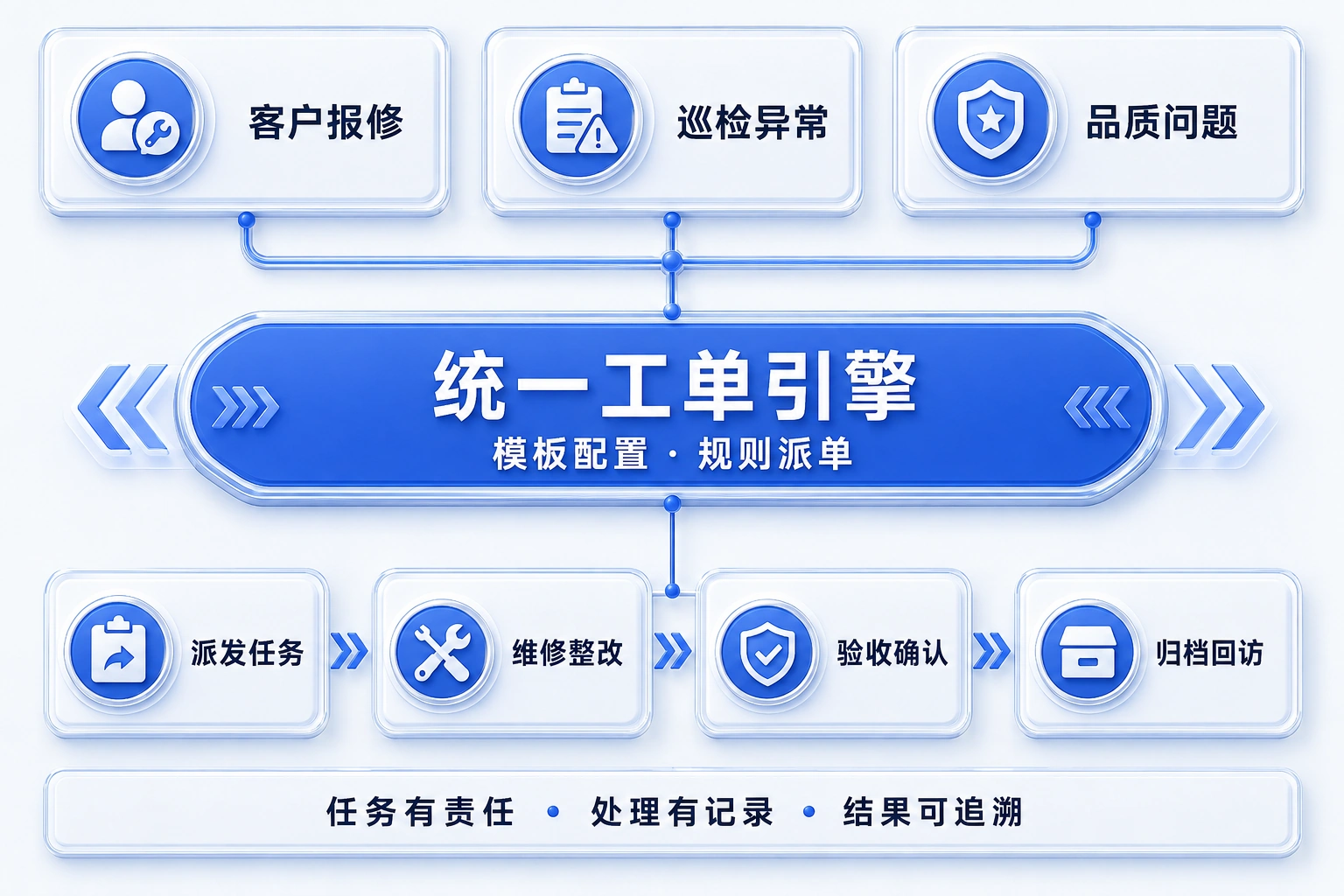
Customer repair, inspection and quality problems into the unified work order engine, associated task responsibility, processing records and results.
Let's zoom in.Users submit repair reports, inquire about fees and handle payment from the service entrance. The repair location, problem pictures and cost details enter the corresponding business respectively, and the service entrance and on-site execution maintain a clear division of labor.

Scan code to open the door, Bluetooth door opening and pass service
Let's zoom in.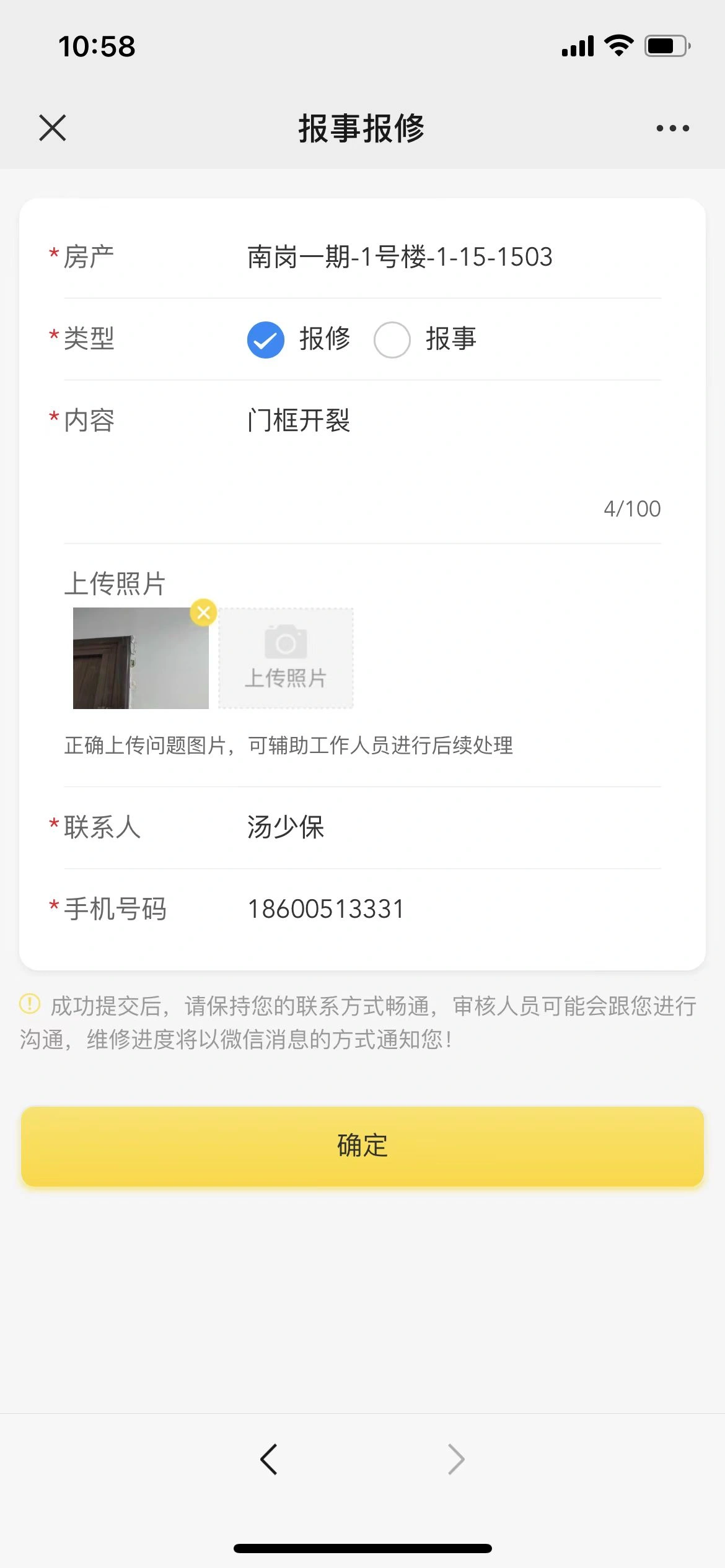
Registration questions, location and on-site pictures
Let's zoom in.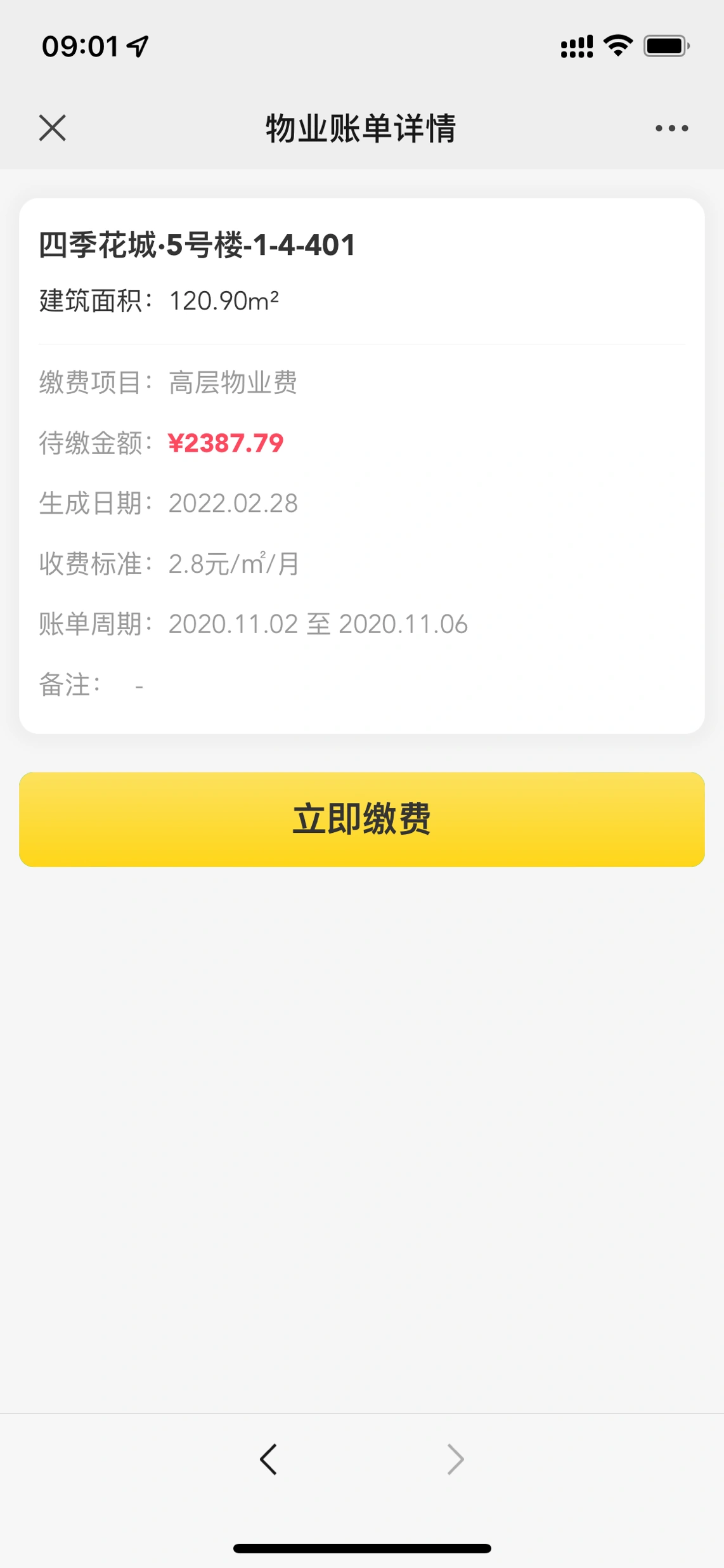
Check the fee details and process payment.
Let's zoom in.Configure inspection items and inspection requirements by business classification. Inspectors score and register problems item by item, handle personnel feedback rectification results, and keep verification records with the task.
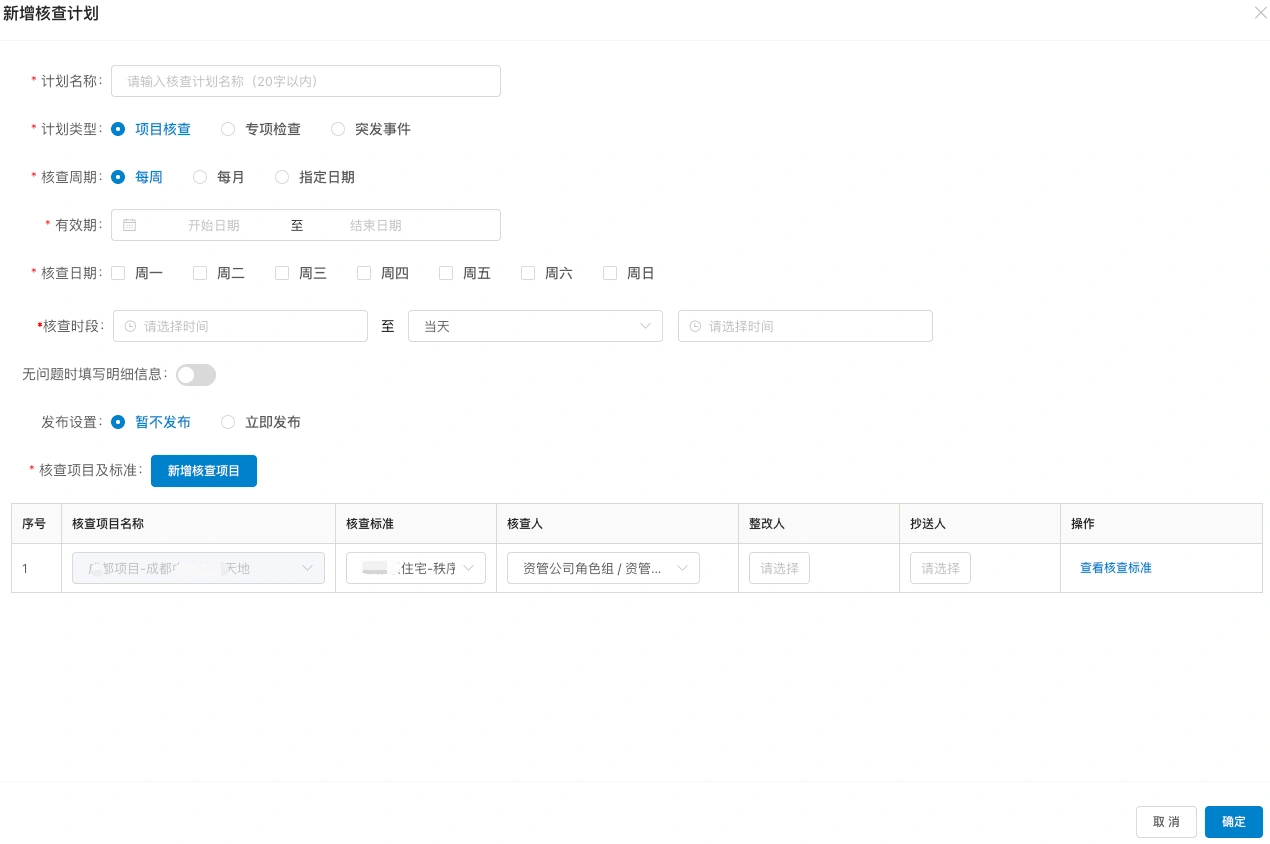
Configuring verification objects, planning cycles, and inspection requirements
Let's zoom in.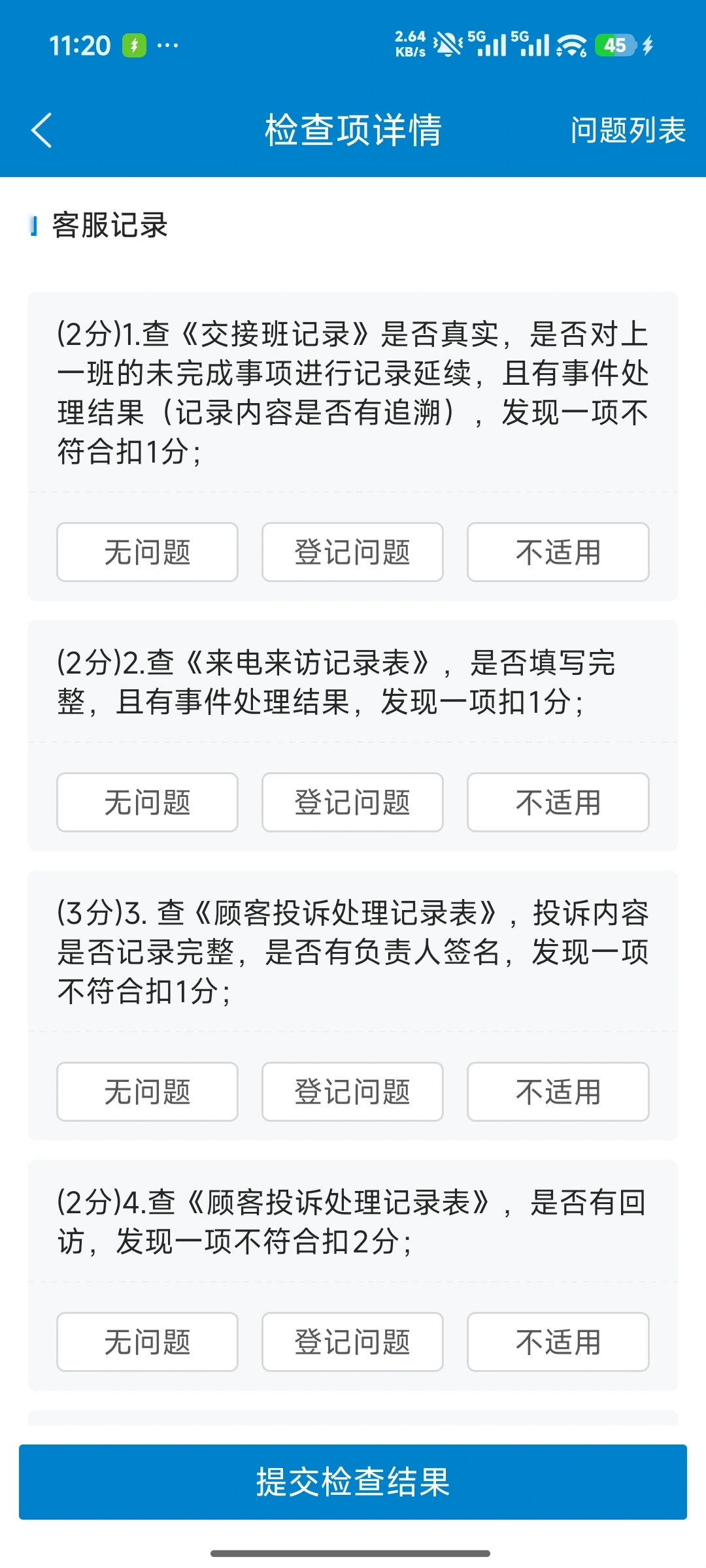
Examine, score, and register questions item by item
Let's zoom in.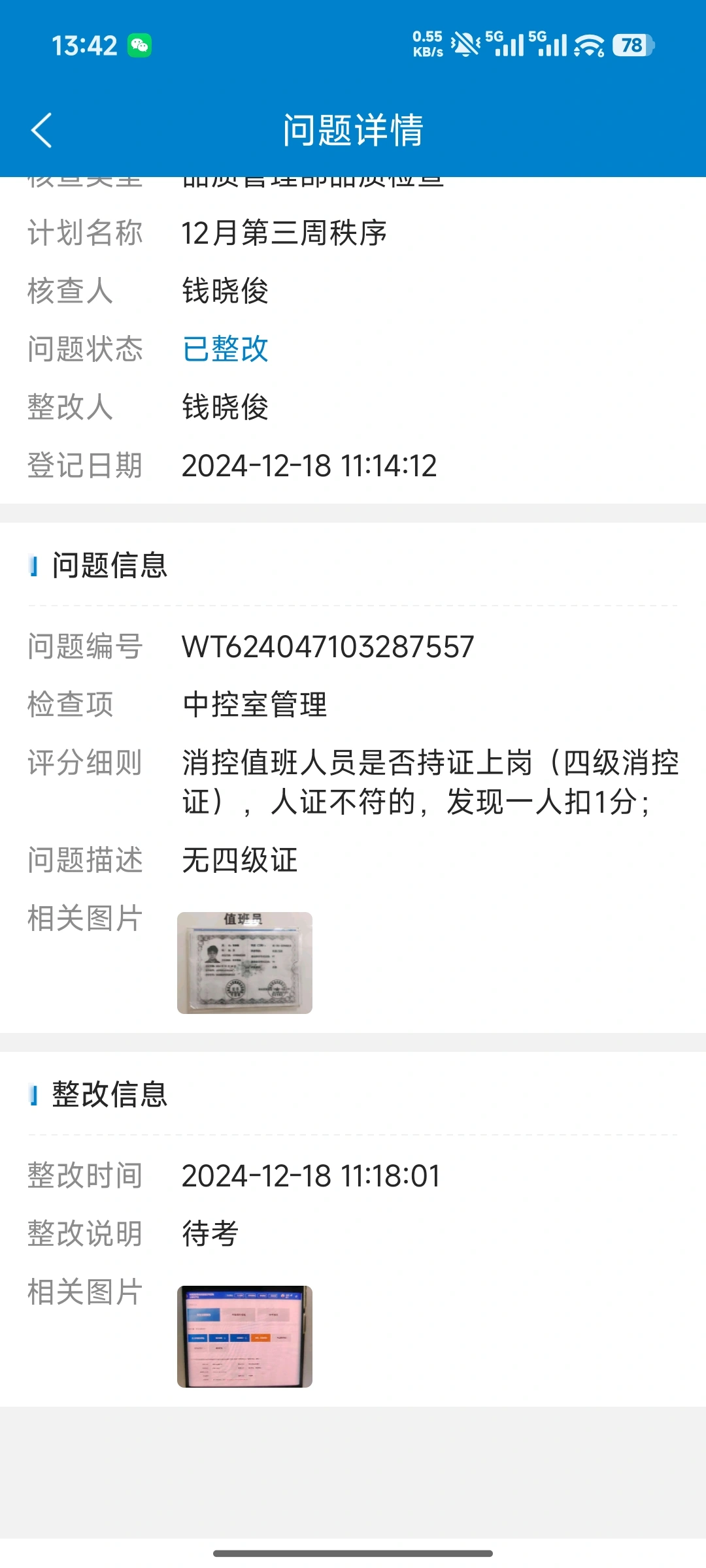
Track rectification feedback and verification results
Let's zoom in.Support mobile inspection, problem location, rectification and reinspection; the decoration process is connected to application, data review, personnel management, deposit, on-site inspection and completion acceptance.
The group unifies inspection standards, forms an inspection plan for projects, and keeps records of on-site tasks and problem rectification to facilitate continuous verification of the implementation results of various services.

Scan the code on site to view the equipment model, location, responsible person and technical information, and the inspection, maintenance and repair processes are continuously included in the equipment files. The circulation of materials and spare parts is connected to the on-site operation through inventory records.
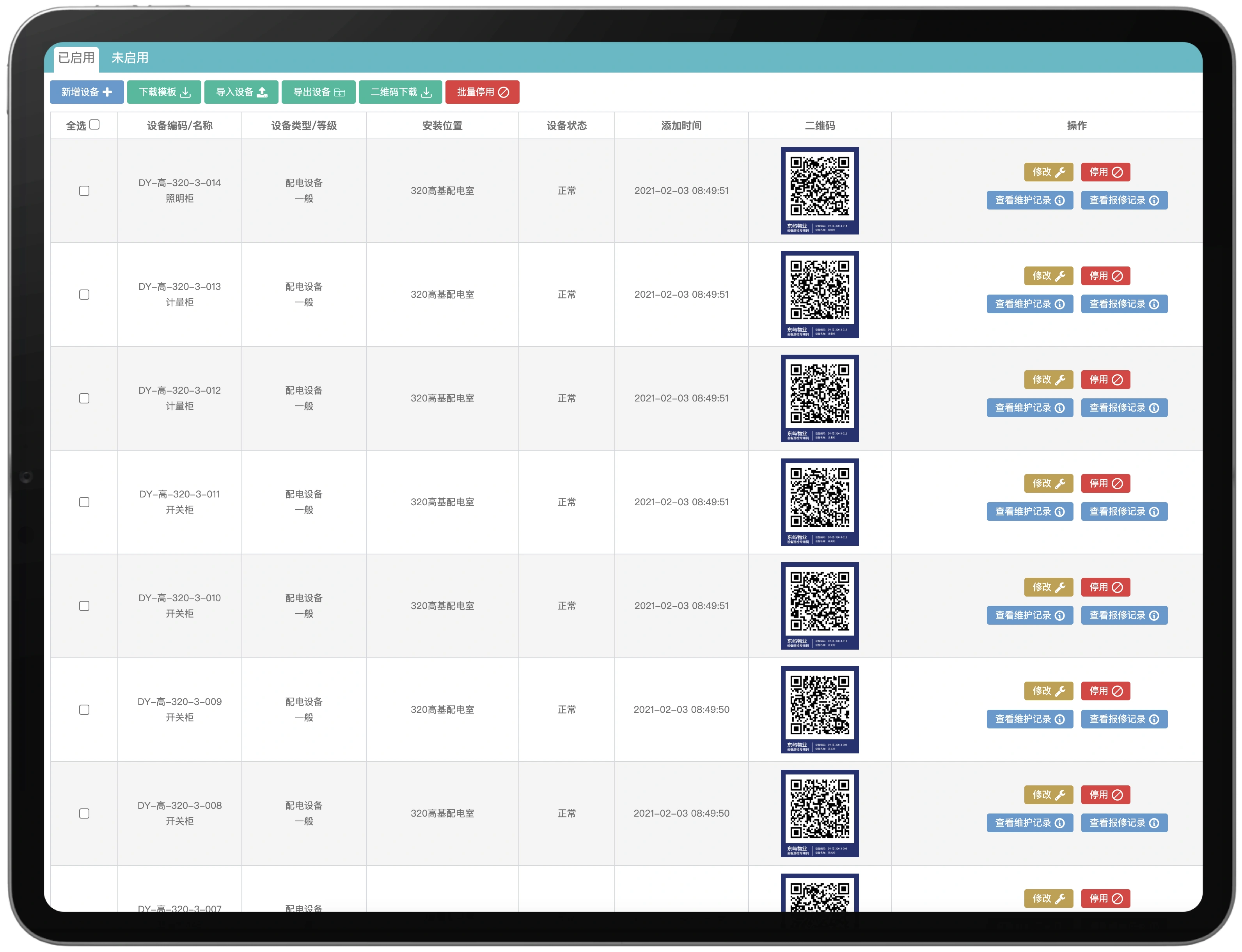
View equipment location, status, and maintenance and repair records
Let's zoom in.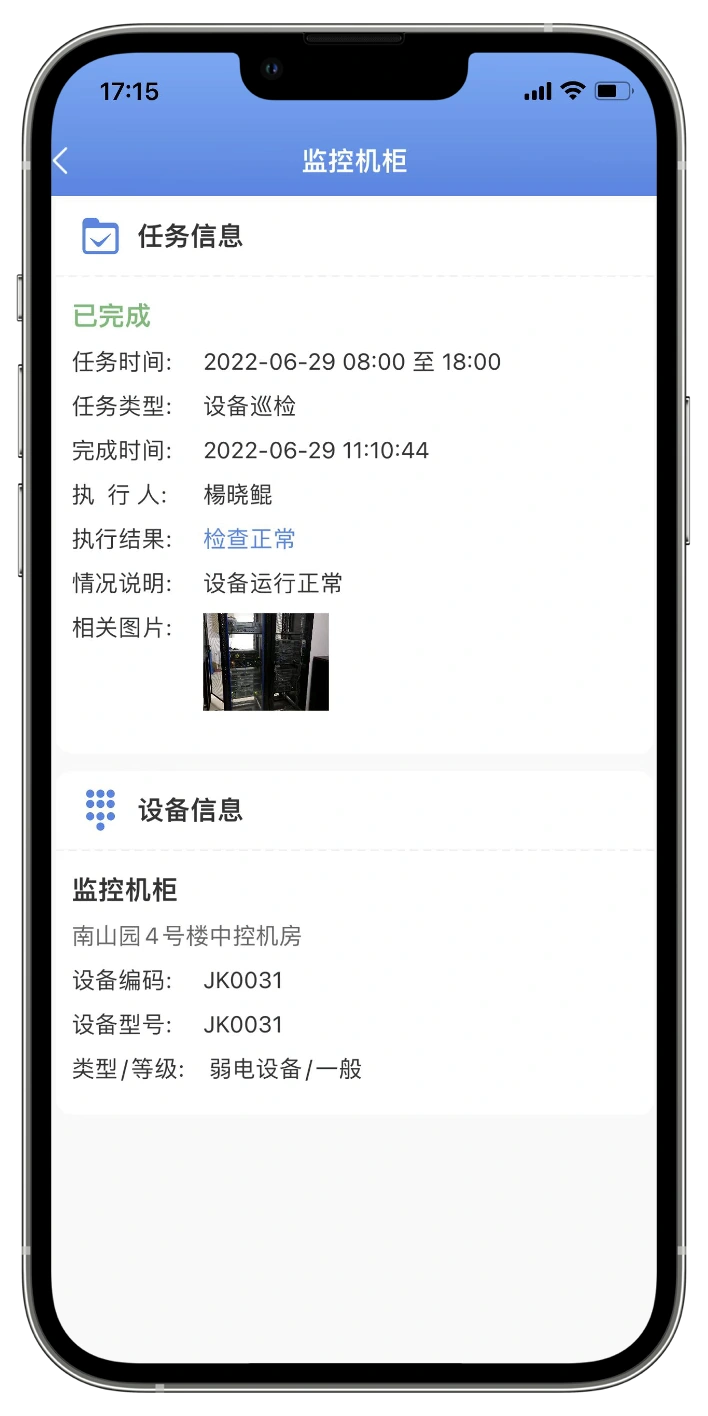
Task status, equipment information, and field execution records
Let's zoom in.Receive scheduled inspection tasks, scan a code to view checkpoint requirements, and record normal or exceptional results. Site issues and photos continue into the work-order process.
Receive point tasks as scheduled
Let's zoom in.Scan the code to view the check items and register the results.
Let's zoom in.The headquarters maintains the required inspection standards such as cleaning and greening, and the project supplements the local inspection items. On-site personnel register the inspection results item by item, record the problems with pictures and texts, and take joint rectification.
Unify engineering, order, environment and customer service inspections
Let's zoom in.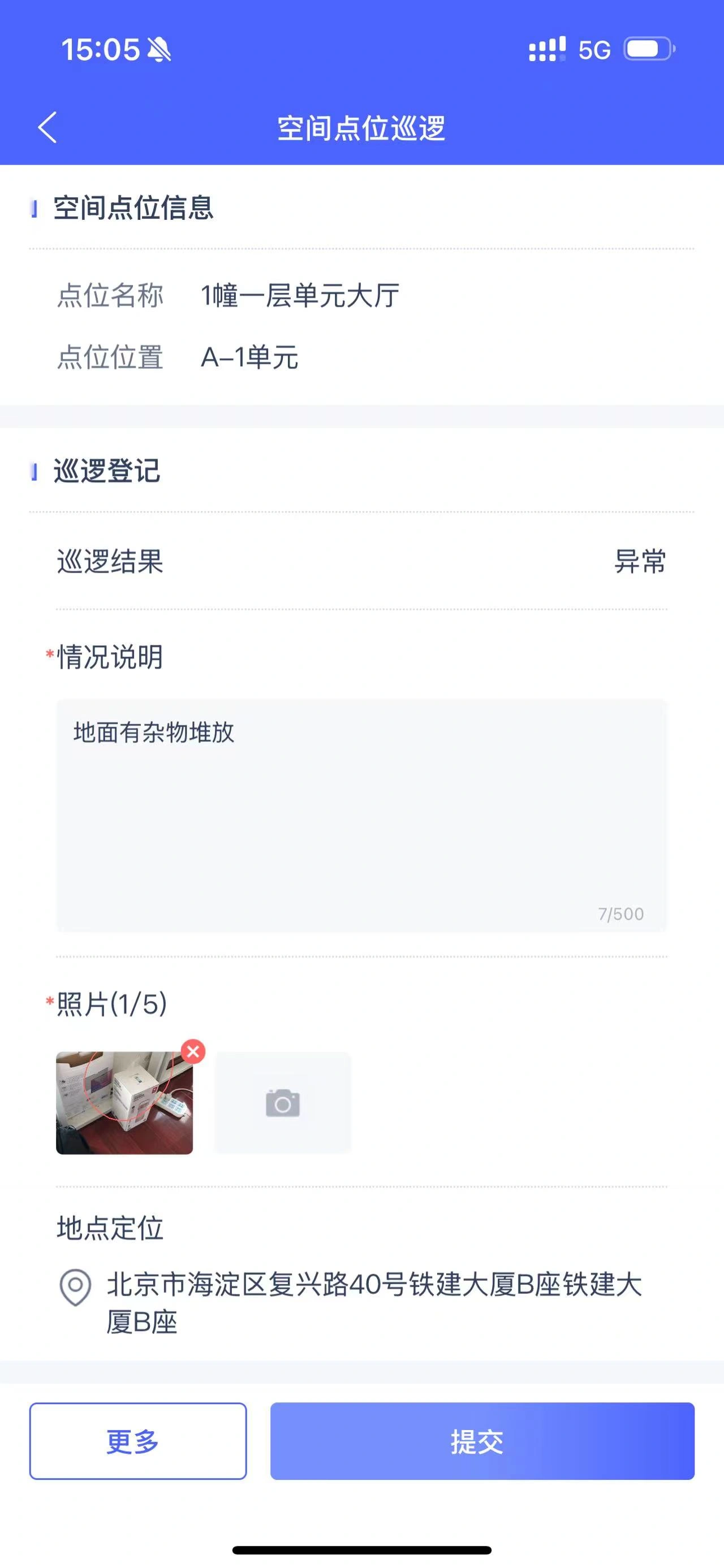
Record inspection results and field photos
Let's zoom in.The user registers for repair online to check the processing status and progress. After the service is completed, the result is confirmed and evaluated, and the processing process is filed according to the business records.
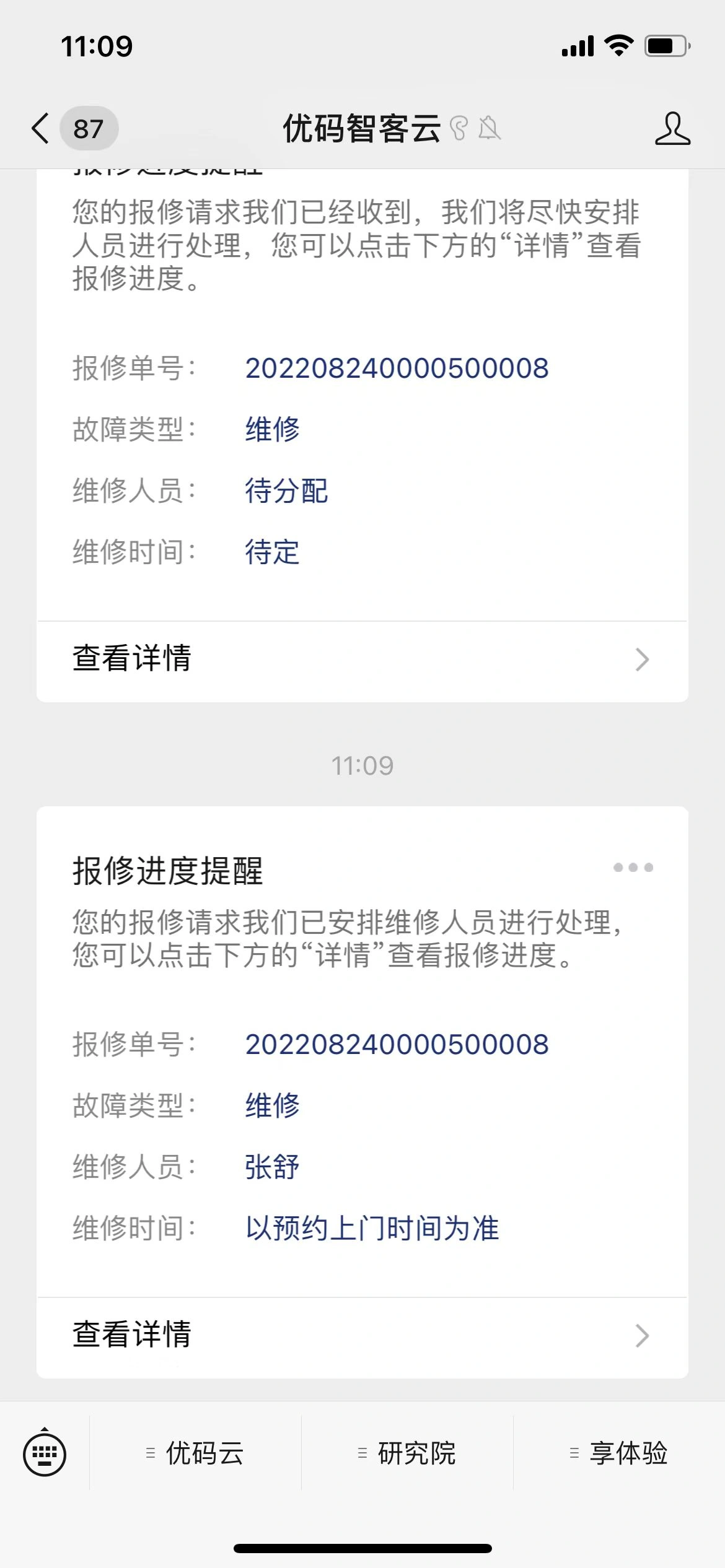
Check the processing status and processing records
Let's zoom in.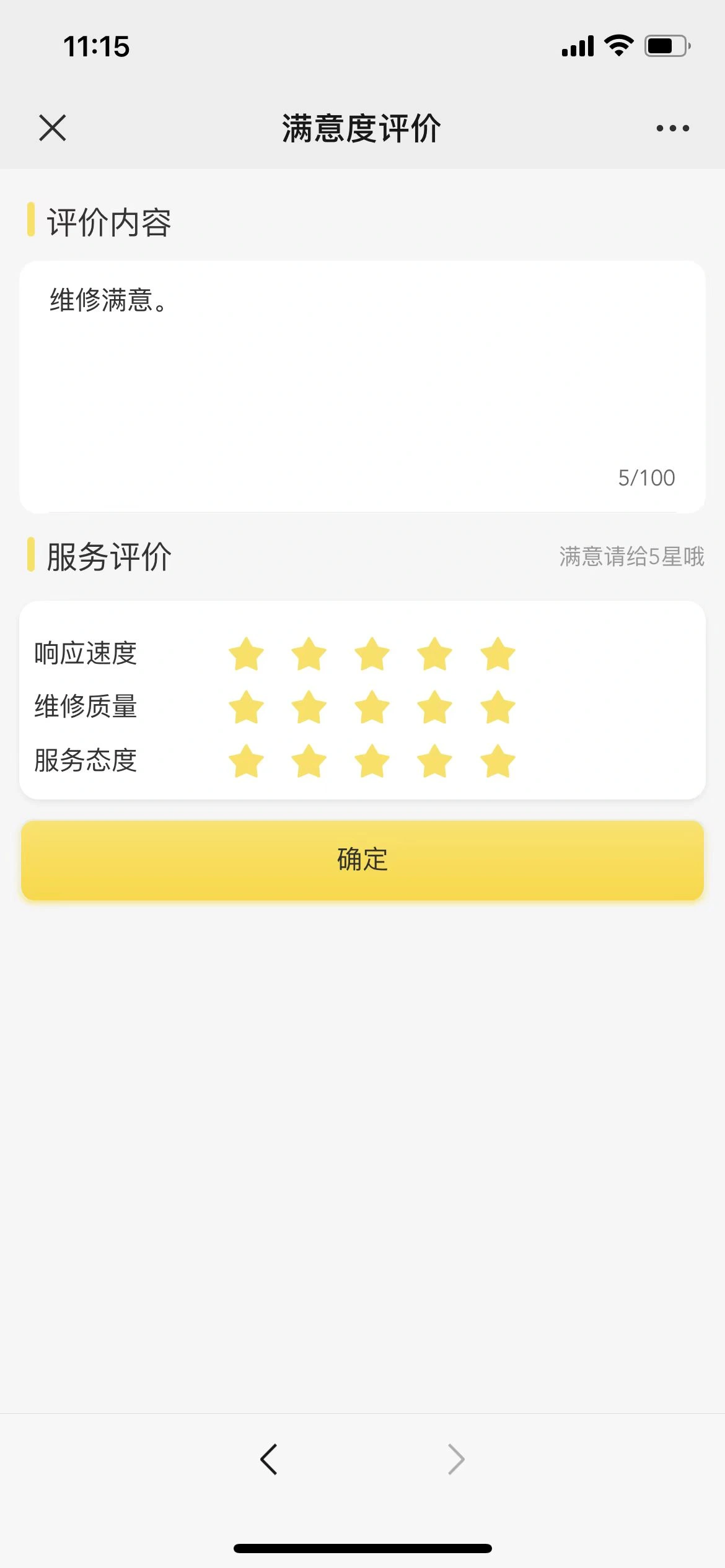
Submit an evaluation of the processing results
Let's zoom in.The system continuously generates receivables and tasks according to business rules, tracks customer accounts, contract performance, supplier services, material whereabouts, maintenance costs, and abnormal energy usage, and analyzes them by group, project, customer, space, and equipment.
Generate receivables by contract, customer, house or space, charges and billing rules, continuously track bills, collections, verification, calls, deductions, refunds, invoicing and reconciliations.
Unify water, electricity, gas, heating and other meter files and meter reading tasks, analyze usage trends and abnormalities; after confirmation, the billing results are charged, and abnormal usage can trigger inspection or maintenance work orders.
Connect the contract subject, service scope, cost node and performance requirements to the supplier, project plan, quality inspection and payment basis, and keep track of expiration, license and service deviation in a timely manner.
From procurement and warehousing to work order receipt, record items, warehouses, equipment, personnel, uses and quantities, and support replenishment, inventory, maintenance costs and abnormal receipt management.
The charging staff checks the status of bills receivable and expenses processing, and the housekeeper follows up with the customer according to the reminder task. The meter reader registers the periodic readings to provide a measurement basis for energy consumption costs.
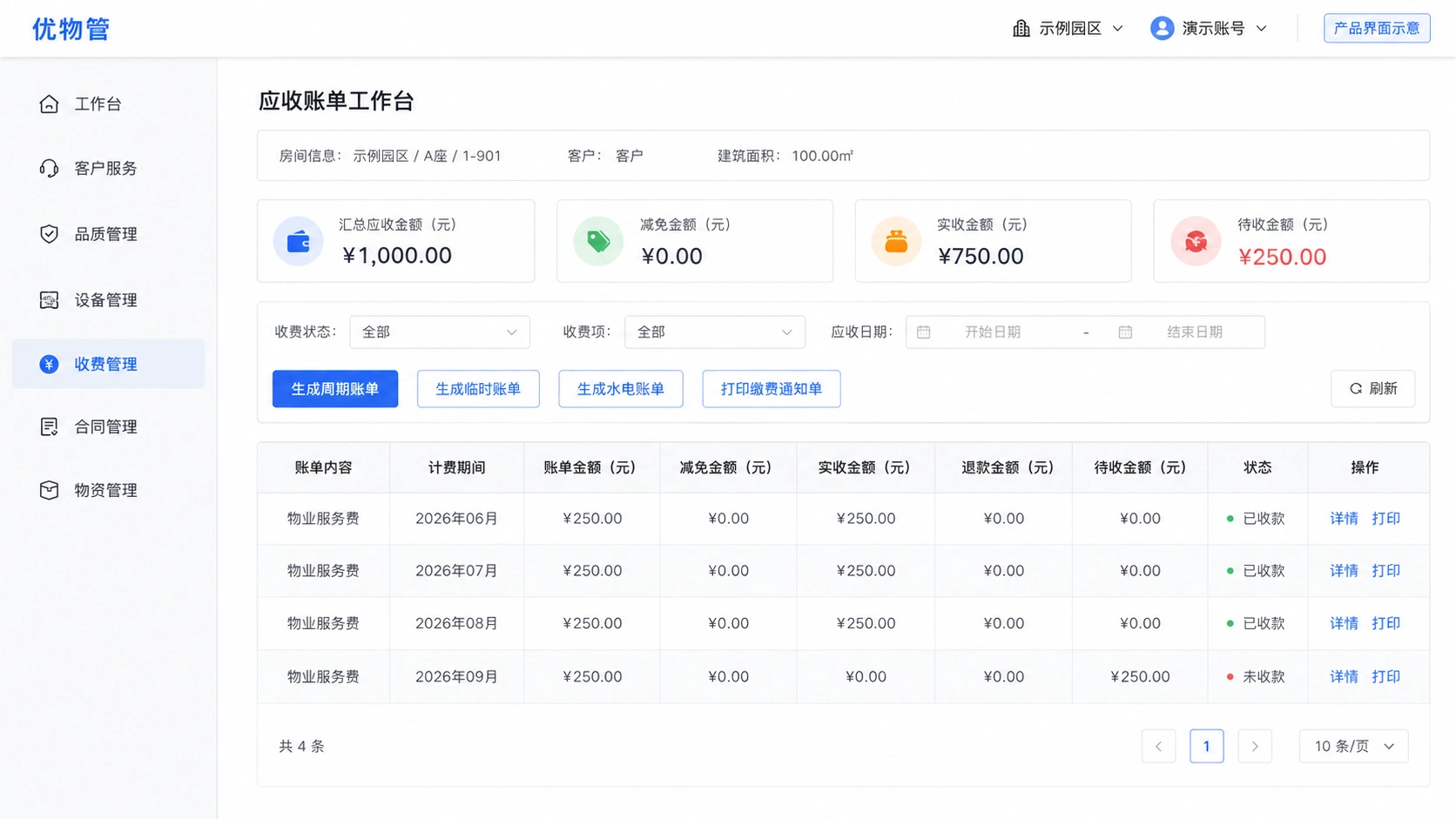
View billing, fees, and expense processing status · Product working view
Let's zoom in.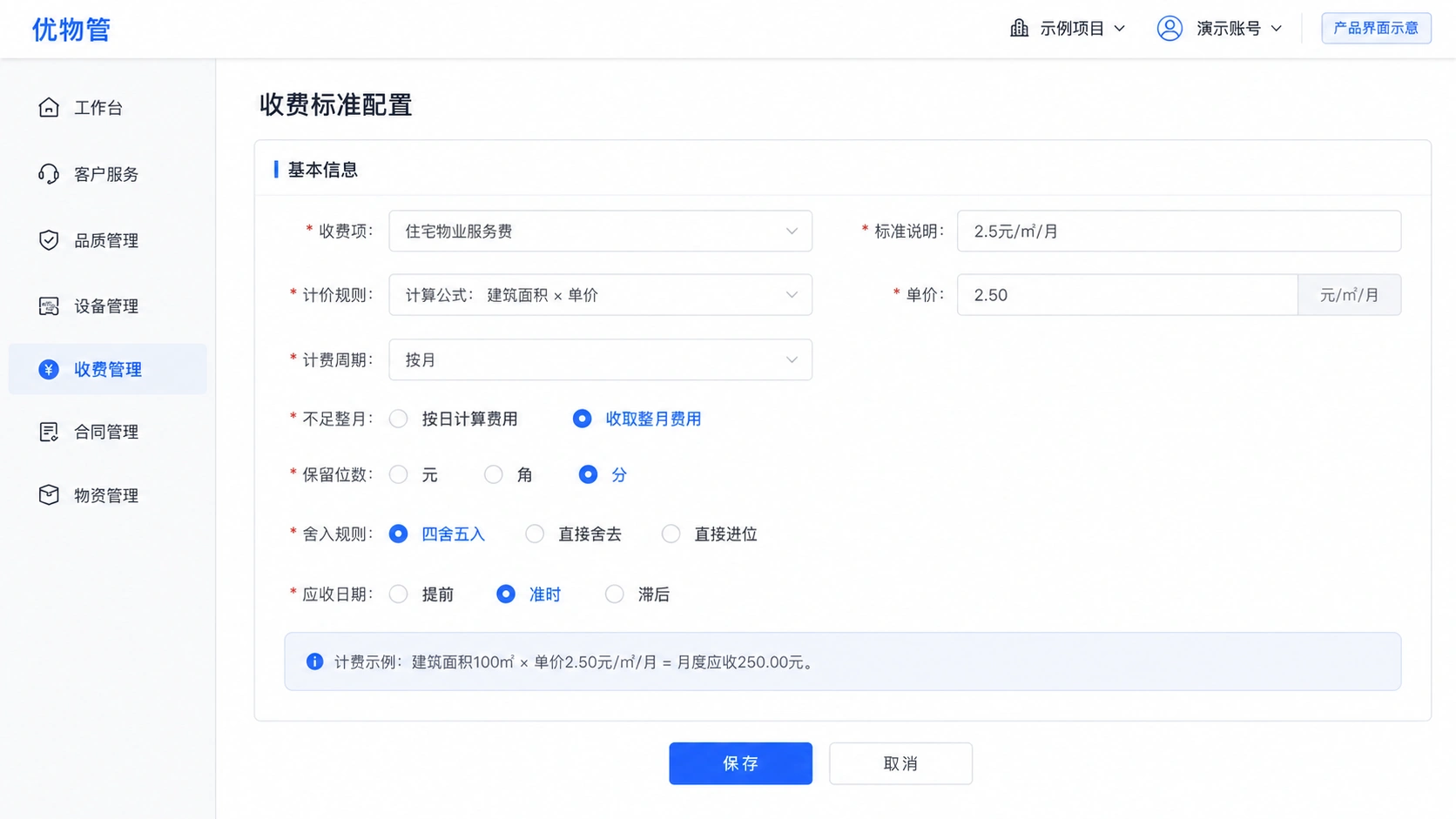
Configure pricing, cycle and conversion rules · Product working view
Let's zoom in.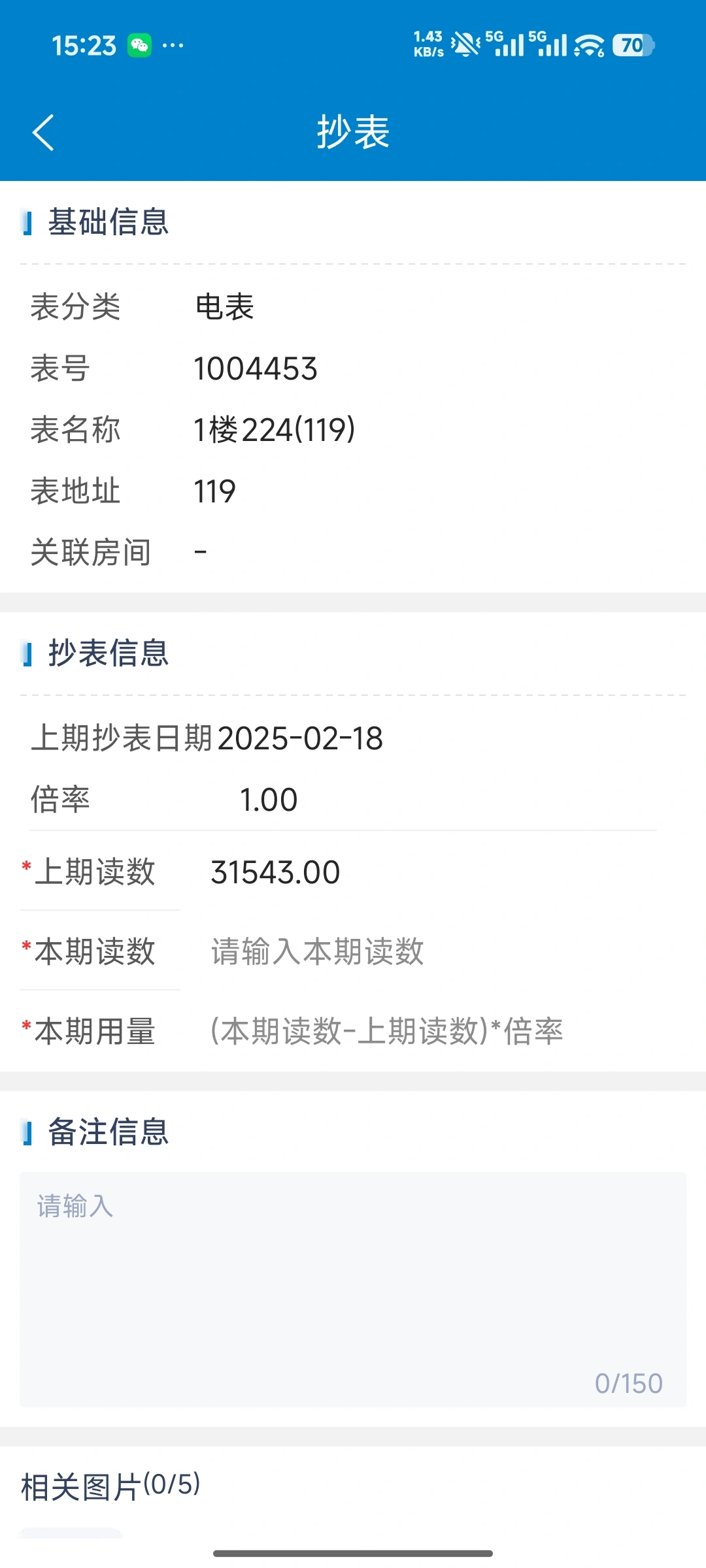
Record current readings and field information
Let's zoom in.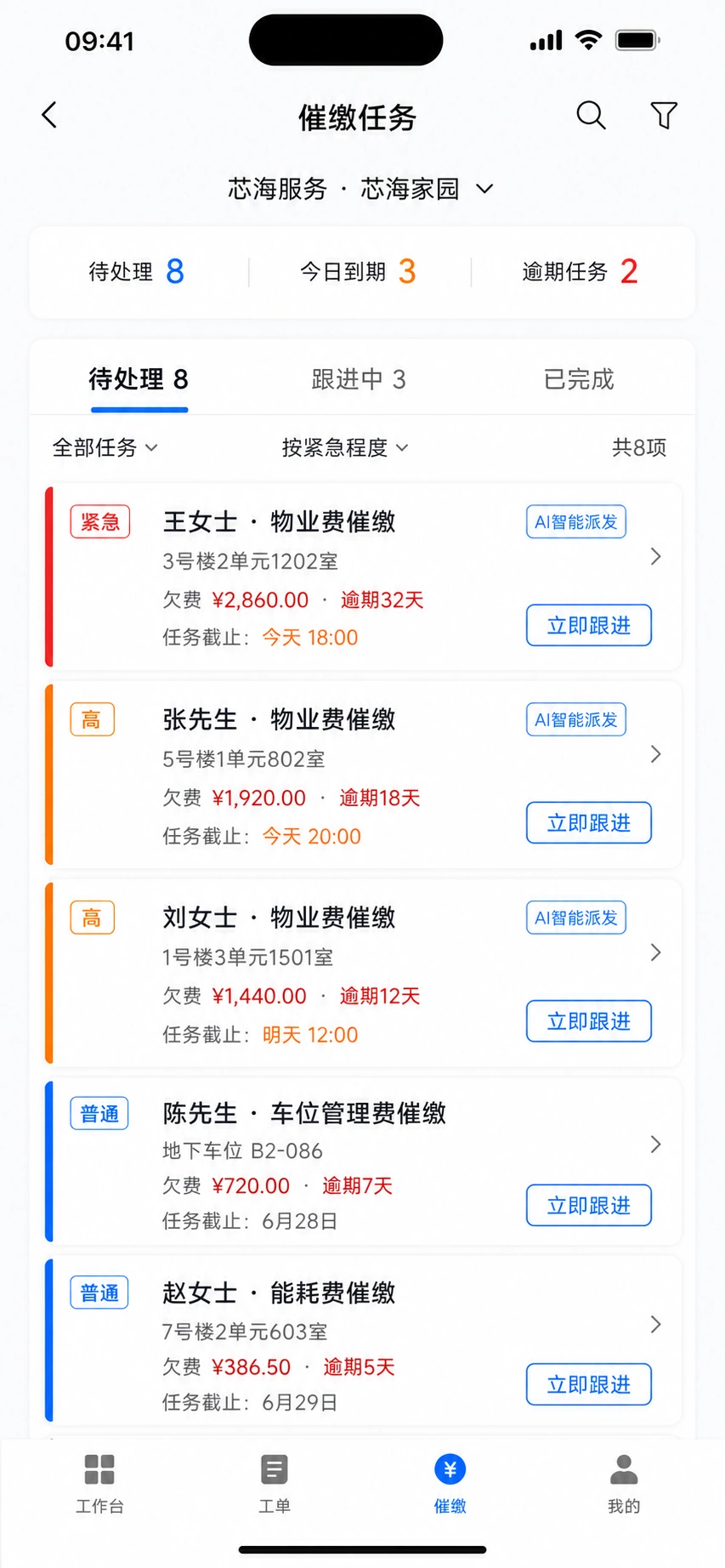
View to-dos and follow up on customer bills
Let's zoom in.From contract drafting, approval and signing to performance filing, view income and expenditure contracts and related information by project.
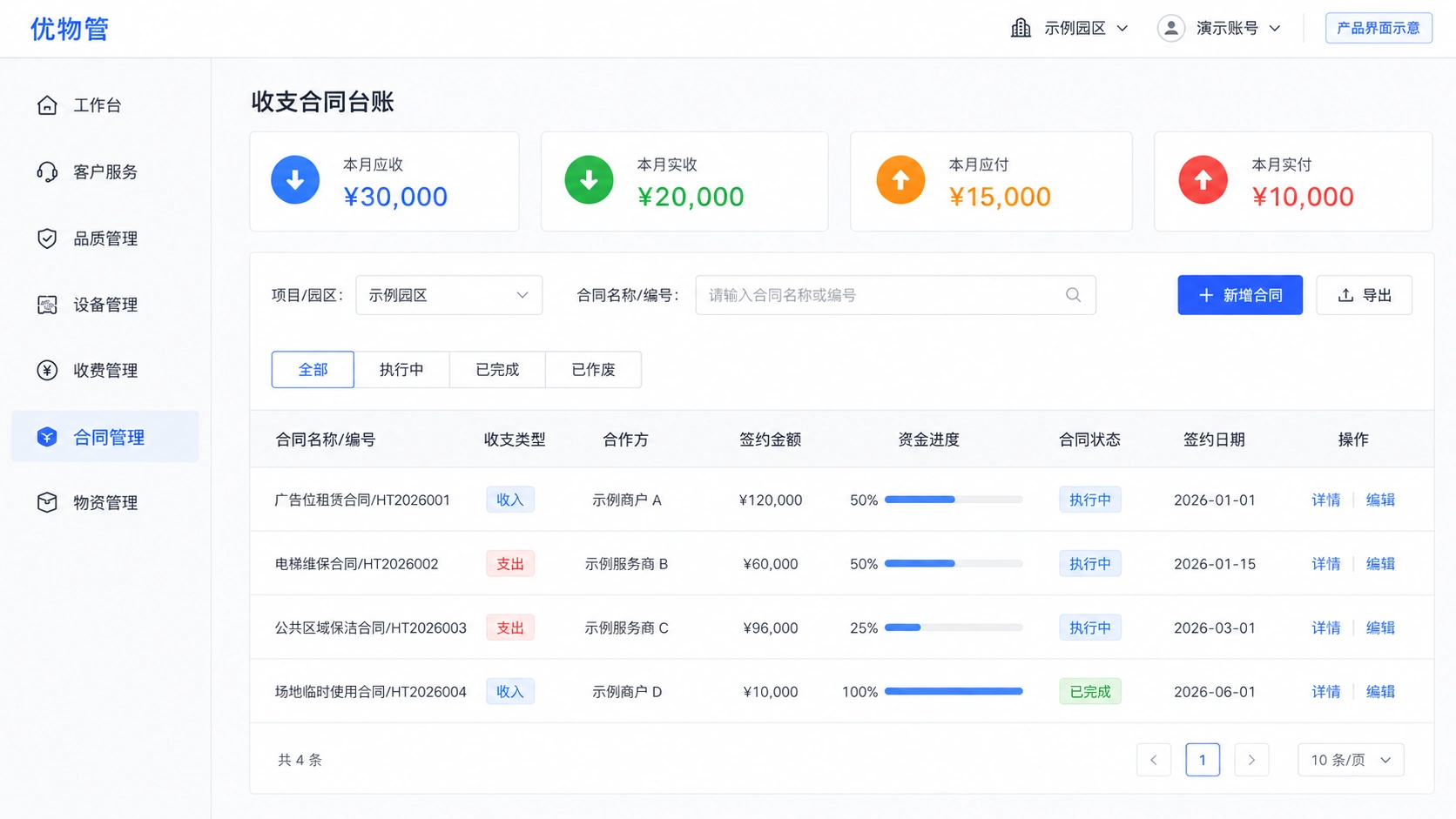
View contract status and funding progress · Product working view
Let's zoom in.Check the inbound and outbound records according to the warehouse and materials, and check the inventory profit, inventory loss and physical quantity after online inventory.
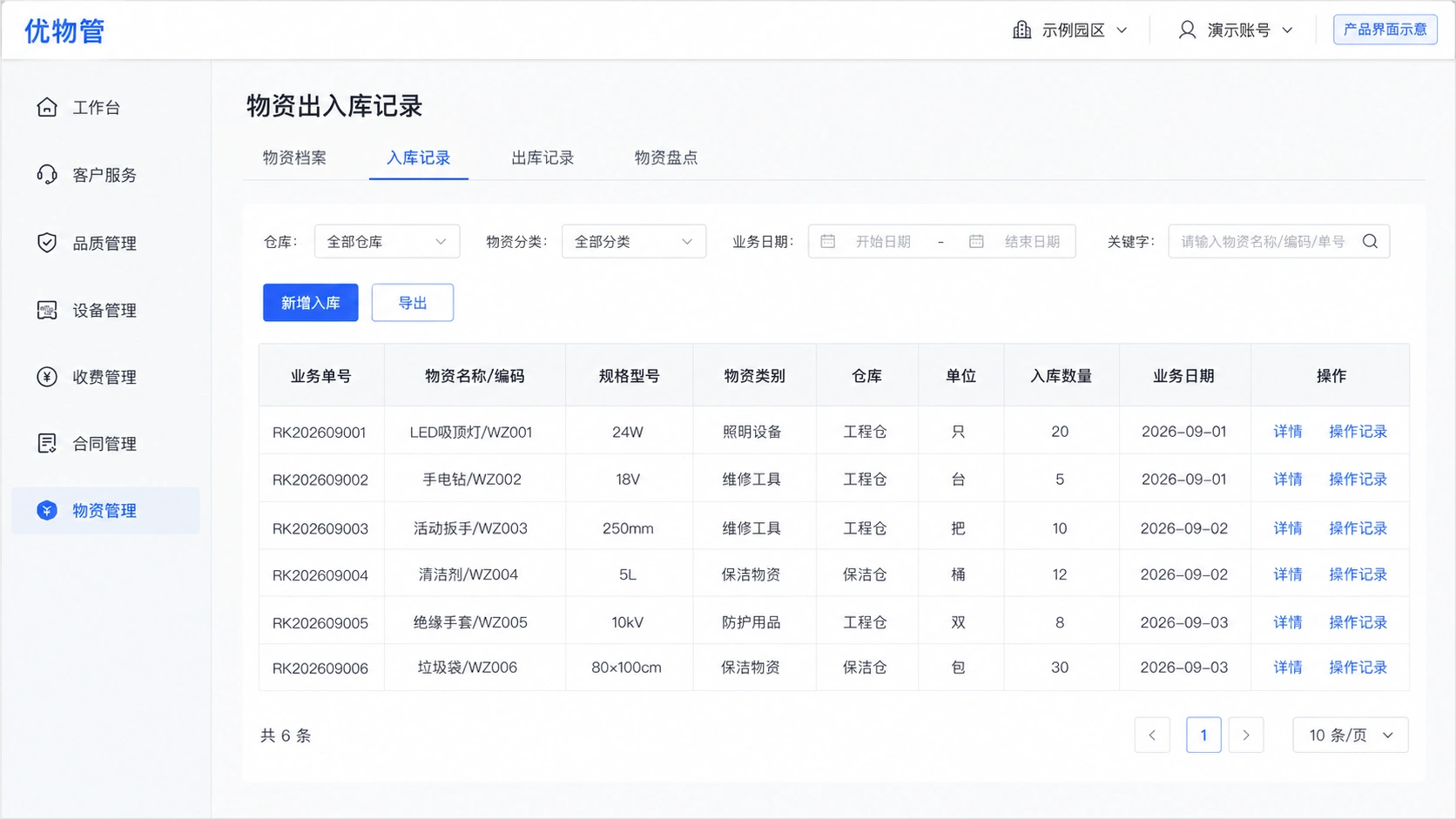
Track warehouse material flow · Product working view
Let's zoom in.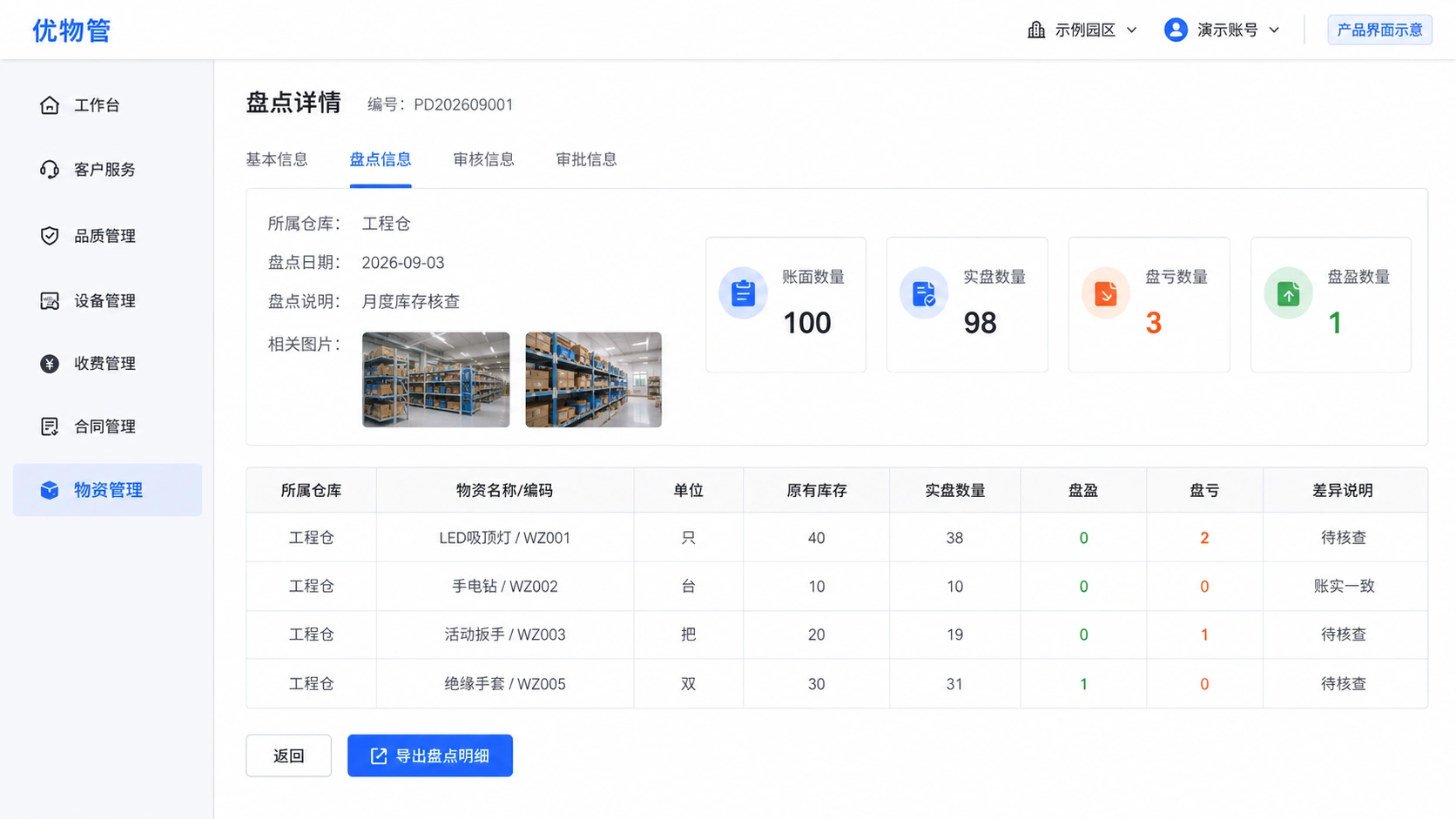
Check the inventory profit, inventory loss and physical quantity · Product working view
Let's zoom in.Front-line employees can complete tasks conveniently, managers receive abnormalities in a timely manner, AI-assisted work order processing, knowledge inquiry, reminder and customer service, and key expenses, approval and service results are still confirmed according to enterprise rules.
The solution can be combined with the enterprise AI Platform to provide work order suggestions, knowledge queries and service assistance. Enterprises can configure the application scope according to positions and data permissions, and key business results are verified by the responsible person.
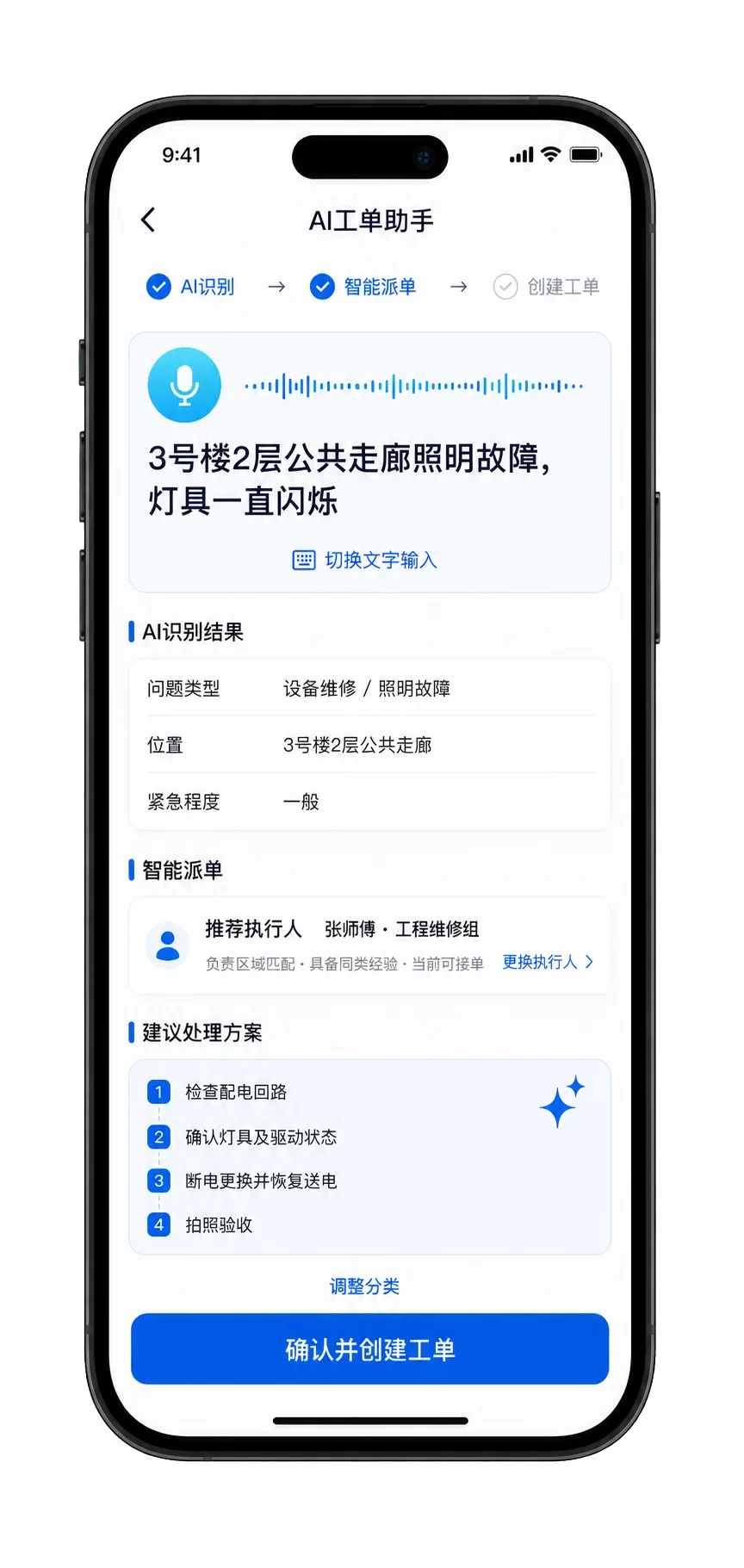
Identify ticket intent, form summaries, and recommend classification and accountability teams.
Equipment alarms, abnormal energy usage, and business events are turned into inspections or work orders according to the rules, and the disposal results are continuously written into the equipment history and operation analysis.
Configure permissions by group, region, project, job, and data scope; maintain logs and change records for key operations in contracts, expenses, inventory, and work orders.
Engineering, order, cleaning, greening, customer service and charging personnel view today's tasks, temporary matters and on-site knowledge by role, and support offline execution.
From group management to on-site execution, the workbench does not stack all functions, but focuses on the work that the current role judges, coordinates, and completes on a daily basis.
Uniformly review multi-project standard implementation, customer service, work orders, equipment, quality, charges, contracts, inventory, and energy metrics, and focus management efforts on overdue, arrears, repeated failures, and performance deviations.
Focusing on today's tasks, outstanding work orders, temporary matters, team performance, customer complaints, and key equipment, directly coordinating issues that need to be upgraded or handled across departments.
Due inspections and maintenance generate tasks automatically. Alerts and exceptions create work orders, while materials used, acceptance results, and shutdown or restart outcomes are written to the equipment history.
Unify the standard of self-inspection, spot inspection and special project inspection, track pending rectification, reinspection, overdue and duplicate problems, and compare the quality of project and supplier performance.
View receivables, receivables, arrears, meter, calls, refunds, invoicing, contract nodes, and inventory costs by project, expense, customer, and space.
View my tasks and temporary matters by role, and understand the service context through one customer, one file, and one household; scan the code, locate, take pictures, voice or enter readings to complete the work after arrival, and transfer the work order directly.
 Representative client · China Railway Construction Property
For multi-project property services, establish a unified operation process around property services, facilities and equipment, work order collaboration, quality management and mobile operations. A unified platform connects project services, facilities and equipment, work order collaboration, quality management and mobile operations, and the management team can continuously check the execution status and improvement results.
Focusing on group control, project execution, unified work order, four guarantees and one service, charging operation and energy management, explain key business processes and usage methods.
The platform connects headquarters standards, project plans, customer and household files, unified work orders, four guarantees and one service, facilities and equipment, quality supervision, property charges, contracts, inventory materials and energy meters to help enterprises unify multi-project operations, improve on-site performance efficiency, and timely identify service, charges, equipment and business risks.
No. The platform can configure space, standards, processes, charges and mobile tasks by project and business asset type, and is suitable for residential, industrial parks, office buildings, commercial shopping centers, hospitals, schools, parks and public buildings.
Connect customer-service calls, WeChat, Mini Programs, employee apps, inspection tasks, quality checks, and equipment alerts. Requests from every channel enter one work-order center and are routed by project, space, type, priority, and responsible team.
Covering engineering maintenance and equipment operation and maintenance, order patrol and fire inspection, cleaning operations, greening maintenance and environmental management, as well as customer service, housekeeping, reporting for repair, evaluation and follow-ups. Headquarters or quality department can carry out project self-inspection, headquarters sampling inspection and special project inspection on unified standards, and enter rectification, reinspection and evaluation after finding problems.
On arrival, staff complete tasks by scanning codes, recording location, taking photos, and entering readings. Projects can run daily self-inspections, while headquarters or quality teams conduct scheduled spot checks. Any exception creates a rectification work order linked to the relevant standard, project, space, and owner. Completed work proceeds to reinspection and is returned for further action if it does not pass.
The platform establishes one item and one file for the equipment, and uniformly manages the location, parameters, responsible persons and technical data. Inspection, maintenance and testing plans are generated on a regular basis, and abnormal maintenance work orders are entered. The results of processing, acceptance and spare parts collection are automatically written back to the equipment history.
Support. The platform can generate receivables by contract, customer, house or space, fees and billing rules, connect bill notifications, collections, verification, calls, deductions, refunds, invoicing and reconciliations, and keep complete accounting and service records in customer files.
Meter files, meter reading, usage trends and abnormal identification belong to project operation management; the confirmed billing results enter the charges and customer accounts, and abnormal usage can directly trigger inspection or maintenance work orders. The platform supports water, electricity, gas, heating and other meter measurement, mobile meter reading, calculation and calculation of fees and abnormal reminders.
Support contract ledgers, approvals, changes, renewals, expiration reminders, and expense nodes, and can also translate outsourced service standards into planning, inspection, and rectification tasks, linking supplier files and performance evaluations.
Support warehousing, collection, return, transfer, inventory and scrapping. Maintenance personnel can pick up materials from work orders, systematically record specific items, equipment, personnel, uses and quantities, and update inventory and equipment maintenance costs.
The mobile workspace shows each user's tasks by role and supports QR scanning, location capture, photos, voice input, readings, and common options. Each task presents the location, standard, steps, and deadline directly. Staff can work offline in weak-signal areas and synchronize results when the connection returns.
The platform unifies customer, member, household, family or business relationships, and is related to housing, rental space, vehicles and service interests. Repairs, complaints, payments, evaluations, activities and historical communications are continuously classified into the corresponding customer and housing files, and customer service and project personnel can view the full service context within the scope of authority.
Headquarters can standardize organizations, projects, spaces, service levels, inspection criteria, and operating metrics. Projects plan and execute against the same standards, while management drills down from group to region, project, space, equipment, crew, and individual owner.
Relevant platforms can connect within each project's integration scope. Equipment alerts, abnormal energy use, and business events can create inspections or work orders, with outcomes continuously written to equipment histories and operating analysis.
AI can be used for work order classification and summary, dispatch suggestions, employee knowledge questions and answers, call communication suggestions, customer frequently asked questions, and operational data inquiries. Key dispatch orders, fees, approvals, and service results are still confirmed according to corporate rules and responsibilities.
Tell us your business model, number of projects and key issues. We will demonstrate the complete business process on site around headquarters standards, project execution, one customer and one file, one household and one file, unified work order, four guarantees and one service, quality supervision, charging, energy meters, contracts and inventory materials.