One Trusted Asset Record
Groups, regions, and projects use the same classification and coding to reduce duplicate ledgers and conflicts.

Create a complete profile for every parcel, project, building, space, facility, and piece of equipment, connecting receipt, change, inventory, operations, assessment, activation, and disposal in one workflow. Management gains a clear view of the portfolio and operating status, teams collaborate around the same assets, and every historical change remains traceable.
Youma Asset Management aims at urban investment and operation platforms, state-owned asset groups, park buildings and multi-project operation organizations, unifying land, projects, buildings, floors, rooms, parking spaces, facilities and equipment and other asset objects, from classification and filing, receipt, change, inventory, to business association, evaluation and activation, update and disposal, forming an asset account that can be queried, traced, and coordinated.
View Urban Asset Operations and Asset Space Management PlatformGroups, regions, and projects use the same classification and coding to reduce duplicate ledgers and conflicts.
There are processes, responsibilities, and records for receipt, change, inventory, and disposal.
Enter individual assets from the asset map to view leases, jobs, returns, risks, and updates.
When group ledgers, project sites, financial records, and operating systems use different asset definitions, management cannot rely on the resulting portfolio view for business decisions.
The investment, finance, operations, property, and project teams maintain separate ledgers with inconsistent names, sizes, locations, and status.
The transfer of assets, ownership, purpose, location, and responsible organization change, and the historical process can only be found through documents.
Inventory surpluses, shortages, and status differences cannot automatically initiate registration, retirement, change, or review workflows.
Leasing, contracts, billing, facility operations, and renovation projects exist in separate systems and cannot be penetrated by asset.
Vacant, idle, risky, repaired, and updated assets do not form a continuously updated management view.
Built on asset classification and a complete profile for every asset, the platform receives new-project and existing assets, then connects them to leasing, property and facility operations, performance analysis, renewal, and disposal. Every business change updates the asset's current status and history.

Classification, coding and archival templates are configured according to the scope of organizational management and asset type, and assets can be established from various sources such as project delivery, historical ledger, system interface and on-site replenishment. Different asset types retain their own professional fields, and the group can still summarize according to a unified standard.
First establish a common asset language, and then let multiple items of data into the same account.
The asset type library supports different asset types and multi-level classifications.

Each asset class can be configured with separate profile fields, list information, and QR code content.
The asset map is drilled down by country, region, project, building and floor; after entering a single asset, the ownership, space, responsibility, contract, bill, equipment, work order, picture and historical changes are summarized with the asset card. QR code connects the on-site physical object with the system file.
A card sees who it is, where it is, who is responsible, and how it is being used.
A portfolio of assets summarizes ownership, space, responsibilities, status, and main attributes.
Starting with project handover or historical-data import, the system manages asset receipt, verification, and multilevel approval. Later changes to ownership, location, use, status, area, or responsible organization follow controlled workflows that preserve before-and-after values and the complete approval history.
Instead of overwriting old values, a retrospective timeline of asset events is formed.Clarify the source, scope, and organization of assets
Verify ownership, location, fields, attachments, and legacy problems
Match approval rules by organization, asset type, and event
Create or Update the Complete Asset Profile after Approval
Changes, responsibilities, and approvals enter the lifecycle timeline
Launch inventory counts by organization, region, asset type, or special task. Site staff scan codes on mobile to verify the physical asset, location, status, and use. The system consolidates surpluses, shortages, and attribute differences, then initiates registration, retirement, change, or review workflows as appropriate.
Inventory is not to make a difference table, but to have each difference have a closing result.
Comprehensive, circular, special projects and temporary inventories can form tasks, responsibilities and schedules.
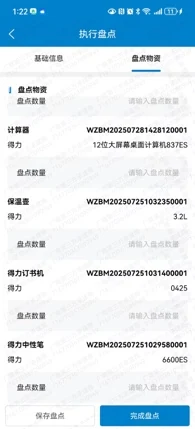
Support photos, positioning, remarks, quantity and abnormal records, and synchronize inventory results after on-site completion.

Select assets by organization, project, category, and status and assign inventory tasks.

Inventory details Retain base, location, title, and value information and write back the asset file when complete.
Link business leases, contract bills, property operations, facilities and equipment, renewal projects and operating metrics to asset objects. Management can identify vacant, inefficient, risky and pending assets from the group dashboard, and then drill down to projects, buildings or specific spaces to check the reasons.
Management sees not just aggregate numbers, but also specific assets and responsibilities.
Identify asset size, type, status, and responsibility organization from national and regional distribution.
Record assessment, activation, repair and renovation, allocation, transfer, retirement, and deregistration based on each asset's operating status and management requirements. Every task identifies the affected asset, responsible organization, approval path, outcome, and status change, then updates the asset record on completion.
Before an asset exits the system, every decision and change it undergoes can be traced back.Empty, inefficient, risky, or repaired assets
Value, ownership, management and transformation conditions
Revitalize, repair, remodel, transfer or exit
Linked responsibilities, approvals, contracts, and renewal projects
Results and new status back to the asset file
Switch roles to see the core workspaces for management, asset managers, operations, finance and audit, and data teams.
Start by looking at asset classification, regional distribution, and operating status, and then drill down to specific projects and responsible organizations.
File, scan, review, and initiate processes around daily asset tasks, and maintain complete accountability records.
Link space, contracts, operations, benefits, and risks to the same asset, and identify the business cause directly after the problem is identified.
Maintain a clear boundary between the asset process and financial accounting, and complete the verification and traceability through coding and result writing.
Governance classification coding, interface mapping, synchronization quality, permissions, and historical versions allow existing systems to communicate around the same asset.
Youma Asset Management unifies asset objects and history, and the existing ERP, investment leasing, property, project, GIS/BIM and IoT systems continue to undertake their respective professional business.
Exchange: asset value, cost, income, voucher number, and accounting results
Exchange: leasable space, lease status, contracts, and operating results
Exchange: Equipment relationships, health status, operating costs, and risks
Exchange: updates on projects, execution status, investments, and deliverables
Exchange: asset encoding, spatial hierarchy, model linking, and drawing versions
Exchange: Equipment status, anomalies, energy consumption, and operating metrics
Exchange: to-do, approval, organization, personnel, and access control
 REPRESENTATIVE CUSTOMER · CITY INVESTMENT & OPERATIONS
Youma assists Haikai Holdings in sorting out multi-project and mixed-use assets, completing asset inventory and unified filing; on this basis, the asset space is related to the available investment resources, merchants, contracts, rental status and business structure. The business team can find the operable space faster and coordinate the promotion of investment leasing. The management can continuously grasp the vacant occupation, lease period and business changes, providing a basis for asset revitalization, business adjustment and operation decisions.
Focusing on asset archiving, inventory changes, business relationships, update disposal and system connection, explain product scope, system collaboration and usage.
It unifies asset classification, coding, filing, ownership, location, status, and responsibility, and manages the process of receipt, change, inventory, business association, update, and disposal, helping multiple organizations form a traceable asset ledger.
It can manage land, projects, buildings, floors, rooms, shops, apartments, warehouses, venues, advertising spaces, parking spaces, facilities and equipment, and new energy assets. Different asset types can be configured with different file templates, and the group is still summarized according to a unified classification.
Financial fixed assets system is mainly responsible for value accounting, depreciation, vouchers and statements. This product pays more attention to the physical, space, ownership, use, responsibility, inventory and business process of assets, and checks the value and accounting results with the financial system through the interface.
No. Existing ERP, finance, leasing, property, project, GIS/BIM, and IoT systems can be retained, with connection data written back through unified coding, interfaces, messages, and results.
First determine the main data responsibility and coding rules, and then establish the old and new coding mapping, data cleaning, duplicate identification, sample verification and migration records. The history system can still keep the query, and finally run with the confirmed main calculation method.
The system summarizes the differences and initiates a review according to the rules. Inventory gains can enter asset registration, inventory losses can enter exit or disposal, attribute differences can enter the change process, and the processing results can be written back to the inventory task and asset files.
No. A map is an entry point for finding and drilling down assets by space. The core is the asset code, ownership, responsibility, status, contracts, operations and life cycle records behind the map, which users can view from groups, regions, projects all the way to individual assets.
Yes. In the first phase, you can choose an area or asset type with clear asset boundaries and good data foundation, first complete the filing, inventory and map, and then expand to more organizations, asset types and business systems according to unified rules.
Whether you are addressing inconsistent asset ledgers, unresolved inventory differences, or limited visibility into operating status, we can tailor a live demonstration to your organization and asset types. See how classification, complete asset profiles, receipt and change, mobile inventory, operating relationships, renewal, and disposal work together.